⚡
Lighthouse 13.3 (released May 7, 2026) moved the Agentic Browsing category out of experimental flags and into the default configuration. PageSpeed Insights inherited it within two weeks. Chrome 150 DevTools followed. Every Lighthouse run — including every PSI check, every SEO audit SaaS that wraps Lighthouse, and every CI/CD pipeline using Lighthouse CLI — now automatically surfaces Agentic Browsing results. Your clients, prospects, and competitors can already see your score.
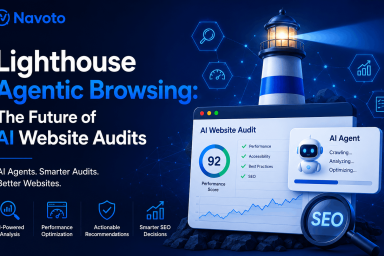
In May 2026, Google changed what Lighthouse measures. For the first time in the tool’s history, it added a category that doesn’t measure performance, accessibility, SEO, or best practices for humans. The new Agentic Browsing category measures something different entirely: how well your website works for AI agents — the autonomous systems now browsing, comparing, booking, and purchasing on behalf of 800 million weekly AI search users.
This is not an experimental footnote. Lighthouse 13.3 (May 7, 2026) shipped Agentic Browsing as a default audit category. That means every PageSpeed Insights run, every Lighthouse CLI execution, and every SEO audit tool that wraps Lighthouse now reports Agentic Browsing scores automatically — to your team, your clients, and potentially your competitors. The window where you can safely ignore this has closed.
This complete guide from Navoto is the most thorough Lighthouse Agentic Browsing resource available. It covers every audit in precise technical detail, provides working fix code for every failure, explains how to run the audit via four different methods, and places the audit within the broader context of agentic search optimization — the emerging discipline that determines whether AI agents select your brand when acting on a user’s behalf. Everything in this guide is sourced from Google’s official Chrome for Developers documentation, Lighthouse 13.3 release notes, and real-world audit data.
What Is Lighthouse Agentic Browsing?
Lighthouse Agentic Browsing is a category within Google’s open-source Lighthouse web auditing tool — released in Lighthouse 13.3 on May 7, 2026 — that evaluates how well a website is constructed for interaction by autonomous AI agents, rather than by human users or traditional search crawlers.
Official Definition — Navoto.com
Lighthouse Agentic Browsing = a deterministic, pass/fail audit category in Google Chrome’s Lighthouse tool that evaluates your site’s accessibility tree integrity, layout stability, llms.txt presence, and WebMCP tool registration — producing a fractional pass-ratio score that signals how reliably AI agents can read, navigate, and take actions on your website.
Lighthouse is the industry-standard web quality tool built by Google and shipped with Chrome DevTools, the Lighthouse CLI, and PageSpeed Insights. Before the Agentic Browsing category, it had four scoring categories: Performance, Accessibility, Best Practices, and SEO. The addition of Agentic Browsing as a fifth category in 2026 represents Google’s first official, tool-based recognition that AI agents are a distinct audience that websites must accommodate — separate from human users and separate from traditional search crawlers.
Per Google’s official documentation, the category “evaluates how well your site is constructed for machine interaction through a set of deterministic audits.” The word “deterministic” is significant: unlike Lighthouse’s performance metrics (which can vary based on network conditions), Agentic Browsing audits produce consistent, reproducible results — making them suitable for CI/CD pipeline integration and automated quality gates.
The four audit areas checked by Agentic Browsing map directly to what real AI agents need to work effectively: a clean accessibility tree (how they navigate your page), layout stability (so elements don’t move between identification and interaction), an llms.txt file (to understand your site’s purpose without crawling everything), and WebMCP tool registration (to call your site’s capabilities as structured functions). Understanding what each checks — and how to fix each failure — is the core skill in agentic browsing optimization. Section 4 covers all four in full detail.
Why Google Added the Agentic Browsing Category
The answer is in the traffic data. Chrome’s engineering team can see that a meaningful and growing share of requests hitting public web servers are not coming from humans or traditional crawlers — they are coming from AI agents: OpenAI’s Operator, Anthropic’s Computer Use, Google’s Project Mariner, Perplexity’s Comet, and ChatGPT’s browse mode. Most of those agent visits fail — the agent either can’t extract the information it needs, can’t reliably interact with the page, or abandons and redirects to a competitor whose site works better.
Google’s position, articulated by Chrome AI engineering director Addy Osmani in April 2026, is that the cheapest place to fix agent-web compatibility is at audit time. Lighthouse has always been Google’s mechanism for operationalizing web quality opinions at scale: when Lighthouse flags something, developers fix it. When Lighthouse added a Core Web Vitals category in 2020, the entire web optimization industry shifted toward performance within 18 months. When Lighthouse added Accessibility scoring, accessible markup became mainstream. The Agentic Browsing category is following the same path — except the pace is faster, because the infrastructure (Google-Agent, WebMCP, UCP) is already live rather than theoretical.
The Three Types of Agentic Browsing Chrome Can Now Detect
1. AI Search Models
Google AI Mode, Perplexity, ChatGPT Search, Claude Search — crawl and extract content to answer questions in their interfaces. Most prevalent today; what GEO/LLM SEO optimizes for.
2. AI Browsing Agents
ChatGPT’s Agent Mode, Claude’s Computer Use, Google’s Project Mariner, Perplexity Comet — load real web pages in a real browser and interact on the user’s behalf. Growing rapidly in 2026.
3. Voice & Conversational AI
Next-gen Siri, Alexa, Google Assistant — making web requests on behalf of users to book, compare, or filter without screen interaction. The most future-looking tier.
The practical reality: Lighthouse 13.3 is now default, which means agents are already evaluating your site. A real-world test from seo-kreativ.de in June 2026 showed a typical well-maintained site scoring only 33% on Agentic Browsing — with only CLS passing, and llms.txt and the accessibility tree failing. That is not an outlier. Most websites were built for human eyes and keyword-crawling bots. The Agentic Browsing audit makes that gap visible for the first time.
How Lighthouse Agentic Browsing Scoring Works
Agentic Browsing deliberately breaks from Lighthouse’s standard 0–100 weighted scoring model. According to Google’s official documentation: “Because the standards for the agentic web are still emerging, the current focus is to gather data and provide actionable signals rather than a definitive ranking.”
Fractional Pass Ratio
The headline score — a ratio showing how many agentic readiness checks your site passes. Example: "4 of 6 audits passed". This replaces the 0–100 number you’re used to from Performance and SEO. Your goal is to increase this ratio toward 6/6.
Pass / Fail Status
Each individual audit returns a clear pass or fail. Some audits may also emit errors (hard failures with a specific technical requirement violated, like invalid WebMCP schema) or warnings (requirements met but with quality issues, like an llms.txt file that exists but is too short).
Informational Counts
Some audits simply tally what exists on the page (e.g., number of WebMCP tools registered, number of forms, number of interactive elements) to add context rather than judgment. These don’t pass or fail — they help you understand your page’s complexity and completeness.
Why no 0–100 score? The “agentic web” standard is genuinely still forming. WebMCP is in a Chrome origin trial. The llms.txt specification has no RFC standard behind it. Google-Agent was added to official docs only in March 2026. Applying a weighted numeric score to audits in this state would create false confidence in a ranking that could become misleading as specs evolve. Google chose the fractional approach deliberately — and noted that results may fluctuate as your site changes how it registers tools or responds to agentic requests.
How to think about your score: The goal is not to “get a high score” — it is to eliminate each failure systematically. A site at 2/4 that fixes its accessibility tree issues goes to 3/4. A site that then adds llms.txt goes to 4/4. Each pass represents a genuine improvement in AI agent usability. The score is a progress tracker, not a ranking system. The broader implications of this for your agentic search optimization strategy are covered in our full guide.
All 4 Agentic Browsing Audits — Explained + Fixed
Google’s Lighthouse Agentic Browsing category runs four core audit areas. Here is every audit explained in detail — what it checks, why it matters to AI agents, what failure looks like in your report, and exactly how to fix it with working code examples.
How to Run the Lighthouse Agentic Browsing Audit (4 Methods)
There are four ways to run the Lighthouse Agentic Browsing audit in 2026. Choose the method that fits your workflow:
Interpreting Your Agentic Browsing Results
Here is how to read your Agentic Browsing report and understand what each result actually means for your site’s agent-readiness:
| Result Type | What It Looks Like | What It Means | What To Do |
|---|---|---|---|
| ✅ Pass | Green checkmark; counted in numerator of pass ratio | This audit’s requirement is met. AI agents can use this aspect of your page correctly. | Monitor quarterly to ensure changes don’t break it. Log baseline for comparison. |
| ❌ Fail | Red X; not counted in pass ratio | This aspect of your site actively impedes AI agent interaction. Needs fixing. | Prioritize by agent impact. Accessibility tree failures first, then CLS, then llms.txt. |
| ⚠️ Warning | Amber triangle; may still count as pass but flagged | Technical requirement met but with quality concerns (e.g., llms.txt too short, incomplete links) | Address when convenient — won’t fail the audit but indicates improvement opportunity. |
| ℹ️ Info | Blue icon; tallied count (e.g., “3 WebMCP tools detected”) | Informational context — not a pass/fail signal. Shows your site’s current state. | Use to understand baseline. Track how counts evolve as you implement changes. |
| N/A | Gray N/A (e.g., “WebMCP: Not applicable — no tools registered”) | Protocol not implemented on this page. Not a failure — not a pass. | Plan WebMCP implementation for transactional pages when rebuilding. Not urgent for content-only pages. |
Priority Fix Order: What to Tackle First
Not all failures deserve equal urgency. Here is the recommended fix sequence based on agent impact, engineering effort, and maturity of the underlying standard:
Accessibility Tree
CLS (Layout Stability)
llms.txt
WebMCP Tools
Is Agentic Browsing a Google Ranking Factor?
This is the most-asked question about the new category — and the honest answer requires distinguishing between two different systems that are easily confused.
❌ NOT a Google Search Ranking Factor
Google’s John Mueller has been explicit: passing the Agentic Browsing audit does not improve your position in Google’s organic search results. Google Search does not use llms.txt, WebMCP registration, or Agentic Browsing scores as ranking signals. Mueller publicly compared llms.txt to the discredited keywords meta tag. Google’s own “Mythbusting generative AI search” documentation states: “You don’t need to create new machine-readable files, AI text files, markup, or Markdown to appear in generative AI search.”
✅ YES — An Agent Usability Factor
Agentic Browsing audit results directly determine whether AI browsing agents (Google’s Project Mariner, ChatGPT Agent Mode, Claude Computer Use) can successfully complete tasks on your site. A site that fails accessibility tree audits will have agents abandon mid-task and redirect to a competitor. A site with WebMCP tools will be selected over equivalent sites without them as agent coverage grows. This is commercial impact — it’s just not mediated through traditional search rankings.
The key distinction is which system you’re optimizing for. The Agentic Browsing audit is not about Google Search indexing — it’s about whether AI agents operating on behalf of users can use your site. Those are different questions with different optimization paths. The Core Web Vitals precedent is instructive here too: CLS became a search ranking signal in 2021, but it was introduced in Lighthouse as a UX signal in 2020. Lighthouse often leads Google’s ranking signals by 12–24 months.
The practical conclusion: implement the Agentic Browsing fixes because agents are already visiting your site and failing at it — not because it will move your Google rankings in 2026. The commercial value comes from agent usability, not from search position. For the full context, see our guide on agentic search optimization and what it means for brand selection by AI agents.
Lighthouse vs Other AI Website Audit Tools (Compared)
Lighthouse Agentic Browsing is not the only tool measuring AI agent readiness in 2026. Here is how it compares to the other major options for an autonomous website analysis of your AI readiness:
| Tool | Cost | What It Audits | AI Audit Signals | Best For | Weakness |
|---|---|---|---|---|---|
| Chrome Lighthouse 13.3 | FREE | Single URL, lab data | A11y tree, CLS, llms.txt, WebMCP — the official standard | Developers; CI/CD; authoritative source | No citation tracking; no competitor benchmarking |
| Google Chrome DevTools MCP | FREE | Live browser, any page | Full Lighthouse + WebMCP tool listing + AI-driven audit automation | AI agents auditing sites autonomously inside Claude Code/Cursor | Requires Claude Code or Cursor; technical setup |
| Cloudflare Agent Readiness | FREE | Public-spec agent checks | Similar to Lighthouse public spec; isitagentready.com; 5-second results | Quick pre-check; non-technical stakeholders | Less detailed than Lighthouse; no CI/CD integration |
| Peec AI / Profound | $99–Custom/mo | AI citation tracking | Citation rate, SoAIV, platform-by-platform — what Lighthouse can’t measure | Marketing teams tracking AI visibility KPIs monthly | No technical website audit; doesn’t measure on-page agent readiness |
| Semrush / Ahrefs | $129–140/mo | Site-wide crawl, rankings | AI Overviews tracking (Semrush), Brand Radar (Ahrefs) — citation-side only | Unified SEO + AI visibility tracking in one tool | Technical agentic browsing readiness (A11y tree, WebMCP) not in scope yet |
| DebugBear | $29+/mo | Continuous monitoring | Wraps Lighthouse 13.3 including Agentic Browsing; continuous monitoring alerts | Teams needing ongoing monitoring vs point-in-time audits | Not a substitute for hands-on Lighthouse for deep debugging |
Running Agentic Browsing Audits in CI/CD Pipelines
Google’s documentation explicitly states that Agentic Browsing audits are “deterministic” and “suitable for integration into CI/CD pipelines.” Here is how to add agentic SEO quality gates to your deployment workflow:
GitHub Actions: Agentic Browsing Quality Gate
# .github/workflows/agentic-audit.yml

name: Lighthouse Agentic Browsing Audit

on:
  pull_request:
    branches: [main, staging]
  push:
    branches: [main]

jobs:
  agentic-audit:
    runs-on: ubuntu-latest
    steps:
      - uses: actions/checkout@v4

      - name: Setup Node.js
        uses: actions/setup-node@v4
        with:
          node-version: '20'

      - name: Install Lighthouse CLI 13.3+
        run: npm install -g lighthouse@latest

      - name: Run Agentic Browsing Audit
        run: |
          lighthouse ${{ env.STAGING_URL }} \
            --output=json \
            --output-path=./lighthouse-agentic.json \
            --only-categories=agentic-browsing \
            --chrome-flags="--headless"

      - name: Check Pass Ratio
        run: |
          PASS=$(node -e "
            const r = require('./lighthouse-agentic.json');
            const cat = r.categories['agentic-browsing'];
            console.log(cat.score || 'no-score');
          ")
          echo "Agentic Browsing pass ratio: $PASS"

      - name: Upload Audit Report
        uses: actions/upload-artifact@v4
        with:
          name: lighthouse-agentic-report
          path: lighthouse-agentic.json

      - name: Comment PR with Results
        if: github.event_name == 'pull_request'
        uses: actions/github-script@v7
        with:
          script: |
            const fs = require('fs');
            const report = JSON.parse(fs.readFileSync('./lighthouse-agentic.json'));
            const cat = report.categories['agentic-browsing'];
            const score = cat.score ? `${Math.round(cat.score * 100)}%` : 'See report';
            github.rest.issues.createComment({
              issue_number: context.issue.number,
              owner: context.repo.owner,
              repo: context.repo.repo,
              body: `## Lighthouse Agentic Browsing\nPass ratio: **${score}**\nAudit artifact uploaded above.`
            });
Real-World Audit Results: What Sites Actually Fail
Based on published real-world Lighthouse 13.3 audit results and analysis from the SEO community in May–June 2026, here is what the data shows about where sites actually stand:
Typical Audit Results by Site Type (June 2026 Data)
| Site Type | A11y Tree | CLS | llms.txt | WebMCP | Typical Score |
|---|---|---|---|---|---|
| Average website (no ASO work) | ❌ Fail | ✅ Pass | ❌ Fail | N/A | 1/3 (33%) |
| Well-maintained accessible site | ✅ Pass | ✅ Pass | ❌ Fail | N/A | 2/3 (67%) |
| Site with ASO foundation work done | ✅ Pass | ✅ Pass | ✅ Pass | N/A | 3/3 (100%) |
| Site with WebMCP implemented | ✅ Pass | ✅ Pass | ✅ Pass | ✅ Pass | 4/4 (100%) |
The key insight from real-world data: The most common failure pattern is the “1/3 site” — CLS passes because Core Web Vitals work was done for SEO reasons, but accessibility tree issues exist because they were never surfaced by a ranking signal before, and llms.txt was never created because it wasn’t a standard audit. Fixing just these two — adding llms.txt (10 minutes) and fixing accessibility tree failures (1–3 days of engineering) — moves the average site from 1/3 to 3/3. That’s a full pass on everything except WebMCP (which isn’t applicable until it’s implemented). The fix effort is almost entirely front-loaded in accessibility work that provides compounding benefits for real users, traditional SEO, and agentic browsing simultaneously. For the strategic context of why this matters commercially, see our complete agentic search optimization guide.
Frequently Asked Questions