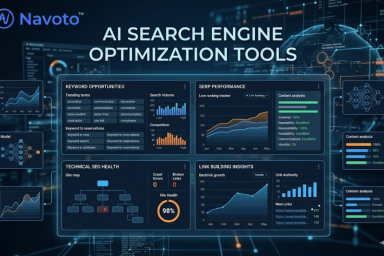
Quick Answer: AI SEO tools are software platforms that use artificial intelligence and machine learning to help websites rank higher in search engines — by automating keyword research, content optimization, technical audits, competitor analysis, and increasingly, visibility across AI-powered search engines like ChatGPT and Google AI Overviews. The best ones do not replace your judgment; they sharpen it.
A few years ago, calling something an “AI SEO tool” was mostly marketing spin. A bit of keyword clustering, some auto-generated meta tags, and vendors slapped “AI-powered” on the homepage. That era is over. Today, the gap between teams using genuinely capable AI SEO tools and those who are not is measurable in rankings, traffic, and time saved. Websites using AI for SEO report improved rankings within three months in 63% of cases. Teams save more than five hours a week on average. That is not a minor efficiency gain — that is the difference between publishing one article a week and four. This guide cuts through the noise: what these tools actually do, which ones are worth paying for, and how to use them without producing content that feels hollow or robotic.
Search is also changing underneath all of this. Google’s AI Overviews now appear for roughly 21% of all keywords. LLM traffic grew 527% year-over-year, reaching over 107,000 sessions tracked across 19 sites. AI-referred visitors convert at rates 23 times higher than standard organic search visitors in some datasets. The tools that help you win in this landscape are not the same ones that worked in 2022. Understanding the difference is what this guide is for.
|
63%
Of sites using AI SEO tools improved rankings within 3 months
|
5 hrs+
Average time saved per week with AI SEO workflows
|
527%
Growth in LLM referral traffic year-over-year (Previsible, 2025)
|
86%
Of SEO professionals have now integrated AI into their strategy
|
What AI SEO Tools Are — and What They Are Not
At the most basic level, an AI SEO tool uses machine learning, natural language processing (NLP), or large language models to help with some part of the search engine optimization process — whether that is finding keywords, analyzing competitors, auditing your technical setup, optimizing content, or tracking how your brand appears across AI-powered search engines.
What they are not: a replacement for strategy, judgment, or genuine expertise. The data makes this clear — 97% of companies that use AI content tools still run a human review process before publishing. The tools accelerate the work; they do not do the thinking. Teams that treat AI output as a finished product consistently produce content that reads like it was written by a machine, because it was. That content is increasingly easy for Google to identify, and increasingly unappealing to the readers who land on it.
The most effective use of AI in SEO is not about writing faster. It is about researching smarter, optimizing more precisely, and monitoring more comprehensively than any human team could manage manually. The five areas where AI genuinely earns its keep in an SEO workflow are:
- Keyword research and clustering — grouping thousands of related terms by intent, faster and more accurately than manual analysis
- Content optimization — real-time scoring against what is actually ranking, with specific suggestions on which terms to add or remove
- Technical SEO audits — crawling sites at scale and identifying issues that would take a developer days to find manually
- Competitor analysis — surfacing what your competitors rank for that you do not, including gaps in content coverage
- AI search visibility monitoring — tracking how and whether your brand appears in ChatGPT, Perplexity, Google AI Overviews, and Gemini answers
The Best AI SEO Tools in 2026: Honest Assessments
What follows is not a ranking generated by a tool. These assessments reflect what is actually known about these platforms from independent testing, user reports, and documented performance data. Each tool is evaluated against the same criteria: what problem it solves best, who it is genuinely suited to, and what the honest trade-offs are.
1. Surfer SEO — Best for Real-Time Content Optimization
| Best for | Writers and content teams who want live optimization feedback |
| Starting price | $89/month |
| Free option | No, but free trial available |
| WordPress integration | Yes — Surfer WordPress Plugin available |
Surfer built its reputation on one genuinely useful idea: instead of telling you what good SEO looks like in theory, it shows you what is actually ranking right now and helps you match it. The Content Editor scans the current top results for your target keyword and surfaces a real-time score based on word count, semantic terms, heading structure, and entity coverage. As you write or paste in your draft, the score updates live.
The practical value of this was illustrated well in an independent test on an “organic bedding” product page. Surfer identified a missing term — “GOTS certified” — that appeared in nearly every competing page but was absent from the draft. That kind of specific, evidence-based suggestion is exactly what justifies the monthly fee. You are not getting generic writing advice; you are getting a competitive gap analysis applied to your specific draft, for your specific keyword, against your specific competitors, in real time.
Surfer also offers a SERP Analyzer for deeper competitor research, a Keyword Research tool, and a Grow Flow feature that surfaces weekly optimization tasks for existing pages on your site. The AI writing capability, powered by GPT-4o, produces reasonable first drafts — but they tend to need substantive editing for voice and depth before they are genuinely publication-ready. That said, using Surfer to generate a structured outline and then writing the actual content yourself is one of the most time-efficient approaches in content SEO right now.
2. Semrush (with Copilot and AI Toolkit) — Best All-in-One Platform
| Best for | Agencies, in-house teams, and anyone who wants one tool to handle everything |
| Starting price | $139.95/month (Pro) |
| Free option | Limited free tier available |
| WordPress integration | Yes — SEO Writing Assistant integrates directly |
Semrush is not a flashy AI tool. It is a comprehensive SEO platform that has been adding genuinely useful AI capabilities on top of an already robust data infrastructure. The combination makes it the most complete option for teams who need keyword research, competitor analysis, technical auditing, content optimization, and AI visibility tracking all under one subscription.
Semrush Copilot is the standout AI addition — a built-in assistant that analyses your account activity and surfaces personalized suggestions specific to your site’s data. Rather than generic SEO advice, Copilot points to a specific page that has dropped in rankings, flags a particular backlink that has turned toxic, or identifies a keyword gap based on a competitor’s recent content. It is most useful for teams managing large sites who do not have time to manually review every dashboard every week.
The SEO Writing Assistant integrates with Google Docs and WordPress, providing real-time feedback on SEO score, readability, tone, and originality as you write. For the WordPress Classic Editor specifically, the Writing Assistant integration works by pasting your content into the tool, reviewing the suggestions, and then incorporating changes before publishing — a two-step workflow that is practical once you have the habit established.
The newer AI Visibility Toolkit (a $99/month add-on to paid plans) tracks how your brand appears across ChatGPT, Perplexity, Google AI Mode, and Gemini. It provides a visibility score, sentiment analysis (how AI describes your brand — positively, neutrally, or negatively), and a share-of-voice comparison against your competitors. For any business taking AI search seriously, this kind of monitoring is increasingly essential.
3. Clearscope — Best for Content Quality and Editorial Teams
| Best for | Agencies and editorial teams with strong writers who need optimization guidance |
| Starting price | $189/month |
| Free option | No |
| WordPress integration | Yes — via Google Docs integration and direct plugin |
Clearscope occupies a specific, well-defined space in the market: it is not trying to write content for you or replace your SEO platform. It does one thing — help you write better content that ranks — and it does it exceptionally well.
The interface is deliberately straightforward. You enter your target keyword, and Clearscope generates a content grade (A to F) based on keyword usage, semantic coverage, readability, and word count — all benchmarked against the current top-ranking pages. The keyword suggestions are highly accurate, drawn from NLP analysis of what the highest-ranking pages actually contain rather than what a keyword tool thinks should be there. The difference matters: Clearscope’s suggestions feel relevant because they are drawn from evidence, not algorithm.
Unlimited user accounts at a flat rate make it genuinely team-friendly. A content director, three writers, and an SEO manager can all work inside the same account without the per-seat pricing that makes many tools prohibitively expensive for larger operations. The content inventory tracking feature is particularly useful — it lets you monitor how existing pages are performing over time and flags when a piece that once ranked well is starting to slip.
4. Frase — Best for Small Teams and Solo Creators
| Best for | Freelancers, small businesses, and solo content creators on a budget |
| Starting price | $45/month |
| Free option | 5-day free trial |
| WordPress integration | Via export; no direct plugin |
Frase earns its place on this list not by being the best at any single thing, but by covering the full research-to-publish workflow in one tool at a price that smaller teams can actually afford. For someone who needs to go from keyword to published article without bouncing between five platforms, Frase is the most sensible starting point.
The workflow is coherent: enter your keyword, see what is ranking (with a summary of how those pages are structured), generate an outline based on that SERP analysis, draft content using the AI writer, and optimize by weaving in the suggested keywords. The content brief generation alone saves a couple of hours per article — it pulls headings, questions, and structural patterns from the top-ranking competitors and organizes them into a working outline you can use or adapt.
The AI writing quality requires honest expectation-setting: the drafts need editing. They tend to be competent but not distinctive, and without meaningful editing they will not produce the kind of content that earns links, builds an audience, or demonstrates the genuine expertise that Google’s E-E-A-T guidelines reward. Use Frase for the research and structure; write the actual sentences yourself, or at minimum rewrite the AI output thoroughly.
5. MarketMuse — Best for Enterprise Content Strategy and Topic Planning
| Best for | Large content teams that need to plan, prioritize, and govern content at scale |
| Starting price | Free tier available; paid from $149/month |
| Free option | Yes — limited free tier |
| WordPress integration | Via export and manual workflow |
MarketMuse operates at a level above most content tools. Where Surfer or Clearscope help you optimize an individual article, MarketMuse helps you decide what to write, in what order, and how to cover topics in a way that builds comprehensive authority across your entire domain — not just for one keyword.
The Content Inventory and strategy documents are the key differentiators. MarketMuse can analyse every page on your site, score each one for topical authority, identify where coverage is thin or missing, and recommend prioritization based on which gaps represent the biggest opportunity. For a site with hundreds or thousands of pages, this kind of systematic analysis is practically impossible to do manually. For an editorial team that needs to justify which content gets written next, it provides data-backed answers.
The SERP X-ray and Heatmap features speed up competitor auditing, and the shareable brief system keeps writers aligned when multiple people are contributing to the same content cluster. The Research and Optimize workflows are genuinely useful for anyone managing topic clusters across large sites.
6. Alli AI — Best for Technical SEO Automation
| Best for | Businesses with established content who need to fix technical SEO issues at scale |
| Starting price | $299/month |
| Free option | No |
| WordPress integration | Yes — direct plugin with site-wide deployment |
Most AI SEO tools focus on content. Alli AI focuses on the technical side — crawling your site, identifying issues, and then deploying fixes across multiple pages without requiring developer involvement. If you manage a large site with lots of technical debt (missing meta tags, broken internal links, slow-loading pages, thin content flagged across dozens of URLs), Alli AI addresses a real pain point that content optimization tools simply cannot reach.
The site-wide deployment capability is the key differentiator. Rather than fixing one page at a time, Alli AI can push optimization changes across an entire site simultaneously. For an e-commerce site with 500 product pages all missing optimized title tags, this is the difference between a week of manual work and an automated workflow that takes an hour to set up.
7. Screaming Frog (with AI Integration) — Best Technical Crawler with AI Augmentation
| Best for | Technical SEOs who want deep crawl data with AI-assisted automation |
| Starting price | £259/year (~$330) |
| Free option | Yes — free version (crawls up to 500 URLs) |
| WordPress integration | Via crawl analysis; not a direct WordPress plugin |
Screaming Frog has been the standard desktop crawler for technical SEOs for over a decade. The recent integration with AI tools — specifically OpenAI and Google Gemini — adds a genuinely useful layer on top of what was already a comprehensive technical analysis toolkit.
The most practical AI addition is automated alt text generation. During a crawl, you can prompt the tool to generate image alt text for every image missing it across your site — a task that would otherwise require going through every page manually. You connect your AI API key, define the prompt (“generate descriptive alt text for this image”), and Screaming Frog handles the rest during the crawl. For large sites with lots of images and poor accessibility compliance, this is a meaningful time-saver that also improves both SEO and accessibility simultaneously.
Beyond the AI additions, Screaming Frog’s site visualization tool converts your URL structure into an interactive map that makes it much easier to spot disconnected sections, orphaned pages, and internal linking gaps that affect crawlability and indexation. At £259/year, it remains one of the most cost-effective tools on this list for what it delivers.
8. SE Ranking — Best for AI Visibility Tracking Alongside Traditional SEO
| Best for | Teams who want to monitor AI Overviews and LLM visibility alongside traditional rankings |
| Starting price | $65/month |
| Free option | 14-day free trial |
| WordPress integration | Via content export and manual workflow |
SE Ranking is a comprehensive SEO platform that has moved faster than most on the AI visibility question. Its AI Overviews Tracker is the standout feature: it shows you which of your target keywords trigger AI Overviews, whether your site is listed as a source, historical SERP versions, and how your presence in AI answers compares to competitors. This addresses a monitoring gap that traditional rank trackers simply cannot fill.
The AI visibility tracking extends beyond Google Overviews to ChatGPT, Perplexity, and Gemini — showing you how often your brand appears in AI-generated responses and how that stacks up against competitors for the same queries. For any team that takes the GEO opportunity seriously, this kind of data is increasingly essential for making strategic content decisions.
The traditional SEO capabilities — keyword ranking, site audit, competitor analysis, backlink monitoring — are solid and competitively priced. The AI-assisted content marketing toolkit generates article outlines based on SERP analytics, and the AI writer produces workable first drafts that reduce the time from brief to publishable draft.
9. ChatGPT — The Most Versatile AI Tool for SEO Tasks
| Best for | Any SEO task that can be approached as a structured conversation or prompt |
| Starting price | Free (ChatGPT Plus from $20/month) |
| Free option | Yes |
| WordPress integration | Not direct; output is pasted into editor manually |
ChatGPT is not an SEO tool in the traditional sense — it has no keyword database, no rank tracker, no technical crawler. What it has is flexibility. With the right prompts and a clear workflow, it handles an impressive range of SEO tasks: generating keyword cluster variations, writing and testing title tag options, drafting meta descriptions for batches of pages, creating internal linking anchor text suggestions, building schema markup, and producing working content outlines in minutes.
The agencies getting the most value from ChatGPT are pairing it with data tools rather than using it in isolation. A common workflow: pull keyword data from Semrush, export it to a spreadsheet, share it with ChatGPT, and ask it to generate content outlines or title tag variations for each keyword in bulk. What would take a team half a day takes 20 minutes. The output still needs human review, but the mechanical work is largely automated.
For WordPress Classic Editor users specifically, ChatGPT is most useful as a pre-writing assistant: briefing, outline generation, and title/meta generation. Write in the tool, refine with data from a platform like Surfer or Clearscope, then paste the polished draft into the Classic Editor’s Text tab before publishing.
Side-by-Side Comparison: Which Tool Suits Which Situation
| Tool | Primary Strength | Best Suited To | Starting Price | WP Classic Editor |
|---|---|---|---|---|
| Surfer SEO | Real-time content scoring | Writers, content teams | $89/mo | ✅ Plugin available |
| Semrush | All-in-one SEO platform | Agencies, in-house teams | $139.95/mo | ✅ WP integration |
| Clearscope | Content quality grading | Editorial teams, agencies | $189/mo | ✅ Via Google Docs |
| Frase | Research-to-draft workflow | Solo creators, small teams | $45/mo | ⚠️ Manual export |
| MarketMuse | Topic cluster planning | Enterprise content teams | $149/mo+ | ⚠️ Manual export |
| Alli AI | Site-wide technical fixes | Large sites with tech debt | $299/mo | ✅ Direct plugin |
| Screaming Frog | Technical crawl + AI auditing | Technical SEOs | £259/year | ⚠️ Via crawl analysis |
| SE Ranking | AI visibility tracking | Teams tracking AI + organic | $65/mo | ⚠️ Manual export |
| ChatGPT | Flexible SEO task automation | Any team, any budget | Free / $20/mo | ⚠️ Manual paste |
How to Use AI SEO Tools Effectively in WordPress Classic Editor
The WordPress Classic Editor does not offer the native AI integrations that tools like Rank Math or Yoast provide with the block editor. That means a slightly different workflow — but not a less effective one. Here is a practical, step-by-step approach that uses AI SEO tools efficiently within a Classic Editor publishing process.
Keyword and intent research (Semrush / Ahrefs / Frase): Before touching the editor, identify your primary keyword, confirm search intent by reviewing the top 5 results, and select 5–8 secondary keywords. Export or note these before you write anything.
Outline generation (Frase / ChatGPT / Surfer): Generate or review a content outline that reflects the structure of what is currently ranking. Identify the key sections, questions to answer, and data points to include. Adjust the outline to reflect your unique angle or expertise — this is where human judgment matters most.
Write or draft the content: Write your draft — either entirely by hand using the outline as a guide, or by using an AI draft as a starting point that you substantially rewrite and enhance with genuine expertise, original examples, and specific data. Keep your keyword list visible while you write.
Optimization check (Surfer / Clearscope / Semrush Writing Assistant): Paste your draft into your optimization tool of choice. Review the score. Identify which suggested keywords are genuinely missing and where you can add them naturally. Do not force keywords — if a suggested term does not fit naturally in the content, it is usually because the suggestion is less relevant than the tool’s score implies.
Generate title and meta description (ChatGPT / Semrush): Use your AI tool to generate 5–10 variations of your title tag and meta description. Select the one that most naturally includes the primary keyword while being compelling to click. Keep the title under 60 characters and the description under 160.
Publish via Classic Editor (Text tab): Switch the Classic Editor to “Text” mode and paste your finalized HTML content. Add your internal links using descriptive anchor text. Set your focus keyword and meta description in Yoast or RankMath. Preview, then publish.
Keeping Your Content Human: Why It Matters More Than Ever
This section is genuinely important, and most AI tool roundups skip it. Here is the honest situation: there is no correlation between the amount of AI content in an article and its search ranking position. That finding, from Ahrefs analysis of 879 marketers, cuts both ways. AI content is not penalized just for being AI-generated. But it is also not rewarded. What Google rewards is content that demonstrates genuine experience, expertise, and trustworthiness — qualities that AI text often lacks not because it is wrong, but because it has no actual experience to draw from.
The practical implication: AI tools should accelerate and inform your content work, not replace the human contribution that makes content worth reading. Marketers using AI publish 42% more content per month on average. That speed advantage only translates into a ranking advantage if the additional content maintains quality — which requires real human editing, original perspective, and accurate information that has been verified rather than generated.
Practical Rules for Keeping AI-Assisted Content Feeling Human
Integrating AI SEO Tools Into a Real Content Strategy
Most teams approach AI SEO tools as individual productivity aids — one tool for keyword research, another for content scoring, another for technical audits. That works, but it undersells the strategic value. The teams generating the most measurable SEO improvement from AI tools are the ones who have integrated them into a systematic content operation rather than using them ad hoc.
The AI-Assisted Content Workflow (From Idea to Indexed)
| Stage | AI Tool Used | What It Does | Human Contribution |
|---|---|---|---|
| Topic selection | MarketMuse / SE Ranking | Identifies topical gaps and opportunity keywords | Strategic judgment on what fits the audience and business goal |
| Keyword research | Semrush / Ahrefs | Surfaces volume, difficulty, and related terms | Intent verification, keyword selection from the data |
| Content brief | Frase / ChatGPT | Generates outline from SERP analysis | Adding unique angle, expert questions, proprietary data |
| Writing | Optional AI draft | First draft structure and coverage | Voice, accuracy, experience, and meaningful editing |
| Optimization | Surfer / Clearscope | Scores content against current top results | Accepting relevant suggestions, ignoring forced ones |
| Technical check | Screaming Frog / Alli AI | Audits page for technical issues pre or post-publish | Prioritizing which fixes to implement first |
| Monitoring | SE Ranking / Semrush AI Toolkit | Tracks rankings and AI visibility over time | Strategic decisions on when to refresh or reprioritize |
The table above reflects a key principle: at every stage, AI handles the mechanical or analytical work while human judgment handles the strategic and qualitative decisions. Neither is optional. The AI reduces the time cost of research and optimization dramatically. The human contribution is what makes the output worth ranking.
Related Guides on Navoto
- Generative Engine Optimization (GEO): How to Get Cited by ChatGPT and AI Search — the companion guide to this article, covering the content and structural tactics that earn AI citations.
- SEO Content Strategy: The Complete Step-by-Step Framework for 2026 — how to build the strategic foundation that AI SEO tools are designed to support.
- How Many Keywords for SEO? The Evidence-Based Answer — keyword density and placement rules that apply whether you use AI tools or not.
- Dental SEO: The Complete 2026 Guide for Growing Your Practice — how to apply AI SEO tools in a healthcare-specific context with YMYL content standards.
- White Label Local SEO Services: The Complete Agency Guide — for agencies using AI SEO tools to deliver local SEO at scale without expanding headcount.