💡 What Are Google Search Operators? — Quick Answer
Google search operators are special commands and symbols — like site:, intitle:, filetype:, and " " — typed directly into the Google search bar to filter, narrow, and supercharge your results. Instead of vague keywords that return thousands of irrelevant pages, operators let you write precise instructions to Google: find only pages from this domain, only pages with this keyword in the title, only PDF files, only pages published after a specific date.
20 power combos
10 SEO use cases
Full cheat sheet
Most people use Google the same way every day: type a few keywords, scroll through results, and settle for whatever comes up. They’ve been using the same search technique since 2005. Meanwhile, every professional SEO, investigative journalist, competitive intelligence analyst, and link-building specialist is running searches that return radically more precise results in a fraction of the time — using a layer of Google most users never touch.
Google search operators are the hidden layer. They’re built directly into the Google search bar — no extensions, no accounts, no paid tools. Type the right command and you can find every indexed page on a competitor’s site, every PDF published by universities on a topic, every page that mentions your brand without linking to you, or every page on your site with a specific keyword in the title — in seconds.
This complete guide from Navoto covers all 50+ working Google search operators in 2026 — organized from basic to advanced, with real working examples for every single one, 20 professional power combinations, 10 real-world SEO use cases, the deprecated operators you need to stop using, and a 2026-exclusive section on using operators to research AI search visibility. By the end, standard Google searches will feel limiting.
What Are Google Search Operators?
Google search operators (also called advanced search commands, search parameters, or colloquially Google dorks in the security research community) are special characters, symbols, and commands typed directly into the Google search bar to refine and filter results with surgical precision.
The Filing Cabinet Analogy
Think of Google as a filing cabinet with hundreds of billions of folders. A regular keyword search shakes the entire cabinet and hopes something falls out. Search operators let you open specific drawers, flip to exact tabs, and pull only the files that match your precise criteria — by domain, by title, by file type, by date, by URL structure, or by content location.
There are over 50 operators in active use in 2026, ranging from one-character shortcuts like - (minus) and " " (quotes) to powerful compound commands like site:, intitle:, and filetype:. They are built into Google’s search engine at the query processing layer — no extension, account, or paid access is required. They work identically whether you’re logged in or not, from any browser, in any location.
One critical rule that applies to every single operator: there is never a space between the operator and its value. site:navoto.com works. site: navoto.com does not. This single mistake accounts for the majority of “operator not working” complaints. Learn it once, never forget it.
Why Google Search Operators Matter for SEO in 2026
Before dismissing this as a “tech nerds only” topic: content marketers, link builders, PR professionals, technical SEOs, digital PR teams, and competitive intelligence analysts use these commands daily. Here is exactly what they unlock:
SEO professionals specifically use Google search operators for technical audits (finding HTTP pages, noindex leaks, crawl issues), competitor analysis (seeing every page a competitor has indexed, their content strategy, their file assets), link building (finding resource pages, guest post opportunities, broken link candidates), content research (locating original studies, statistics, and academic sources), and brand monitoring (tracking every mention of your brand across the web, including unlinked mentions that represent link-building opportunities).
In 2026, with Google’s AI Overviews now appearing for over 13% of searches, operators also serve a new purpose: researching the content landscape that AI-generated responses draw from. Understanding which pages AI cites for your target queries — and optimizing to be among them — is a skill that builds directly on operator proficiency. More on that in Section 10. For a complete overview of AI search optimization, see our LLM SEO guide.
Basic Google Search Operators (Foundation Set)
Master all of these before progressing to advanced operators. They appear in almost every professional power combination — knowing them precisely makes every advanced query work better.
Advanced Google Search Operators for Power Users
These are the operators that make SEO professionals dangerous. Each one is a precision instrument — learn when to reach for each tool and combine them with the basics for maximum research power.
Utility & Speciality Operators
These operators serve specific functions beyond standard search filtering — from unit conversions to stock quotes to maps. Know them so you can use them when needed:
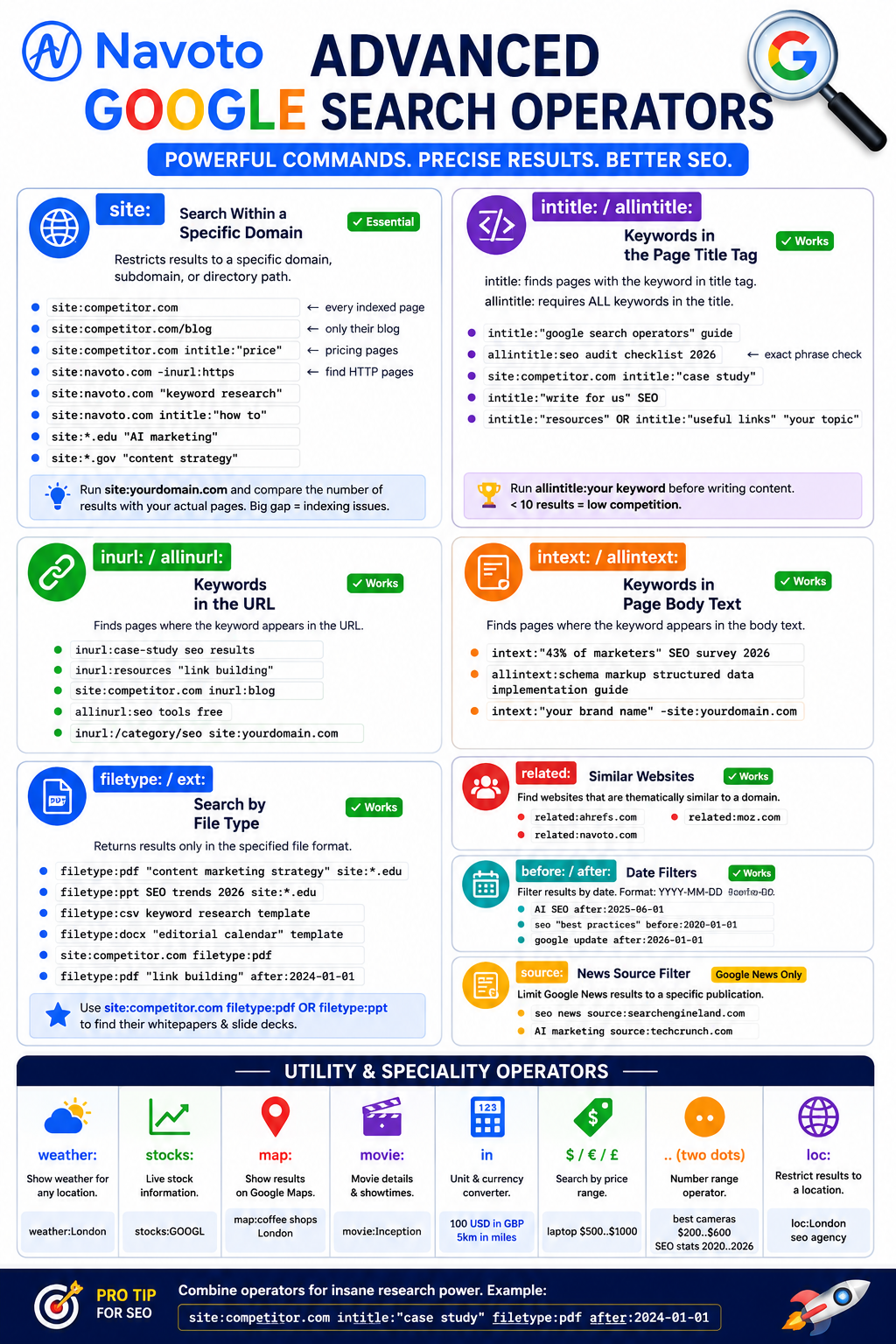
weather:
Instantly shows weather for any location. weather:London, weather:New York
stocks:
Displays live stock information. stocks:GOOGL, stocks:AAPL
map:
Forces Google Maps results. map:coffee shops London
movie:
Shows movie details and showtimes. movie:Inception
in
Unit and currency converter. 100 USD in GBP, 5km in miles
$ / € / £
Search by price. laptop $500..$1000 returns products in that price range.
.. (two dots)
Number range operator. best cameras $200..$600, SEO stats 2020..2026
loc:
Restricts results to a geographic location. Inconsistent behavior but useful for local SEO competitive research. loc:London seo agency
Deprecated Operators to Stop Using in 2026
Google quietly kills operators over time. The most dangerous thing about deprecated operators is that some of them still return partial results — giving the illusion of working while providing severely incomplete data. Making decisions based on this data is worse than having no data at all.
| Operator | What It Did | Status | Use This Instead |
|---|---|---|---|
| link: | Showed backlinks pointing to a URL | ❌ Dead | Ahrefs, Semrush, Moz, or Google Search Console for accurate backlink data |
| ~ | Included synonym variations in results | ❌ Dead | Google’s NLP handles synonyms automatically now — no operator needed |
| inanchor: | Found pages linked to with specific anchor text | ❌ Dead | Use dedicated backlink analysis tools (Ahrefs anchor text report) |
| daterange: | Filtered by Julian date range | ❌ Dead | Use before: and after: operators (YYYY-MM-DD format) |
| info: | Displayed Google’s info panel for a URL | ⚠️ Unreliable | Search the URL directly in Google, or use GSC URL Inspection tool |
| allinanchor: | Found pages with all specified anchor text terms | ❌ Dead | Backlink tools only |
| + | Required a specific term to appear | ❌ Dead | Use exact quotes "term" or the AND operator for required terms |
20 Power Combinations the Pros Use Daily
Individual operators are useful. Combined operators are unstoppable. Copy every one of these, swap in your domain or keyword, and run them. Each one produces intelligence that would take hours to gather manually — these take seconds.
TECHNICAL SEO 01
Find HTTP Pages on Your HTTPS Site
site:yourdomain.com -inurl:httpsEvery result is a non-HTTPS page that may have redirect issues or mixed content warnings affecting indexing speed.
TECHNICAL SEO 02
Find Duplicate Title Tags
site:yourdomain.com intitle:"Exact Page Title"Multiple results = duplicate title tag problem. A common cause of keyword cannibalization affecting your rankings.
TECHNICAL SEO 03
Indexing Audit — Count vs Actual
site:yourdomain.comCompare Google’s count to your actual sitemap count. A gap of 30%+ indicates indexing problems to investigate in Search Console.
COMPETITOR 04
Find Competitor’s Most Recent Content
site:competitor.com after:2026-01-01See everything published in 2026 — monitor their content calendar without checking their blog manually every day.
COMPETITOR 05
Discover Competitor Depth on a Topic
site:competitor.com intitle:"your keyword"If they have 20 pages on a topic and you have 2, you know exactly where your content budget should go next.
LINK BUILDING 06
Find Resource Pages in Your Niche
intitle:"resources" inurl:resources "SEO"Resource pages exist specifically to link out — get on them for referral traffic and domain authority simultaneously.
LINK BUILDING 07
Guest Post Prospects in 30 Seconds
"write for us" OR "guest post guidelines" "SEO"Returns sites actively seeking guest contributions in your niche. Swap SEO for your industry keyword for a custom prospect list.
BRAND MONITORING 08
Track Brand Mentions Across the Web
"Your Brand Name" -site:yourdomain.comFind reviews, press mentions, forum threads, and unlinked mentions — each unlinked mention is a potential link waiting for a simple outreach email.
CONTENT RESEARCH 09
Find Original Academic Research Fast
filetype:pdf site:*.edu "your topic" after:2023Bypass the 50 blogs that regurgitate the same stats — go directly to primary university research your competitors aren’t citing.
CONTENT RESEARCH 10
Find Original Source of Any Statistic
"exact statistic" -site:contentfarm.comStrip away the 30 blogs that copied it. Use minus to exclude known content aggregators and find the original study or report.
INTERNAL LINKING 11
Find Internal Link Opportunities
site:yourdomain.com "keyword to link from"Returns every page on your site mentioning a keyword — prime locations to add contextual links to strengthen your internal linking for better SEO rankings.
COMPETITION CHECK 12
Measure Keyword Competition Before Writing
allintitle:your target keyword phraseUnder 10 results = low competition. Over 500 = fight for it. This 10-second check can save months of wasted effort.
COMPETITOR INTEL 13
Find Competitor Strategy Documents
site:competitor.com filetype:pdf OR filetype:pptCompetitors often expose their internal frameworks in slide decks and whitepapers. This surfaces everything they’ve made publicly accessible.
PR / DIGITAL PR 14
Find Journalists Who Cover Your Topic
inurl:author "SEO" site:techcrunch.comTarget specific writers at publications — vastly more effective than cold emailing the news desk. Swap the publication and topic for any niche.
LOCAL SEO 15
Find Local Citation Opportunities
"your city" "business directory" inurl:listingFind every local directory you should be listed on. Consistent NAP citations across directories are a core local SEO ranking signal.
CONTENT GAP 16
Find Content Gaps vs Competitor
site:competitor.com intitle:"beginner guide"Swap “beginner guide” for any content type. If they have it and you don’t — that’s a content gap and a traffic opportunity. For full gap analysis, see our search visibility tool guide.
LINK BUILDING 17
Find Broken Link Opportunities
intitle:"useful resources" "your keyword" -site:competitor.comFind resource pages in your niche that don’t link to your strongest competitor yet — making them more likely to consider linking to you.
CONTENT RESEARCH 18
Government Research on Any Topic
filetype:pdf site:*.gov "your topic" after:2023Government statistics from authoritative .gov sources. These are primary data nobody else is citing — major E-E-A-T boost for your content.
COPYRIGHTING 19
Check if Your Content Is Being Copied
"unique sentence from your article" -site:yourdomain.comCopy your most distinctive sentence into quotes, add -site: to exclude your own domain. Any other results are sites scraping your content.
AI SEARCH 20
Discover AI-Cited Sources in Your Niche
intitle:"your keyword" after:2024-01-01 -site:competitor.comFind the freshest, highest-quality content on your topic — the type of pages AI search engines like ChatGPT and Perplexity typically cite. Use this to model your own content. See our AI citation building guide.
10 Real-World SEO Use Cases
Knowing operators is step one. Knowing exactly when to reach for which one is what separates a good SEO from a great one. Here are 10 practical scenarios and the exact operator queries to run for each:
1. Conducting a Site Indexing Audit
Run site:yourdomain.com and compare the result count to your actual page count. A gap of 20%+ means crawl budget issues, noindex leaks, or thin content exclusions. Then drill deeper: site:yourdomain.com intitle:"keyword" to find keyword cannibalization — multiple pages targeting the same term. Check our how to get indexed faster guide for the full audit workflow.
2. Pre-Content Competition Analysis
Before investing time writing any piece, run two checks: allintitle:your target keyword (under 10 results = easy, 500+ = hard) and site:topcompetitor.com intitle:"keyword" (how deeply have they covered it?). These two searches in 30 seconds give you a complete picture of what you’re walking into before you spend a day writing.
3. Building a Guest Post Prospect List in 10 Minutes
Combine: "write for us" "your industry" + "guest post guidelines" "your topic" + "submit an article" "your keyword". Run all three, combine the results, remove duplicates — you have a qualified guest post prospect list without touching a paid tool.
4. Finding Resource Pages for Link Building
Resource pages exist specifically to link out. Find them with: inurl:resources "your keyword" and intitle:"useful links" "your topic". Reach out to each page owner explaining why your content belongs on their list. Conversion rates for this type of outreach are typically 10–30% — much higher than cold link requests.
5. Tracking Brand Mentions for Link Reclamation
Run "Your Brand Name" -site:yourdomain.com monthly. You’ll surface reviews, forum threads, press mentions, and most importantly — sites using your brand name without linking to you. These unlinked mentions are the easiest link-building wins available: the site owner already knows you exist, and a simple “would you mind adding a link?” email converts at a very high rate.
6. Finding Original Statistics for Your Content
Stop sourcing the same recycled statistics everyone else uses. Run: your topic filetype:pdf site:*.gov OR site:*.edu after:2023. This surfaces primary research from government bodies and universities that most bloggers have never found. Your content will cite unique sources — making it genuinely more credible for both human readers and AI citation systems that prioritize primary sources. This directly improves your AI citation building performance.
7. Discovering Competitors You Didn’t Know Existed
Run related:yourcompetitor.com for your top 3 known competitors. Google’s “similar sites” data reveals the full competitive landscape — including niche sites that rank for your keywords but never show up in your own searches. Add every result to your competitive monitoring watchlist.
8. Finding Internal Link Opportunities at Scale
When you publish a new important page, immediately run site:yourdomain.com "keyword from new page". Every result is an existing page that mentions your topic — a ready-made internal link opportunity. Adding these links on publication day creates instant discovery paths for Googlebot, accelerating indexing of the new page. This is the free, no-technical-setup version of crawl optimization.
9. Technical HTTP/HTTPS Audit
Run site:yourdomain.com -inurl:https. Every result is a page serving over HTTP when it should be HTTPS — these may have mixed content warnings, incorrect canonical tags, or missing redirects. Fix each one: set up a 301 redirect from the HTTP version to the HTTPS canonical. This cleanup improves crawl budget efficiency and eliminates potential ranking penalties from serving insecure pages.
10. Researching Your AI Search Visibility Landscape
With AI search now influencing over 50% of purchase decisions, understanding which content Google is surfacing for your key queries is critical for AI citation optimization. Run intitle:"your keyword" after:2024-01-01 — these are the freshest, most authoritative pages on your topic that Google is already valuing. Study their structure, depth, and approach. Your AI-optimized content needs to match or beat each of these pages across every quality dimension to earn citations from platforms like ChatGPT, Gemini, and Perplexity.
Common Mistakes & How to Fix Them
❌ Mistake 1: Space After the Colon
The #1 beginner error. site: navoto.com will not work. There must be zero space between the operator and its value. Always: site:navoto.com
❌ Mistake 2: Using Deprecated Operators for Data
link: still returns some results — but they’re severely incomplete. Using link: data to assess your backlink profile is like checking your bank balance on a screen that only shows 10% of transactions. Use Ahrefs, Semrush, or GSC instead.
❌ Mistake 3: Overcomplicating the Query
Five operators combined often return zero results. Start with one operator, validate what you see, then add one layer at a time. site:competitor.com → site:competitor.com intitle:"keyword" → add date filter. Build incrementally.
❌ Mistake 4: Running Many Queries Too Fast
Rapid-fire operator queries trigger Google’s bot detection — CAPTCHA prompts appear. This is not a ban, just a temporary slowdown. Simply slow your research pace. Space queries 30–60 seconds apart during heavy research sessions.
❌ Mistake 5: Using Operators in Isolation
Most beginners use one operator at a time. The real power is in combination. A solo intitle: is useful. site:competitor.com intitle:"guide" after:2025-01-01 is actionable intelligence. The 20 power combinations above are your starting point.
❌ Mistake 6: Lowercase OR/AND
Boolean operators must be uppercase: OR works, or does not. Lowercase “or” is treated as a regular search word, not a boolean operator. Same for AND.
2026 Bonus: Using Operators to Research AI Search Visibility
In 2026, AI search engines like ChatGPT, Gemini, Perplexity, and Google AI Overviews are influencing over 50% of purchase decisions and generating 1.13 billion referral visits per month. Google search operators provide a powerful — and completely free — window into the content these AI systems are drawing from.
AI search engines primarily cite from the same pool of high-authority, well-indexed, recently-published content that ranks well in Google. Using operators to understand this content landscape is the first step in any AI citation building strategy.
5 Google Operator Queries for AI Search Research
Find what’s being cited for your key query
intitle:"your keyword" after:2024-01-01
These are the freshest, highest-quality pages on your topic — the ones most likely appearing in AI Overviews and ChatGPT citations.
Find authoritative sources AI tools prioritize
filetype:pdf site:*.edu OR site:*.gov "your topic" after:2022
AI platforms weight primary research from educational and government sources highly. Understanding what they cite helps you structure your own content accordingly.
Check if AI tools are citing your competitors
site:competitor.com intitle:"your keyword" after:2023-01-01
If your competitor has 15 recent pages on a keyword and you have 2, they will dominate AI citations for that topic. This is your content gap to close.
Find FAQ-style content that earns AI citations
intitle:"what is" OR intitle:"how to" OR intitle:"why" "your topic" after:2024-01-01
Question-format content earns disproportionately high AI citation rates. Study what already ranks with these patterns and replicate the approach.
Find your brand mentions in AI-cited pages
"your brand name" -site:yourdomain.com after:2024-01-01
Recent third-party mentions of your brand signal the kind of entity authority that AI search engines use to validate citation worthiness. Each unlinked mention is also a link opportunity.
For a complete strategy on appearing in AI-generated responses beyond just operators, see our guides on LLM SEO, SEO for ChatGPT, and our full AI search analytics guide.
Complete Google Search Operators Cheat Sheet (50+)
Bookmark this section or open it in a tab while you work — every operator at a glance with working examples:
| Operator | What It Does | Example Search | Status |
|---|---|---|---|
| ” “ | Exact phrase match | “content marketing strategy 2026” | ✅ Works |
| – | Exclude a term or phrase | apple -fruit -recipe | ✅ Works |
| OR / | | Either term (OR must be uppercase) | ahrefs OR semrush review | ✅ Works |
| AND | Require both terms (must be uppercase) | SEO AND “content marketing” | ✅ Works |
| * | Wildcard — any word or phrase | “best * for small business” | ✅ Works |
| ( ) | Group operators — control search logic | (seo OR ppc) guide 2026 | ✅ Works |
| site: | Search within a specific domain | site:navoto.com seo | ✅ Essential |
| intitle: | Keyword in page title tag | intitle:”SEO guide” 2026 | ✅ Works |
| allintitle: | All keywords must be in title | allintitle:seo audit checklist 2026 | ✅ Works |
| inurl: | Keyword in page URL | inurl:case-study seo results | ✅ Works |
| allinurl: | All keywords in URL | allinurl:seo tools free | ✅ Works |
| intext: | Keyword in body text | intext:”43% of marketers” survey | ✅ Works |
| allintext: | All keywords in body text | allintext:schema markup guide | ✅ Works |
| filetype: | Search specific file formats | SEO checklist filetype:pdf | ✅ Works |
| ext: | Same as filetype: | marketing plan ext:docx | ✅ Works |
| related: | Similar websites | related:ahrefs.com | ✅ Works |
| define: | Dictionary definition | define:crawl budget | ✅ Works |
| cache: | Cached version of page | cache:navoto.com | ⚠️ Partial |
| before: | Results before a date (YYYY-MM-DD) | SEO tips before:2022-01-01 | ✅ Works |
| after: | Results after a date (YYYY-MM-DD) | AI SEO after:2025-06-01 | ✅ Works |
| source: | Filter Google News by publication | AI news source:techcrunch.com | ⚠️ News only |
| weather: | Weather for a location | weather:London | ✅ Works |
| stocks: | Stock information | stocks:GOOGL | ✅ Works |
| map: | Google Maps results | map:coffee shops Paris | ✅ Works |
| movie: | Movie details and showtimes | movie:Oppenheimer | ✅ Works |
| in | Unit and currency conversion | 100 USD in GBP | 5km in miles | ✅ Works |
| $ / € | Price range search | headphones $100..$300 | ✅ Works |
| .. | Number range | SEO stats 2020..2026 | ✅ Works |
| loc: | Geographic location filter | loc:London seo agency | ⚠️ Inconsistent |
| link: | Backlinks (deprecated) | Use Ahrefs/Semrush instead | ❌ Dead |
| ~ | Synonym search (deprecated) | Google NLP handles this now | ❌ Dead |
| inanchor: | Anchor text search (deprecated) | Use backlink tools instead | ❌ Dead |
| info: | URL info panel (unreliable) | Use GSC URL Inspection instead | ⚠️ Unreliable |