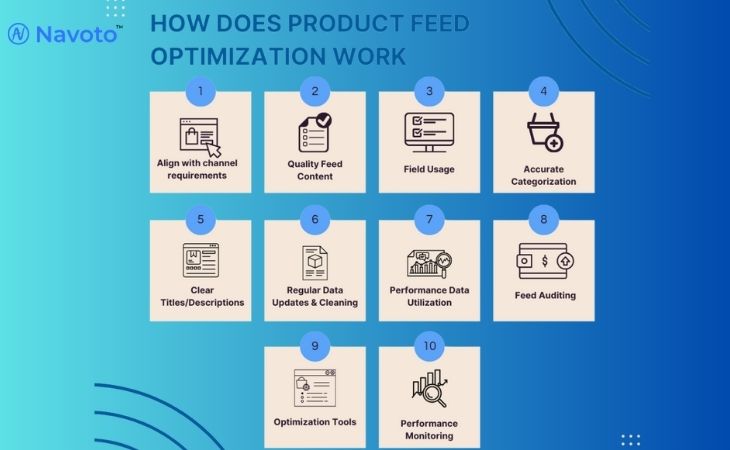
Product feed optimization is an important process for ecommerce businesses that advertise or sell products across search engines, marketplaces, and paid shopping platforms. An optimized product feed helps platforms to understand your products, match them to relevant searches, and display them to high-intent buyers.
In this guide we explain what product feed optimization is, why it matters, and how to implement best practices that improve visibility, click-through rate, conversions, and return on ad spend.
What Is Product Feed Optimization?
Product feed optimization is the process of improving and structuring product data so it meets the technical requirements and ranking signals of platforms such as Google Shopping, Meta Ads, and online marketplaces.
A product feed is typically a structured file (XML, CSV, or TXT) that contains information such as:
- Product title
- Product description
- Price and availability
- Product images
- Category and attributes (brand, size, color, material, GTIN)
Optimization ensures this data is accurate, complete, consistent, and aligned with how users search for products.

Why Product Feed Optimization Is Important
Product feed optimization directly impacts both organic and paid performance.
Key benefits include:
- Increased product visibility across shopping results and marketplaces
- Higher click-through rates due to clearer titles and images
- Improved conversion rates from accurate pricing and availability
- Fewer feed errors and disapprovals
- Better performance in automated ad systems
Platforms rely on structured data to determine when and where a product appears. Poor-quality feeds limit reach and reduce efficiency.
Core Elements of a High-Quality Product Feed
Product Titles
Product titles are the most important ranking and relevance factor. Titles should clearly describe the product using natural search terms.
Best practices:
- Include brand name
- Specify product type
- Add key attributes such as size, color, or model
- Avoid unnecessary promotional language
Example:
- Poor: Running Shoes
- Optimized: Nike Air Zoom Pegasus 40 Men’s Running Shoes – Black
Product Descriptions
Descriptions should provide clear, factual information about the product. They should support the title, match the landing page content, and focus on features and benefits.
Avoid keyword stuffing and duplicated content across products.
Categories and Taxonomy
Assigning the correct product category helps platforms understand where your product belongs. Incorrect categorization can reduce visibility or cause disapprovals. If you sell “Espresso Machines,” don’t just put them in “Appliances.” Map them specifically to Home & Garden > Kitchen & Dining > Kitchen Appliances > Coffee Makers. This ensures you don’t waste money showing ads to people looking for refrigerators.
Always select the most specific and accurate category available.
Product Images
Images are critical for engagement and conversions.
Image requirements:
- High resolution
- Clear background
- Accurate representation of the product
- Compliant with platform image policies
Multiple images showing different angles can improve performance.
Price, Availability, and Identifiers
Feed data must always match your website.
This includes:
- Price
- Stock availability
- Brand
- GTIN or SKU
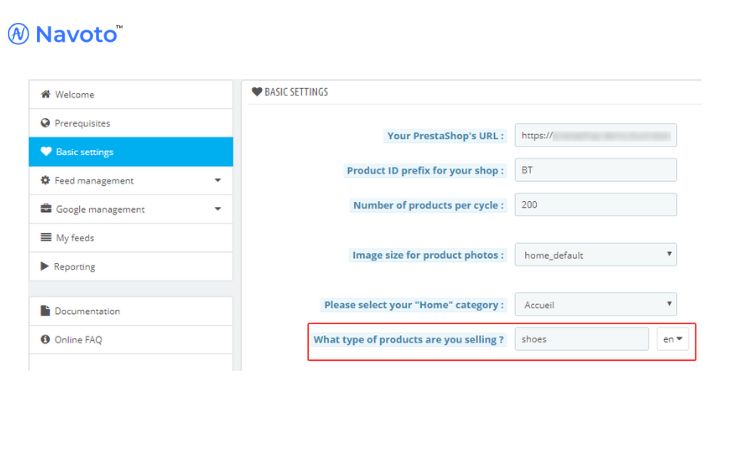
Inconsistent data is one of the most common causes of feed errors.
Product Feed Optimization Best Practices
Optimize Per Channel
Different platforms interpret feeds differently. Where possible, customize titles, categories, and attributes for each channel to improve relevance.
Use Optional Attributes
Optional attributes such as size, color, gender, material, and condition help platforms better match products to search queries.
These attributes often improve reach and targeting accuracy.
Update Feeds Regularly
Frequent updates ensure that price changes, promotions, and stock availability remain accurate. Daily updates are recommended for active catalogs.
Monitor and Fix Feed Errors
Regularly review feed diagnostics to identify:
- Missing required attributes
- Policy violations
- Landing page mismatches
Fixing errors improves approval rates and campaign stability.
Strategy: One Feed, Many Destinations
Not all platforms are created equal. Optimization means tailoring your data to fit the “vibe” and technical requirements of each channel.
| Feature | Google Shopping | Facebook/Instagram | Amazon |
| Primary Goal | Search Relevance | Visual Discovery | Purchase Intent |
| Key Attribute | Google Product Category | High-Quality Imagery | GTIN/EAN/UPC |
| Title Strategy | Keyword-heavy & Brand first | Lifestyle & Emotional | Technical & Feature-rich |
| Update Frequency | Daily (at minimum) | Daily | Near Real-time |
FAQs
What is a product feed?
A product feed is a structured data file that contains product information such as title, price, images, and availability. Platforms use this data to display products in shopping results and ads.
Why is product feed optimization important?
Product feed optimization improves how platforms understand and display products. Better data leads to higher visibility, stronger ad performance, and improved conversions.
How often should a product feed be updated?
Product feeds should be updated daily or whenever there are changes to pricing, availability, or product details.
Which platforms use product feeds?
Product feeds are used by search engines, shopping ad platforms, online marketplaces, comparison shopping engines, and affiliate networks.
Can product feed optimization improve SEO?
Yes. Optimized product data improves relevance, crawlability, and structured data consistency, which supports organic and shopping visibility.