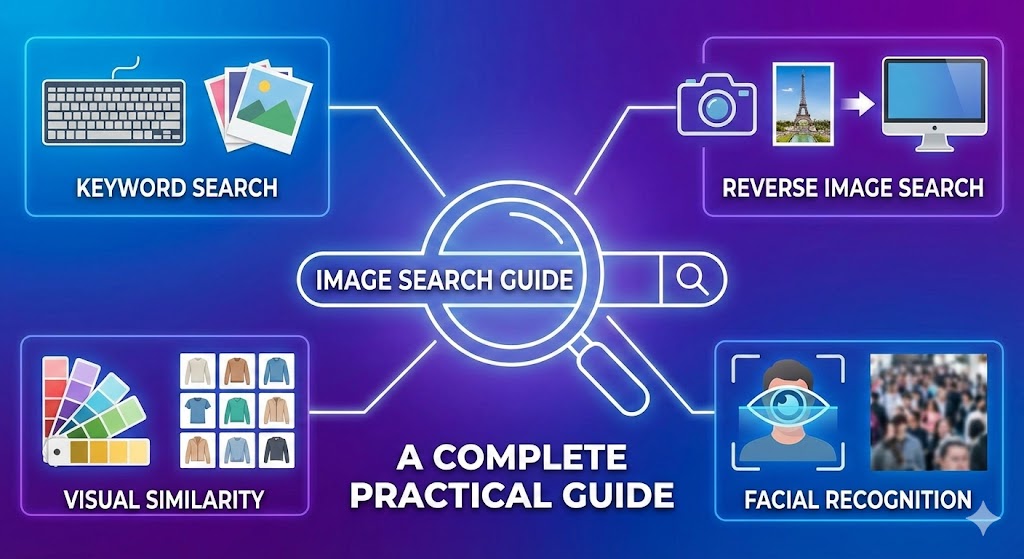
Now, Images rule the internet as one of the strongest communication tools. From social media feeds to online shopping platforms, people rely on visuals to understand, compare, and decide faster than ever. In this digital-first environment, the ability to search and analyse images efficiently is no longer optional — it has become essential.
Here, image search techniques play a crucial role. Instead of relying only on text, users can now search using images themselves. Whether you are a student, marketer, content creator, researcher, or business owner, understanding how image search works can save time, improve accuracy, and enhance decision-making.
In this guide, we will clearly explain what image search is, how it works behind the scenes, the different types of image search techniques, the best tools available today, and how to use them effectively in real-world situations.
By the end of this article, you will know precisely how to apply image search methods in both personal and professional use.
What Is Image Search?
Image search is a technology that allows users to find images or information related to an image using either keywords or visual input. Instead of typing only text, users can upload a photo, paste an image URL, or select part of an image to get related results.
This feature is useless when text descriptions are unclear or unavailable. For example, image search can help you identify a product you see online, trace the source of a photo, confirm whether an image is authentic, or discover visually similar content.
Industries such as journalism, digital marketing, eCommerce, education, and design heavily rely on image search because visual accuracy and credibility matter greatly in these fields.
Over time, image search has evolved beyond basic keyword matching. Modern systems now use artificial intelligence, machine learning, and visual recognition to understand the content, context, and structure of an image — making searches faster, more innovative, and more reliable.
How Image Search Works
At its core, image search works by teaching machines to understand visuals in a mathematical way.
Search engines do not “see” images like humans. Instead, they analyze visual data, convert it into numbers, and compare it with billions of other images stored across the web.
When a user uploads an image or clicks on one, the system processes it, understands what it contains, and finds visually similar results.
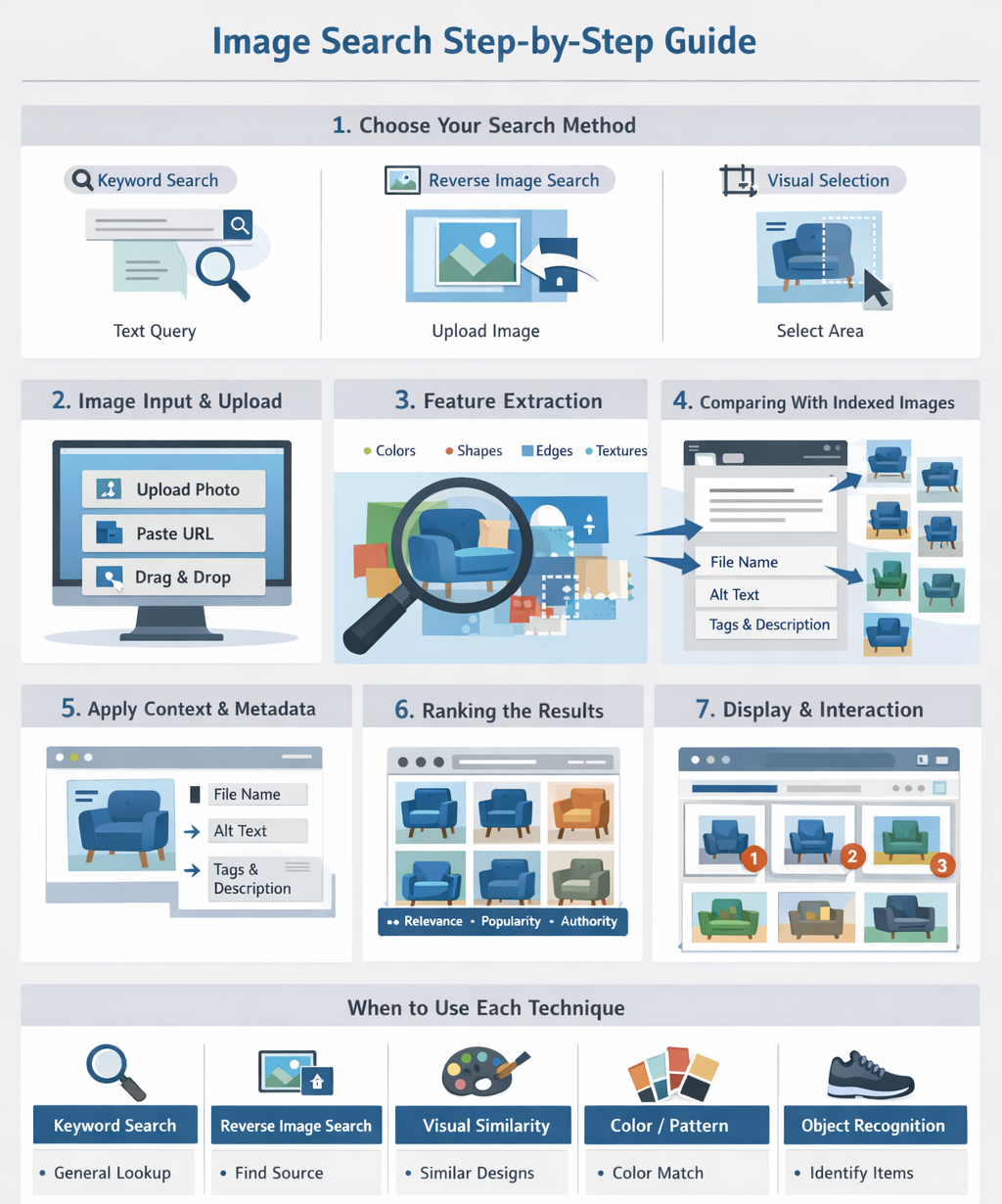
Step 1: Image Input (What the User Provides)
The image search process begins with an input image. This can be:
-
An image uploaded by the user
-
A product image clicked on from a website
-
An image already indexed on the web
Example:
A user uploads a photo of a blue sofa they like.
Step 2: Image Processing & Feature Extractio
Once the image is uploaded, it is processed using computer vision models.
These models analyze and extract important visual features, such as:
-
Colors (blue, beige, black)
-
Shapes and edges
-
Objects (sofa, cushions, legs)
-
Patterns and textures
All extracted features are converted into numerical values called vectors.
These vectors act as a digital fingerprint of the image.
Step 3: Feature Matching (Finding Similar Images)
After feature extraction, the system compares the image vector with vectors stored in a large image database.
The goal is to find visually similar images, not necessarily exact duplicates.
For example, the results may include:
-
The same sofa sold on ecommerce websites
-
Similar sofas with the same shape and color
-
Alternate brands with near-identical designs
This allows image search to work even when the exact image is not available online.
Step 4: Context & Metadata Analysis
To improve accuracy, image search systems combine visual data with contextual information, including:
-
Image file names
-
Alt text
-
Captions
-
Surrounding page content
-
Product descriptions, categories, and tags
This context helps search engines understand what the image represents, not just how it looks.
Step 5: Ranking & Display of Results
Finally, results are ranked and displayed based on multiple factors, such as:
-
Visual similarity to the input image
-
Relevance to user intent
-
Popularity and freshness
-
Trust and authority of the source website
The most relevant images are shown on the search results page, often with pricing, product links, or related recommendations.
Image Search Architecture (Simplified Flow)
The overall image search process can be summarized as:
Why Image Search Matters for SEO
-
High-quality images increase discoverability
-
Optimized alt text improves relevance
-
Clear product images enhance visual matching
-
Strong contextual content boosts rankings
Image search plays a critical role in ecommerce visibility, product discovery, and visual search platforms like Google Lens.
Types of Image Search Techniques
Different goals require different image search methods. Understanding each technique helps you use image search more effectively.
Keyword-Based Image Search
This is the most common and accessible form of image search. Users type descriptive keywords into a search engine, and relevant images are displayed based on metadata such as image titles, captions, and alt text.
This method works best for general searches like stock photos, illustrations, or concept visuals. For example, searching for “sunrise over ocean” will return a wide range of related images.
Keyword-based search is ideal when you know precisely what you are looking for in words.
Reverse Image Search
Reverse image search allows users to upload an image instead of typing text. The system finds similar or closely related photos across the internet.
This technique is commonly used to:
- Find the source of an image
- Detect plagiarism or stolen content
- Verify image authenticity
- Identify fake or manipulated images
It is beneficial for journalists, photographers, and content creators who need to confirm image credibility.
Visual Similarity Search
Visual similarity search focuses on Appearance rather than exact matches. Instead of finding the same image, it finds images with similar colours, patterns, layouts, or designs.
This method is widely used in:
- Fashion
- Interior design
- Product discovery
- Creative inspiration
For example, uploading a photo of a chair may show visually similar furniture options rather than the exact product.
Colour and Pattern-Based Search
This technique allows users to search images using specific colours or patterns. Designers and marketers use this technique to maintain visual consistency to the branding and campaigns.
Many platforms offer colour filters that help narrow results to a specific palette, gradient, or tone — making it easier to find visually aligned content.
Object and Facial Recognition Search
Object and facial recognition technology enables systems to identify faces, objects, text, logos, and landmarks within images.
These methods are widely used in:
- Security and law enforcement
- Social media platforms
- Media verification
- Identity analysis
This technology significantly improves search accuracy and provides deeper image insights.
When to Use Each Image Search Technique
Choosing the correct technique depends on your goal:
- Use keyword search for general visuals and inspiration
- Use reverse image search to verify sources or track misuse
- Use visual similarity search for design and shopping needs
- Use colour-based search for branding and creative projects
- Use object or facial recognition for identification purposes
Combining multiple techniques often produces the best results.
Top Tools for Image Search
Google Images
Google Images remains the most popular tool for both keyword and reverse image searches. It offers fast results, wide coverage, and strong recognition accuracy.
Lenso AI
Lenso AI specialises in face search and advanced reverse image detection. It helps track image usage, detect duplicates, and identify potential fraud.
TinEye
TinEye is known for tracking image origins and detecting modified versions of images. It is widely used for copyright protection.
Bing Visual Search
Bing Visual Search excels in object identification and shopping-related searches. Users can select specific areas within an image for targeted results.
Pinterest Lens
Pinterest Lens is ideal for lifestyle inspiration, fashion, and décor ideas. It converts everyday images into creative discovery tools.
Yandex Images
Yandex is powerful in facial recognition and object matching. Many professionals use it as a secondary verification tool.
Best Practices for Effective Image Searching
- Use high-quality, clear images
- Be specific with keywords
- Try multiple search tools
- Use filters such as size, colour, and usage rights
- Always check image licensing before use
Ethical image usage protects both users and creators.
Common Mistakes to Avoid
- Dont Use low-resolution or cropped images
- Depend on only one search engine
- Ignoring copyright and usage rights
- Overloading searches with unnecessary keywords
Simple, focused searches deliver better results.
Practical Applications of Image Search
Image search is widely used in:
- Journalism and media verification
- eCommerce and online shopping
- Graphic design and marketing
- Education and academic research
- Law enforcement and security
- Brand monitoring and protection
- Social media tracking
The Future of Image Search
As AI continues to evolve in image search and become more intelligent and personalised. Now Future systems understand emotions, context, and user intent more deeply.
Integration with increased reality, wearable devices, and real-time camera searches will further transform how users interact with the digital world.
Privacy and ethical use will also remain important as technology advances.
Summing Up
Image search techniques have changed how we interact with visual content online. From verifying authenticity to discovering products and generating creative ideas, these techniques offer robust solutions across industries.
Each technique has its strengths, and knowing when to use each one leads to better accuracy and efficiency. By applying the right tools and best practices, you can unlock the full potential of image search in your digital journey.