Quick Answer
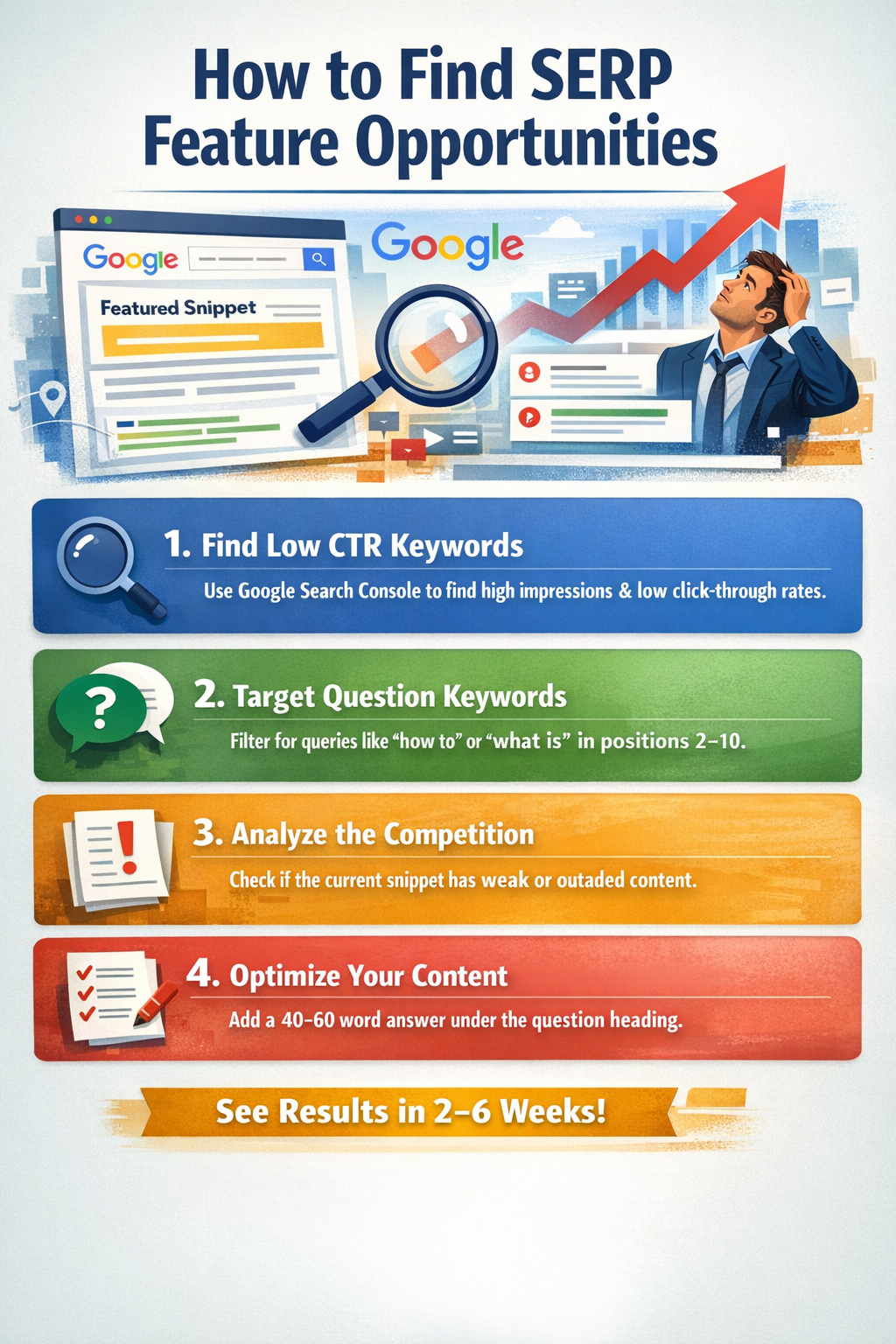
To find SERP feature opportunities: use Google Search Console to spot keywords with high impressions but low CTR, filter question queries ranking positions 2–10, analyze the current snippet holder’s weaknesses, and add a direct 40–60 word answer below a matching question heading. Results often appear within 2–6 weeks.
Let’s be honest. Ranking #1 on Google used to be the holy grail. But today, over 50% of Google searches end without a single click — because Google answers the question right on the results page. Those direct answers are called SERP features, and the brands inside those boxes get more traffic than even the organic #1 result below them.
This guide walks you through exactly how to find SERP feature opportunities your competitors have missed and business owners frustrated ranking #1 but still losing clicks, how to score and prioritise them, and how to write content that wins — all in with real examples.
Chapter 1
What Are SERP Features? The Complete Breakdown
SERP stands for Search Engine Results Page. A SERP feature is any result on Google’s search page that goes beyond a standard blue link. Think of Google’s results page as prime beachfront property — SERP features sit right on the shore where everyone sees them first, and everything else is further back.
There are 10 major SERP features every content creator must know:
| SERP Feature | Where It Appears | Best Triggered By | Traffic Impact |
|---|---|---|---|
| Featured Snippet (Position 0) | Top of page, above all organic results | Informational questions: how, what, why, best | Gets 8–12% of ALL page clicks |
| People Also Ask (PAA) | Just below or within top results | Related follow-up questions to main query | Multiple clickable slots — compounds over time |
| Knowledge Panel | Right sidebar on desktop, top on mobile | Brand, person, or notable entity searches | Massive brand credibility — Google endorses you |
| Local Pack / Map Pack | Top of local search results | Location queries: near me, in [city] | Dominates 44% of local clicks on average |
| Image Pack | Row of images within organic results | Visual intent: products, places, before/after | Direct clicks to visual or product content |
| Video Carousel | Typically positions 2–5 in results | Tutorial, review, how-to, explainer intent | YouTube results average 4.5x higher engagement |
| Top Stories Carousel | Near top for news/trending queries | Breaking news, trending topics, PR content | Time-sensitive but massive visibility |
| Sitelinks | Below main result for brand searches | Navigational searches for your brand | Increases CTR by 20–64% on brand keywords |
| Rich Snippets | Embedded within organic blue-link results | Pages with proper Schema markup | Star ratings boost CTR by 15–30% |
| AI Overview (SGE) | Very top — generates synthesised summary | Complex, multi-part informational queries | Cited sources gain visibility even at position 5+ |
💡 Key Insight
Featured Snippets and People Also Ask are the most winnable SERP features for most websites. Start there before targeting Knowledge Panels (which require notable brand status) or Sitelinks (which Google controls automatically).
Chapter 2
Why SERP Features Are More Valuable Than Ranking #1
Here are three statistics that will permanently change how you think about SEO:
of all Google searches now end without a click to any website — zero-click searches (SparkToro, 2024)
of Featured Snippets receive clicks — often MORE than the #1 organic result below them (SEMrush, 2023)
of voice search results are pulled directly from Featured Snippets — Google reads them aloud on smart speakers
Winning the Featured Snippet for a keyword with 1,000 monthly searches can deliver more traffic than ranking organic #1 for that same keyword without the snippet. Here is a concrete comparison:
❌ Ranking #1 WITHOUT the Snippet
You rank #1 organically. But a competitor at position 3 has the Featured Snippet above you. They collect ~12% of clicks. You collect ~10%. Despite outranking them, they are consistently out-performing you on the most visible part of the page.
✅ Owning the Featured Snippet
You win the Featured Snippet. Your content appears twice on the page — in the snippet box and in your organic position. Combined click share can reach 20–25%. Google is endorsing your content as the definitive answer.
Chapter 3
How to Find Serp Features Opportunities — The Complete 5-Step System
Google selects snippets based on very specific content signals. Follow all five steps in order — each one filters out weak targets and surfaces the best ones.
Step 1: Build Your Seed Keyword List
Start with 20–50 topic keywords related to your business. Focus on informational keywords — ones where people seek answers and guidance. Here are the highest-converting keyword patterns for SERP features:
| Keyword Pattern | Real Example | SERP Feature Most Likely to Appear |
|---|---|---|
| What is [term] | What is keyword difficulty | Featured Snippet — paragraph definition |
| How to [task] | How to find SERP features | Featured Snippet — numbered steps list |
| Why does/is [thing] | Why does Google change rankings | Featured Snippet — explanation paragraph |
| Best [thing] for [purpose] | Best SEO tools for beginners | Featured Snippet list + People Also Ask |
| [X] vs [Y] | Ahrefs vs SEMrush | Featured Snippet — comparison table |
| Steps to [task] | Steps to optimise a blog post | Featured Snippet — ordered steps |
| [Thing] examples | Featured snippet examples | Featured Snippet list |
| [Service] in [city] | SEO agency in Delhi | Local Pack — map + 3 listings |
| [Product] review | Ahrefs review 2025 | Rich Snippets — star ratings |
| How long does [thing] take | How long does SEO take | Featured Snippet — paragraph answer |
🛠 Free Tool Tip
Go to AlsoAsked.com or AnswerThePublic.com and type your main topic keyword. Both tools instantly generate dozens of real questions people search around your topic. Every single question is a potential SERP feature target — both have free daily searches to get you started.
Step 2: Filter Keywords That Already Trigger SERP Features
Not every keyword has a Featured Snippet. Target ones that already do — Google has already decided that keyword deserves a direct answer box. Your job: provide a better answer than whoever currently holds it.
Method A: Google Search Console (Free — Always Start Here)
⚠️ The Low-CTR Signal You Must Not Ignore
When a keyword has 3,000 monthly impressions but only a 2% CTR, that almost always means a competitor’s Featured Snippet is sitting above your result and absorbing your traffic. These pages already have Google’s attention — they just need snippet-formatted content to claim the box. This is your highest-priority opportunity category.
Method B: Ahrefs Keywords Explorer (Paid)
Step 3: Score and Qualify Each Opportunity
Use this 4-point scoring framework. Score each keyword 1–4 on each dimension and add up the total. Targets scoring 12 or above deserve immediate attention.
| Scoring Dimension | 1 Point | 2 Points | 3 Points | 4 Points |
|---|---|---|---|---|
| Your Current Position | Not ranking at all | Position 11–20 | Position 4–10 | Position 1–3 (no snippet) |
| Current Snippet Quality | Expert, thorough, current | Good but lengthy | Decent but incomplete | Weak, vague, or outdated |
| Competitor’s Domain Authority | DA 80+ major brand | DA 60–80 | DA 40–60 | DA under 40 — beatable |
| Keyword Intent Match | Pure transactional | Commercial investigation | Mixed intent | Clearly informational |
📊 Worked Example
Keyword = “how to improve page speed“. You rank position 7 (3 pts). Current snippet is vague and from 2021 (4 pts). Competitor has DA 42 (3 pts). Clearly informational (4 pts). Total: 14/16 — HIGH PRIORITY. Optimise this page this week.
Step 4: Study the Current Snippet Holder in Detail
Before writing a single word, Google the keyword and study whoever currently holds the feature. Take notes on these six things:
- ●Answer length: Snippets are typically 40–60 words. If theirs is 100 words and rambling, a tighter version wins.
- ●Format used: Paragraph, list, or table? You must match or improve this exact format.
- ●Freshness: A 2022 article can be beaten with an updated 2025 version with current data.
- ●Content gaps: Does the snippet answer “what” but not “how” or “why”? A more complete answer wins.
- ●Page quality: No author bio? No citations? Thin article? These are exploitable weaknesses.
- ●Schema markup: Right-click → View Source → search “schema”. If they have none and you add it, you gain a technical edge.
Step 5: Prioritise Your Opportunity Pipeline
Chapter 4
How to Write Content That Wins SERP Features
Finding the opportunity is only half the work. Google selects snippets based on very specific content signals. Here is exactly what to do.
The Golden Rule: Answer First, Explain Second
Stop burying your answers. Google’s snippet algorithm wants the answer at the top of each section — not buried in paragraph 3. See the difference:
❌ Wrong Way
“There are many opinions on this topic. Experts have debated it for years. After extensive research, we have concluded that the most important factor is…”
✅ Right Way
“Direct answer formatting is the most important factor for winning SERP features. Place a concise 40–60 word answer directly below a question-formatted heading, using the same words your audience searches.”
Paragraph Snippets — “What Is” & Definition Queries
- ●Write the answer in 40–60 words — Google’s sweet spot for paragraph snippets
- ●Place it directly below the H2/H3 heading that asks the question
- ●Use the exact question as your heading (e.g., “What Is a Featured Snippet?”)
- ●Write in neutral, encyclopaedic third-person — avoid “I think” or “in my opinion”
📝 Paragraph Snippet Formula
[Keyword] is [core definition in 10–15 words]. It [explains what it does/how it works in 20–25 words]. [One supporting fact or stat in 10–15 words.]
List Snippets — “How To” & Steps Queries
- ●Use HTML
<ol>for steps in sequence;<ul>for unordered tips or tools - ●Begin each item with an action verb: Open, Click, Add, Create, Set, Check
- ●Keep each item to one clear sentence — Google truncates long list items
- ●Aim for 5–8 items — fewer looks incomplete, more gets truncated in the snippet
- ●The heading above the list must be the exact question people are searching
Table Snippets — Comparisons, Pricing, Specs
- ●Use a clean HTML table with 2–4 columns maximum
- ●Write short column headers — Google shows about 30 characters per header
- ●Keep cell values brief: a number, short phrase, or yes/no — not full sentences
- ●Use proper
<table>markup — never images of tables or ASCII text tables
People Also Ask Boxes — FAQ Sections
- ●Research exact PAA questions using AlsoAsked.com before writing — never guess
- ●Create a dedicated FAQ section at the bottom of every long-form article
- ●Use each PAA question word-for-word as an H3 heading
- ●Answer in 2–4 sentences — self-contained and clear, no referencing “sections above”
- ●Add FAQ Schema markup in JSON-LD — critical for PAA box eligibility
- ●Target 6–10 PAA questions per article for maximum coverage
🔑 The PAA Snowball Effect
When Google grants you one PAA box for a keyword, it often expands more PAA boxes for the same query — pulling additional answers from your page. One well-structured FAQ section can generate consistent clicks from 3–6 PAA positions simultaneously. This compounds over time as your page builds authority.
The Complete On-Page SEO Checklist
| Element | What to Do | Priority |
|---|---|---|
| H1 Title | Include primary keyword naturally. Keep under 60 characters. | Critical |
| Meta Description | 150–160 chars. Keyword in first sentence. End with a benefit. | Critical |
| Answer Paragraph | 40–60 word direct answer immediately below each question H2/H3 heading. | Critical |
| Question Headings | Use exact question keyword phrase as H2/H3 wherever you answer a key question. | Critical |
| FAQ Section | 6–10 PAA-matched questions as H3s with 2–4 sentence answers. | High |
| Schema Markup | Add FAQ Schema and/or HowTo Schema using JSON-LD. Test with Rich Results Test. | High |
| Word Count | 1,500–2,500 words for competitive topics. 800–1,200 for simple queries. | High |
| Updated Date | Add “Last Updated: [Month Year]” at top. Actually update content regularly. | High |
| Internal Links | Link to 3–5 closely related articles using descriptive anchor text. | High |
| Image Alt Text | 80–120 character alt text with target keyword naturally for each image. | Medium |
| Author Bio | Brief bio with relevant credentials below the article — critical for E-E-A-T. | Medium |
| Page Speed | LCP under 2.5 seconds. Test at pagespeed.web.dev. Fix top 3 issues first. | Medium |
Chapter 5
How to Track Your SERP Feature Performance
People optimise a page and never check if it worked. SERP features change constantly — won, lost, and modified every week. You need a tracking system.
Free Tracking: Google Search Console
📊 How to Read the Signals
Impressions UP + Clicks UP + Position UNCHANGED → You won a SERP feature ✅
Impressions UP + CTR DROPPING → Competitor has the snippet above you — attack immediately ⚠️
Position improved + CTR DROPPED → You climbed but lost the snippet — reoptimise now 🔄
The Monthly SERP Audit (15 Minutes)
- ✓Export top 50 keywords by impressions from Search Console
- ✓Manually Google each keyword — Is there a snippet? Do you own it?
- ✓Flag every keyword with 500+ impressions and CTR below 5%
- ✓Check if competitors have updated content for snippets you currently own
- ✓Update top-performing feature pages with new stats and examples
- ✓Log everything in a spreadsheet with dates — trends appear after 2–3 months
Chapter 6
Best Content Types for Every SERP Feature
| Content Type | Best SERP Feature | Key Requirements |
|---|---|---|
| How-To Guides | Featured Snippet (List) | Numbered HTML list, action-verb items, question heading, 1–2 sentence summary before the list |
| Definition Articles | Featured Snippet (Paragraph) | 40–60 word definition below question H2, neutral encyclopaedic tone, no opinion language |
| Comparison Pages | Featured Snippet (Table) | Clean HTML table, 2–4 columns, short cell values, logical sorting, comparison-intent keyword |
| FAQ Articles / Sections | People Also Ask Boxes | AlsoAsked.com research, H3 question headings, 2–4 sentence answers, FAQ Schema (JSON-LD) |
| Long-Form Pillar Guides | AI Overview Citations | 2,500+ words, original data, expert quotes, strong E-E-A-T signals, logical heading hierarchy |
| Product / Image Pages | Image Pack | Original images, keyword in filename + alt text, image XML sitemap submitted to Search Console |
| Video + Article Combos | Video Carousel | Keyword-matched YouTube title + description, VideoObject Schema on embedding page |
| Product / Review Pages | Rich Snippets (Stars) | Product or Review Schema, genuine user reviews, validate with Rich Results Test before publishing |
| Local Landing Pages | Local Pack / Map Pack | Optimised Google Business Profile, LocalBusiness Schema, consistent NAP citations |
Chapter 7
Common Mistakes That Kill Your SERP Feature Chances
❌ Mistake 1: Targeting Snippets on Pages That Don’t Rank Yet
In practice, almost every Featured Snippet I’ve tracked comes from a page already sitting somewhere in the top 10. If your page 2 or 3, no amount of formatting will win you Position 0. Build your ranking first, then optimise for snippets.
✅ Fix: Reserve snippet optimisation for pages ranking positions 2–15. For pages not yet ranking, focus entirely on content quality, topical authority, and backlinks first.
❌ Mistake 2: Burying the Answer in Long-Winded Introductions
Google’s snippet algorithm looks for a clean, quotable answer near a relevant heading. If your content spends 200 words on background before the answer, the algorithm moves to a competitor who leads with it. The patience threshold for finding an answer is essentially zero.
✅ Fix: For every section answering a question: use the question as the heading → write the 40–60 word answer in the very next paragraph → write the expanded explanation after that.
❌ Mistake 3: Missing or Invalid Schema Markup
The most structured FAQ section in your niche means nothing without FAQ Schema markup. Without it, PAA box eligibility drops dramatically — Google has to guess what type of content each section represents, and it often skips you entirely.
✅ Fix: Use the free Merkle Schema Markup Generator to build FAQ or HowTo Schema. Test it at search.google.com/test/rich-results before publishing.
❌ Mistake 4: Slow Page Speed Undercutting Good Content
Google will not select a page for a Featured Snippet if it delivers a poor user experience. An LCP over 4 seconds sends a negative quality signal that prevents snippet selection even when your content is excellent.
✅ Fix: Run pagespeed.web.dev on your target pages. Fix the top three issues: compress images, defer render-blocking JavaScript, and enable browser caching.
❌ Mistake 5: One-Time Optimisation With No Follow-Through
A Featured Snippet you win today can be claimed by a competitor in two weeks if they update their content with better formatting or newer information. Sites that consistently hold featured snippets check and refresh them at least quarterly.
✅ Fix: Schedule a recurring 90-day content review for every SERP feature page. Update statistics, improve FAQ sections, and check if competitors have upgraded their content.
❌ Mistake 6: Optimising Only for Google, Not for Readers
Content optimised so heavily for snippets that it becomes robotic will win the snippet briefly, then lose it. Google measures user engagement — if readers bounce quickly, Google learns the page is disappointing despite the snippet win.
✅ Fix: Write for the human reader first and the snippet algorithm second. The direct answer paragraph is for Google; everything else on the page is for your reader.
Chapter 8
Your 30-Day Action Plan
🚀 Realistic Timeline Expectations
Featured Snippets (pages ranking 2–10): visible results within 2–6 weeks of optimisation.
PAA Boxes after adding FAQ Schema: can appear within 2–10 days.
New article rankings: 2–4 months in competitive niches, 3–6 weeks in low-competition niches.
Frequently Asked Questions
Everything You Need to Know About SERP Features
Quick Reference
Complete SERP Feature Cheat Sheet
Save or bookmark this table. Use it every time you plan or optimise a piece of content.
| Target This Feature | Keyword Type | Content Format | Technical Requirement |
|---|---|---|---|
| Featured Snippet (Paragraph) | What is, Why is, Definition queries | 40–60 word answer below question H2/H3 | Article Schema (optional) |
| Featured Snippet (List) | How to, Steps to, Ways to | Proper HTML <ol> or <ul> below question heading | HowTo Schema for guides |
| Featured Snippet (Table) | X vs Y, Compare, Pricing, Specs | Clean HTML <table> with 2–4 columns | Structured data markup |
| People Also Ask | Any informational keyword | FAQ section with H3 question headings + 2–4 sentence answers | FAQ Schema (JSON-LD) — required |
| Local Pack / Map Pack | [Service] in [City], near me | Local landing page + fully optimised Google Business Profile | LocalBusiness Schema + NAP citations |
| Image Pack | Product, visual, recipe, place | Original images with keyword in filename + alt text | Image XML sitemap in Search Console |
| Video Carousel | Tutorial, review, how-to, explainer | YouTube video with keyword-matched title + description | VideoObject Schema on embedding page |
| Rich Snippets (Stars) | Product, review, recipe, course | Pages with genuine user reviews or editorial ratings | Product, Review, or Recipe Schema |
| AI Overview Citation | Complex, multi-part informational | Long-form guide (2,500+ words) with original insights | Strong E-E-A-T: author credentials, citations |
| Sitelinks | Brand name, navigational searches | Clear site architecture with key pages linked from homepage | No direct control — optimise via site structure |
Every piece of content you publish from today forward should be built with SERP features in mind.
Research the keyword → Identify the target feature → Write the right format → Add the right schema → Track and refresh. That is the complete system.