If you’re running Google Shopping campaigns, you’ve probably noticed something frustrating: some products get clicks but don’t convert, while others barely get any visibility at all. The secret to fixing this? Better keyword research. Unlike traditional search ads where you bid directly on keywords, Shopping ads work differently. Google automatically matches your products to search queries based on your product feed. But here’s the thing—understanding which keywords trigger your ads is absolutely critical to success. In this guide, I’ll walk you through everything you need to know about Google Shopping Ads Keyword Research. You’ll learn how to find the right search terms, optimize your product data, and ultimately drive more sales without wasting your ad budget.
How Google Shopping Ads Actually Work?
Before we dive into keyword research, let’s clear up how Shopping ads match to searches.
When someone searches on Google, the algorithm scans your product feed—specifically your product titles, descriptions, and other attributes. It then decides whether your product is relevant enough to show. You don’t choose keywords like you do with search ads. Instead, Google does the matching for you.
This means your “keyword research” for Shopping ads is really about:
- Understanding what people are searching for when they want your products
- Optimizing your product feed to match those searches
- Using negative keywords to block irrelevant traffic
- Analyzing search term reports to see what’s actually working
Think of it this way: your product data IS your keyword strategy for Shopping ads.
Step-by-Step Guide to Google Shopping Keyword Research
Step 1: Start with Your Product Inventory Analysis
Before you research anything, list out all the products you’re selling. For each product, write down:
- The actual product name
- What category it belongs to
- Common ways customers describe it
- Brand names (if applicable)
- Key features (color, size, material, etc.)
This gives you a starting foundation. You’re essentially creating a “keyword universe” around each product.
Step 2: Use Google’s Keyword Planner for Search Volume Data
Even though Shopping ads don’t use traditional keyword bidding, Keyword Planner is still valuable.
Here’s how to use it:
- Go to Google Ads and open Keyword Planner
- Enter your main product terms (e.g., “running shoes,” “wireless headphones”)
- Look at the suggested keywords and their monthly search volumes
- Pay special attention to long-tail variations (e.g., “waterproof running shoes for women”)
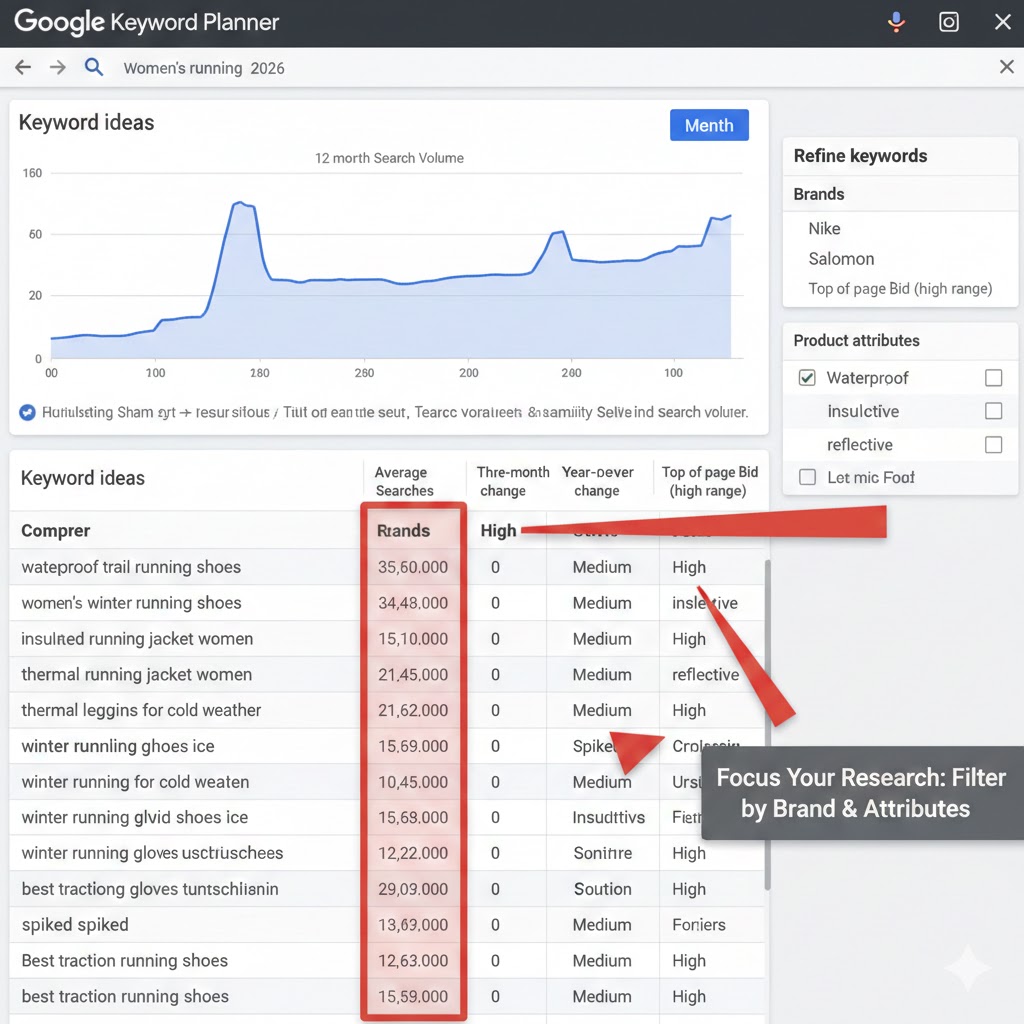
What you’re looking for: high-volume terms that match your products AND show buying intent (words like “buy,” “best,” “cheap,” “reviews”).
Step 3: Analyze Competitor Shopping Ads
This is a goldmine that most advertisers ignore.
Search for your main product terms on Google. Look at the Shopping ads that appear. Study:
- How competitors structure their product titles
- What attributes they highlight (price, brand, features)
- Which products appear most frequently
- The language they use in descriptions
Take notes. These successful ads are already doing the keyword research for you by showing what converts.
Step 4: Mine Your Own Search Term Reports
If you’re already running Shopping campaigns, your search term report is pure gold.
Access it by:
- Going to your Google Ads account
- Clicking on your Shopping campaign
- Selecting “Search terms” from the left menu
[SCREENSHOT PLACEHOLDER: Search terms report showing actual queries that triggered Shopping ads]
Look for patterns in:
- High-converting searches: What exact phrases led to sales?
- High-volume searches: What are people searching for most?
- Irrelevant searches: What terms wasted money? (Add these as negatives)
Step 5: Use Third-Party Research Tools
While Google’s tools are powerful, third-party platforms can reveal additional insights:
- SEMrush or Ahrefs: See what organic keywords competitors rank for
- Answer the Public: Discover question-based searches
- Google Trends: Identify seasonal patterns and rising searches
- Amazon search suggestions: Great for product-specific long-tail keywords
Step 6: Optimize Your Product Feed Based on Research
Now comes the crucial part—implementing your research.
Update your product feed optimization for Shopping ads with:
Product Titles: Include your top keywords naturally. Format: Brand + Product Type + Key Attributes
Example: Instead of “Running Shoe Model X230,” use “Nike Air Zoom Running Shoes – Men’s Lightweight Trainers Black Size 10”
Product Descriptions: Expand on features using natural language that matches search queries
Custom Labels: Tag products by performance, margin, or seasonality for better campaign organization
Key Framework: Keyword Research Methods Comparison
| Method | Best For | Effort Level | Data Quality |
|---|---|---|---|
| Google Keyword Planner | Initial volume research | Low | High |
| Search Term Reports | Finding proven converters | Low | Very High |
| Competitor Analysis | Understanding market standards | Medium | High |
| Third-Party Tools | Deep competitive insights | Medium-High | High |
| Customer Language Mining | Natural phrasing discovery | Medium | Medium-High |
Product Title Optimization Framework
| Element | Example | Purpose |
|---|---|---|
| Brand | “Samsung” | Brand searches & trust |
| Product Type | “55-inch 4K TV” | Main category match |
| Key Feature 1 | “QLED” | Technology searches |
| Key Feature 2 | “Smart TV” | Function searches |
| Model/Year | “2024 Model” | Specificity & recency |
Common Mistakes to Avoid
1: Copying Product Titles Directly from Manufacturers
Manufacturer titles are designed for retail shelves, not search engines. They often use internal SKU codes or vague names. Always rewrite them for search.
2: Ignoring Long-Tail Keywords
Yes, “headphones” has huge search volume. But “noise cancelling bluetooth headphones for office work” shows much stronger buying intent and faces less competition.
3: Forgetting About Negative Keywords
Just because Google matches your ad doesn’t mean you want that traffic. Regularly add negative keywords for:
- Free/cheap searches (if you’re premium)
- Unrelated products
- Job searches, DIY tutorials
- Wrong sizes, colors, or versions you don’t sell
4: Setting and Forgetting
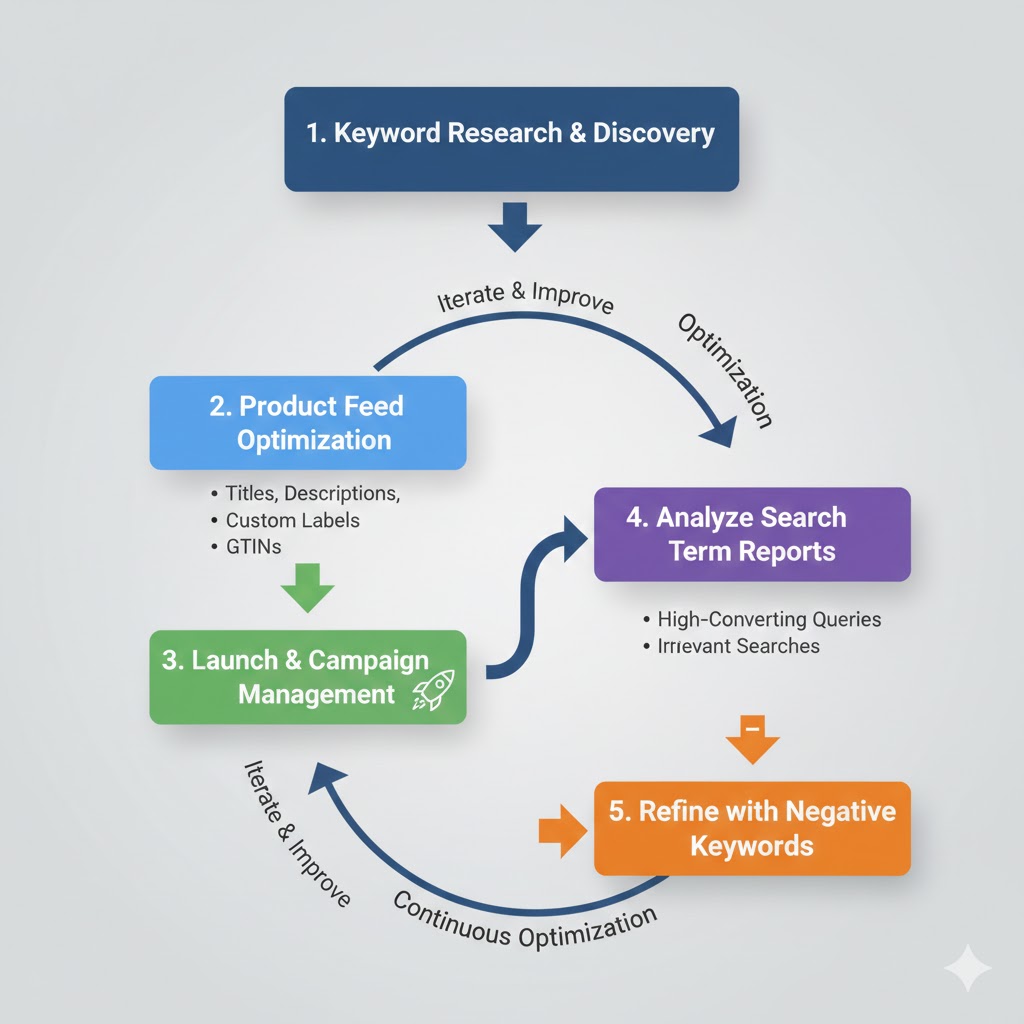
Shopping keyword research isn’t a one-time task. Search trends change. Competitors adjust. New products launch. Review your search term reports weekly.
5: Over-Optimizing with Keyword Stuffing
Yes, keywords matter. But “Buy Cheap Best Affordable Budget Running Shoes Sale Discount” looks spammy and actually hurts performance. Keep titles natural and readable.
Pro Tips for Better Results
1: Use Seasonal Keyword Modifiers
Add time-based terms to your product titles during relevant periods: “Christmas,” “Back to School,” “Summer,” “Holiday Gift.”
2: Test Different Title Structures
Create multiple variations of the same product with different title structures. Let data tell you which format performs best for your audience.
3: Prioritize High-Margin Products
Not all keywords are created equal. Focus your optimization efforts on products with the best profit margins, not just the highest volume.
4: Create Specific Landing Pages
When possible, link Shopping ads to category pages or specific product landing pages that match the search intent—not just your homepage.
Frequently Asked Questions
Q: Do I need to add keywords to Google Shopping campaigns like I do with search ads?
No. Shopping campaigns don’t use keyword targeting. Instead, Google matches your products to searches based on your product feed data. Your “keywords” are embedded in your product titles, descriptions, and attributes.
Q: How many keywords should I include in my product titles?
There’s no magic number, but keep titles under 150 characters (Google’s limit). Focus on 3-5 high-value keywords that naturally describe your product. Quality over quantity always wins.
Q: What’s the difference between search terms and keywords in Shopping ads?
Search terms are the actual phrases people type into Google. Keywords (in Shopping context) are the terms you strategically include in your product feed to match those searches. Your search term report shows you the real queries triggering your ads.
Q: How often should I update my keyword research?
Review your search term reports weekly. Do deeper keyword research monthly. Update your Google Shopping product feed setup whenever you add new products or notice performance shifts. Shopping is dynamic—treat it that way.
Q: Can I use the same keywords for both Shopping and Search campaigns?
Absolutely. In fact, you should coordinate them. Use your Shopping keyword research to inform search campaigns, and vice versa. Many advertisers run both simultaneously for maximum coverage.
Q: What if my products aren’t showing for relevant searches?
First, check if those keywords appear naturally in your product titles and descriptions. Second, verify your product categorization is correct. Third, ensure you’re not blocking them with negative keywords. Fourth, check if your bids are competitive enough.
Key Takeaways: Your Shopping Keyword Research Checklist
Let’s wrap this up with clear action items you can implement today:
Audit your current product feed – Are titles optimized or just manufacturer names?
Run Keyword Planner research – Identify high-volume, high-intent terms for your products
Analyze search term reports weekly – This is your reality check on what’s working
Add negative keywords aggressively – Protect your budget from irrelevant clicks
Test and iterate continuously – Shopping success comes from constant refinement
✓ Prioritize products strategically – Start with high-margin or best-selling items
Remember, Google Shopping keyword research isn’t about finding the “perfect” keywords and calling it done. It’s an ongoing process of understanding your customers’ language, optimizing your product data, and letting performance guide your decisions.
The advertisers who win at Shopping ads are the ones who treat their product feed like a living, breathing document—constantly improving it based on real search data.
Start with one product category today. Apply these research methods. Update your feed. Then watch what happens. You’ll be surprised how much better your Shopping campaigns perform when you speak your customers’ language.