You typed your name into Google. What came up? If the answer is nothing, an old social media profile you forgot about, or someone else entirely — you have a real problem. In a world where people Google names before shaking hands, your search result is your first impression. Google’s “Add Me to Search” feature lets you create a personal card that appears directly in search results — like a virtual business card that anyone can find instantly. This guide covers everything: what it is, why it matters, and exactly how to set it up in minutes.
What Does “Add Me to Search” Actually Mean?
“Add me to search” was a phrase users typed directly into Google to trigger the creation of a Google People Card — essentially a digital business card that appeared at the very top of search results when someone looked up your name. Think of it as a personal knowledge panel that you built yourself.
Google launched this feature in February 2020, primarily rolling it out in India, Nigeria, Kenya, and South Africa. The goal was simple: let everyday people — freelancers, entrepreneurs, coaches, creators — claim their spot in search results without needing a Wikipedia page or a massive website.
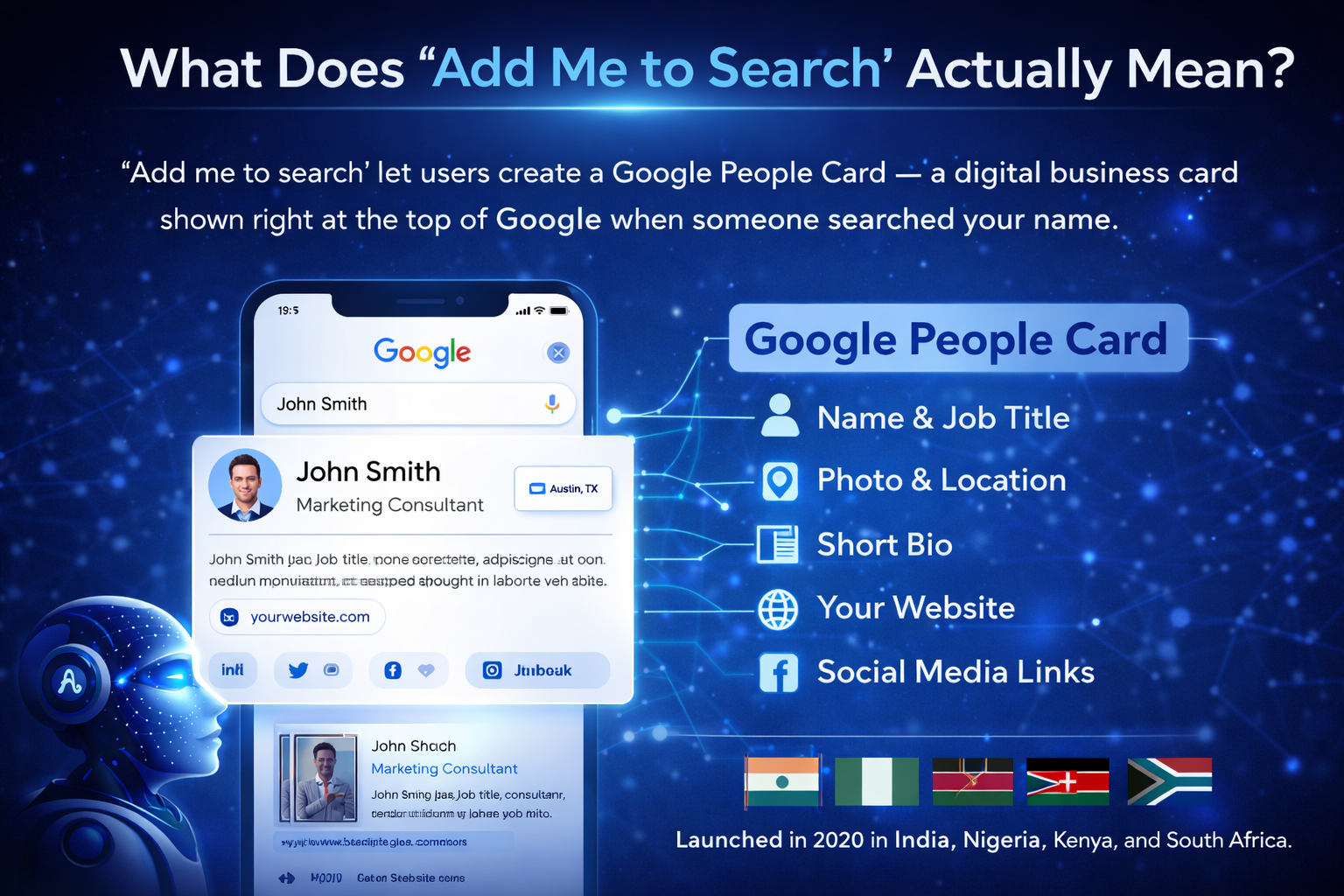
When set up correctly, your People Card would display your name, job title, photo, location, a short bio, your website, and links to your social media profiles. It made discovering the right person fast and easy — no hunting across scattered profiles, no confusion with people sharing your name.
Benefits of a Google People Card
Beyond simply “showing up” in search, a well-crafted People Card delivers real, tangible advantages:
Instant Visibility
Your card appears at the top of results when someone searches your name — above most other links.
Credibility & Trust
Being findable on Google signals legitimacy. It’s the modern equivalent of a professional directory listing.
Control Your Narrative
You choose what appears — your title, bio, and links — so you define your own first impression.
Better Networking
Clients, recruiters, and collaborators find your details instantly without digging through search results.
Career Opportunities
Recruiters regularly search candidate names. A People Card puts your best self front and centre.
Privacy Control
You decide exactly what personal details to share — and can remove or update them any time.
Step-by-Step: How to Create Your Google People Card
Setting up your card takes less than 10 minutes. Here’s exactly what to do:
Sign in to your Google account – Open Google on your mobile browser and make sure you’re signed in to the account you want your card linked to.
Search “Add Me to Search” – Type “add me to search” or “add me to Google” in the search bar. A prompt card will appear at the top of results inviting you to create your profile.
How to Delete Your Google People Card
If you want to remove your card entirely:
Troubleshooting: When Your People Card Isn’t Working
If you’re having trouble creating or viewing your card, try these fixes in order:
1. Check your internet connection
A weak connection can prevent the interface from loading. Switch between Wi-Fi and mobile data to rule this out.
2. Clear your browser cache
Outdated cached data is a common cause. Clear your browser’s cache and cookies, then reload and try again.
3. Confirm you’re using the right Google account
Your People Card is tied to one specific account. Make sure you’re signed into the same account used to create the card.
4. Check feature availability in your region
People Cards aren’t available everywhere. If the “Add Me to Search” prompt doesn’t appear, the feature may not yet be live in your country.
5. Try Chrome on mobile
Google Chrome on Android tends to have the most consistent support for this feature. Try switching to it if another browser isn’t working.
6. Contact Google Support
If nothing works, visit the Google Help Center or the Google Search community forums for personalized assistance.
Why Appearing in Google Search Still Matters More Than Ever
Before we get into the how-to, let us talk about the why. Your online presence is not just for celebrities or big brands. Here is what happens when someone with your name appears in search results and you do not:
- A potential client finds someone else first and assumes they found you.
- A recruiter types your name and sees a 10-year-old blog or an embarrassing photo.
- A new connection searches for you after meeting at an event and finds nothing — which feels equally odd.
- Your competitors show up when someone searches in your niche.
Controlling your search presence is not vanity — it is professional hygiene. For freelancers, consultants, coaches, job seekers, and anyone building a personal brand, it directly affects your income and opportunities.
How to Add Yourself to Google Search in 2026 (Step-by-Step)
Since Google’s built-in People Card option is gone, here are the real methods that work right now to make yourself discoverable in search results. These are not workarounds — they are the strategies serious professionals use.
1. Build a Personal Website
A personal website is the single most powerful tool for controlling your search results. When someone searches your name, a dedicated website with your name in the domain (like yourname.com) will rank far faster than anything else. Your website acts as your home base online — you own it completely and no platform can shut it down.
Key elements to include on your personal site:
- A clear, keyword-rich title tag and meta description using your full name
- An About page that reads naturally and describes who you are and what you do
- A portfolio or work samples section if relevant
- Contact information and social links
- Schema markup for Person to help Google understand your identity
2. Fully Optimize Your LinkedIn Profile
LinkedIn profiles consistently rank on the first page of Google for name searches. It is one of the most trusted domains on the internet, and Google loves it. If you do not have a website yet, a polished LinkedIn profile is the fastest path to search visibility.
To maximize your LinkedIn search presence:
- Use your full real name exactly as people would search for it
- Set a custom profile URL like linkedin.com/in/yourname
- Write a headline that describes what you do — not just your job title
- Fill out the About section with a genuine first-person description
- Make your profile public so Google can index it
3. Claim Your Google Business Profile (If Applicable)
If you run any kind of business — even as a solo freelancer — a Google Business Profile gives you a presence directly in Google Search and Maps. It shows your name, services, location, and contact details prominently. This is the closest modern equivalent to what the old People Card offered.
4. Create Consistent Profiles on Key Platforms
Google looks for consistency across the web. When your name, photo, and bio appear consistently on multiple platforms, it builds what strategic SEOs call entity authority — Google gets more confident about who you are and surfaces your profiles higher. Platforms worth securing include Instagram, Twitter/X, YouTube, GitHub (for developers), Medium, Quora, and Pinterest.
5. Submit Your Site to Google Search Console
Once your personal website is live, do not wait for Google to find it organically. Submit your sitemap directly through Google Search Console. This tells Google your site exists, speeds up indexing, and lets you monitor how your pages appear in search. It is free and takes about five minutes.
Common Questions People Have About Add Me to Search
Is the “Add Me to Search” feature still available in 2025?
No. Google officially shut down the People Card feature on April 7, 2024. You cannot create new cards, and existing cards have been removed. The “Get started” prompt no longer appears even in regions where it was previously available.
Can I still add myself to Google Search without a People Card?
Absolutely yes — and the methods available today are actually more powerful. A personal website, an optimized LinkedIn profile, and a Google Business Profile will give you far more control and permanence than a People Card ever did. Google does not add people to search results manually; it indexes publicly accessible web pages. Your job is to create high-quality, well-optimized pages about yourself.
How long does it take to show up in Google Search?
It varies. LinkedIn profiles can appear in search results within days to a couple of weeks. A personal website submitted through Google Search Console can be indexed within a few days. However, ranking at the top for your name search (especially a common name) may take several weeks of consistent effort and cross-platform activity.
What if my name is very common?
Common names require more work but are entirely solvable. The key is to pair your name with a professional niche. For example, “John Smith web developer London” is far more manageable than plain “John Smith.” Build all your profiles with your name plus your specialty so people who know what they are looking for find you immediately.
Which countries did the People Card feature work in?
Google People Cards were primarily available in India, Nigeria, Kenya, and South Africa. Users in other countries used VPN workarounds to access the feature. Regardless of location, the feature is now discontinued globally.
Advanced Tips: How to Truly Stand Out in Google Search Results
Getting indexed is one thing. Showing up at position one with a compelling, trust-building result is another. Here are the strategies that separate people who simply exist in search from people who dominate it.
Use Schema Markup for Persons
Schema.org Person markup is structured data you add to your website that tells Google in machine-readable language exactly who you are, what you do, your social profiles, and how to categorize you. It greatly increases the chances of getting a rich result or knowledge panel in search.
Keep Your Name and Bio Identical Across All Platforms
Consistency is everything for entity recognition. Use the exact same version of your name, the same profile photo, and a similar bio across every platform. This signals to Google that all these profiles belong to the same real person — which builds your digital identity and search authority over time.
Publish Content Regularly Under Your Name
Articles, blog posts, YouTube videos, LinkedIn posts — anything you publish under your real name adds to your search footprint. Google rewards active, consistent contributors. Even one well-written article per month can meaningfully increase how prominently your name appears in search.
Get Mentioned on Other Sites
When reputable websites mention your name and link to your site or profile, it dramatically accelerates how Google perceives your authority. Podcast appearances, guest articles, directory listings, and press mentions all count. Even unlinked name mentions (called co-citations) can help Google understand who you are.
Monitor Your Search Presence Regularly
Do a name search every month or two to see what is ranking. If something negative or outdated is showing up, you can take steps to push it down by creating new content and strengthening your best-performing profiles. Use Google Search Console to track impressions and clicks for your personal pages.
The Lesson Behind “Add Me to Search”
Google’s People Card was never the destination — it was just a shortcut. The real goal was always the same: make it easy for the right people to find accurate, trustworthy information about you when they search. That goal has not changed. Only the path has.
A personal website you fully control, a LinkedIn profile that tells your story, and consistent profiles across relevant platforms will do everything a People Card did — and much more. They will not disappear overnight because a tech company changed its product roadmap. And they will grow more powerful the longer you maintain them.
The people who show up first in search results are not lucky. They put in the work to make themselves findable. In 2025, that work is more accessible — and more important — than it has ever been.
Quick Summary: Your Action Plan
- Register yourname.com and build a simple personal website with an About page and contact info
- Fully complete your LinkedIn profile and set it to public
- Claim a Google Business Profile if you offer any service or product
- Add Person schema markup to your website
- Submit your site to Google Search Console
- Secure your name on Instagram, Twitter, YouTube, and any niche-specific platforms
- Start publishing content under your real name — even one article a month helps
- Check your name in Google every 4-6 weeks and adjust as needed
Taking control of your search presence is one of the highest-leverage things you can do for your career or business. Start today — even one step in the right direction puts you ahead of most people who have not bothered.