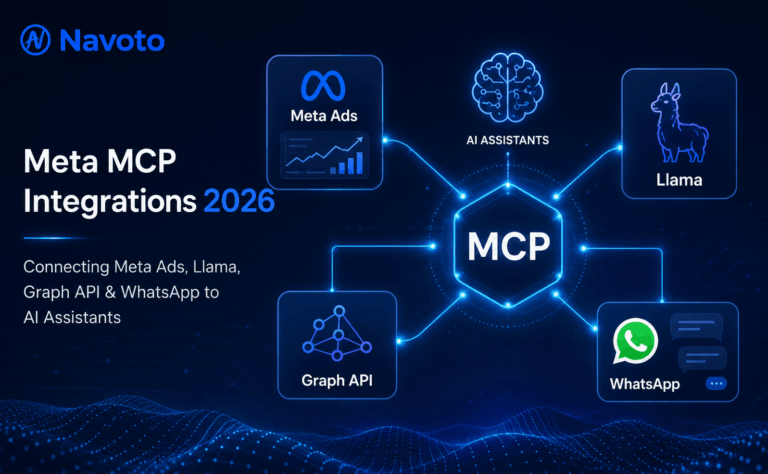
On April 29, 2026, Meta released the official Meta Ads AI Connectors — an MCP server at mcp.facebook.com/ads and a companion CLI — making it one of the last major ad platforms to join Google and Amazon in the official MCP ecosystem. For anyone managing Facebook or Instagram campaigns, this launch fundamentally changes the workflow: no developer credentials, no App Review process, just a Meta Business OAuth login and 29 tools available immediately in Claude, ChatGPT, or any MCP-compatible AI assistant.
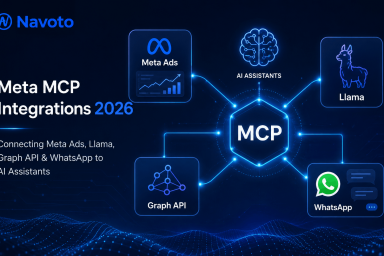
But “Meta MCP” is not a single thing. Meta operates five distinct developer surfaces — Ads API, Llama models, Horizon OS, Graph API, and WhatsApp Business — each with its own MCP status, setup path, and use case. Most guides cover only one of these surfaces. This guide covers all five, giving developers, marketers, and agencies the complete picture needed to build a coherent Meta + AI workflow in 2026.
This complete guide from Navoto covers every layer: what MCP is and why it matters, the official Meta launch and what it unlocks, all five API surfaces, step-by-step setup for every integration, a full comparison of official vs. community MCP servers, security best practices, and a clear decision framework for who should use which integration. Everything is based on actual 2026 data from Meta’s developer documentation, Pipeboard, GoMarble, and Anthropic’s MCP specification.
What Is Meta MCP?
Meta MCP refers to the ecosystem of Model Context Protocol server implementations that connect Meta’s developer APIs — including the Ads API, Llama inference API, Graph API, Horizon OS, and WhatsApp Business Cloud API — to AI assistants like Claude, ChatGPT, Cursor, and Claude Code.
Core Definition — Navoto.com
Meta MCP Integration = connecting any of Meta’s five developer API surfaces to an AI assistant through the Model Context Protocol standard — enabling AI agents to manage ad campaigns, run Llama model inference, post social content, build VR apps, or send WhatsApp messages through natural language, without custom API glue code.
The phrase “Meta MCP” is intentionally ambiguous because Meta itself has never shipped a single unified MCP. Instead, the 2026 landscape contains: one official Meta MCP (for Ads, launched April 29), one official Meta MCP (for Horizon OS, launched earlier), and a community of third-party MCP servers covering Llama, Graph API, and WhatsApp. This guide navigates all five.
Meta MCP integrations are a crucial part of any comprehensive AI marketing strategy in 2026. They transform the relationship between AI assistants and Meta’s advertising ecosystem from copy-paste workflows to direct, conversational campaign management — and from manual API calls to natural-language agent orchestration.
What Is MCP (Model Context Protocol)? The Standard Explained
Model Context Protocol (MCP) is an open-source standard created by Anthropic and released on November 25, 2024. It defines a universal interface for AI assistants to discover, authenticate, and call external tools and data sources — eliminating the need to build bespoke integrations for every AI-platform combination.
How MCP Works: The Three-Layer Architecture
MCP Client
Claude, ChatGPT,
Cursor, Claude Code
MCP Server
JSON-RPC endpoint
exposing tool manifest
External System
Meta Ads API,
Graph API, Llama API
The MCP Server reads the client’s natural language intent, translates it into structured API calls, and returns results — no custom integration code required per AI client.
The best analogy for MCP is USB-C for AI. Before USB-C, every device needed a different cable. Before MCP, every AI-to-API integration required a bespoke build. MCP gives AI applications one universal interface to connect to any external system — and once a server exists for a platform (like Meta Ads), any MCP-compatible AI client can use it without additional integration work.
MCP uses a client-server architecture built on JSON-RPC 2.0. The server exposes a manifest of “tools” — each with a name, description, and JSON schema for parameters. When an AI assistant needs to take an action (like “pause this ad”), it reads the manifest, selects the right tool, and routes the call to the MCP server. The server handles authentication and API communication. The AI returns results to the user in natural language. Zero code required from the end user.
Meta’s Official MCP Launch: April 29, 2026 — Everything That Changed
April 29, 2026 was a turning point for Meta’s advertising ecosystem. After Google (October 2025) and Amazon (February 2026) had both released official ad platform MCP servers, Meta released Meta Ads AI Connectors — comprising two tools: an MCP server at mcp.facebook.com/ads and a CLI tool installable via npm.
🚀 What Changed on April 29, 2026
Previously, connecting any AI tool to Meta Ads required creating a Meta Developer App, going through App Review, managing API tokens, and handling OAuth — a process taking days. Now: authenticate via Meta Business OAuth in minutes. Same login as Business Manager.
The official MCP exposes 29 tools across 5 capability areas: reporting & insights, campaign management, catalog operations, account diagnostics, and dataset operations — covering the full Meta Marketing API through conversational prompts.
With Google, Amazon, and Meta all on the official MCP track, the industry is standardizing around a single protocol. The IAB Tech Lab Agent Registry listed 10 active MCP entries as of March 2026. Multi-platform AI-driven campaign management is no longer theoretical — it’s live infrastructure.
Every campaign, ad set, and ad created through the official MCP lands in PAUSED status by default. No CLI flag overrides this. This safety guardrail prevents accidental live campaign launches — a critical design choice for AI-managed advertising at scale.
The official Meta MCP also introduced a structural shift in the competitive landscape. Third-party MCP providers like Pipeboard, GoMarble, Adzviser, and Coupler.io had built successful businesses solving this exact problem. The official Meta MCP doesn’t replace them entirely — it lacks cross-account analytics, proactive alerting, and Google Sheets integration that third-party tools provide — but it eliminates the primary barrier to entry for any advertiser who wants basic AI-assisted campaign management.
Note on availability: As of June 2026, the official Meta MCP at mcp.facebook.com/ads is in open beta but returns is_ads_mcp_enabled: false for some ad accounts. If your account isn’t enabled yet, Pipeboard’s community MCP works on every account using the standard Marketing API and is the recommended alternative while Meta’s rollout continues.
The 5 Meta API Surfaces & Their 2026 MCP Status
Meta operates five distinct developer surfaces, each with its own API, authentication model, and MCP status. Understanding these separately is essential — they are not interchangeable and each requires a different integration approach:
| API Surface | What It Does | MCP Status | Auth Method | Best For |
|---|---|---|---|---|
| Meta Ads API | Manage FB + IG ad campaigns, budgets, creatives, audiences | ✅ Official (Apr 2026) | Meta Business OAuth | Marketers, growth teams, agencies |
| Llama API | Inference on Llama 3/3.1/4 open-weight models | ⚠️ Community MCPs | API key (hosted) or local llama.cpp | Developers building AI products |
| Horizon OS API | Quest VR development, Horizon Worlds tooling | ✅ Official MCP | Meta Developer account | XR / VR app builders |
| Graph API | Post to FB Pages/IG, read comments, fetch page insights | ❌ Custom Build Only | OAuth + long-lived page token | Social media managers, agencies |
| WhatsApp Business | Send/receive messages, templates, media via Cloud API | ⚠️ Custom Build (2026) | WhatsApp Business App credentials | Customer support, sales automation |
Meta Ads MCP: Official Server + All 29 Tools (Full Guide)
The Meta Ads MCP is the integration most marketing teams want when they say “connect Meta to my AI assistant.” Meta’s official MCP server at mcp.facebook.com/ads exposes 29 tools across five capability areas. If your account isn’t yet enabled in the official beta, Pipeboard’s community MCP provides identical functionality and works on all accounts today.
The 29 Official Meta Ads MCP Tools by Category
- ads_get_insights (campaign performance)
- ads_get_ad_account_info
- ads_get_campaigns_by_account
- ads_get_ad_sets_by_campaign
- ads_get_ads_by_ad_set
- ads_get_creative_by_ad
- ads_get_benchmark_data
- ads_get_errors
- ads_create_campaign (→ PAUSED default)
- ads_update_campaign
- ads_create_ad_set
- ads_update_ad_set
- ads_create_ad
- ads_update_ad (pause/resume/budget)
- ads_get_product_catalog
- ads_create_product_catalog
- ads_update_product_catalog
- ads_get_product_feed
- ads_create_product_feed
- + 5 more product data ops
- ads_get_pixel_health
- ads_get_capi_status
- ads_diagnose_tracking
- ads_get_dataset_quality
- ads_get_dataset_stats
Option A: Official Meta MCP Setup (Claude Desktop)
Prerequisites: Claude Desktop + Meta Business account + account in open beta
# Step 1: Add the official Meta MCP server to Claude Desktop
# Open Claude Desktop → Settings → MCP Servers → Add Server

Server URL: https://mcp.facebook.com/ads
Name: Meta Ads (Official)

# Step 2: Authenticate
# Claude will prompt you to authenticate via Meta Business OAuth
# Log in with your existing Meta Business Manager credentials
# Grant the requested Marketing API permissions

# Step 3: Verify tools are available
# In Claude, type: "What tools do you have for Meta Ads?"
# You should see all 29 tools listed

# Step 4: Start with read-only queries first
# "Show me my top 5 campaigns by ROAS this week"
# "What was my total spend on Instagram ads in June?"
# "Which ad creative had the highest CTR last month?"

# Step 5: Add write operations with confirmation
# All creations land in PAUSED status — review before activating
# "Create a new retargeting campaign for website visitors"
Option B: Pipeboard Meta Ads MCP (Works Today — All Accounts)
Recommended while official Meta MCP beta rolls out to all accounts
# Method 1: Remote MCP (recommended — no local install)
claude mcp add --transport http pipeboard-meta-ads \
  https://meta-ads.mcp.pipeboard.co/?token=pk_YOUR_TOKEN

# Method 2: CLI install
claude mcp add meta-ads npx -y @pipeboard/meta-ads-mcp

# Method 3: API token (instant setup, no browser auth)
claude mcp add --transport http pipeboard-meta-ads \
  https://meta-ads.mcp.pipeboard.co/?token=pk_...

# Authenticate:
# Type /mcp in Claude Code to authenticate with Pipeboard
# Or use API token from pipeboard.co dashboard (no browser needed)

# Pipeboard exposes 42 tools (vs official Meta's 29):
# + Dynamic creative testing
# + Image upload and creative management
# + Interest / behavior / demographic / geo targeting
# + Cross-account analytics (official Meta MCP lacks this)
# + Google Sheets export integration
💬 What You Can Do With Meta Ads MCP — Sample Prompts
“Generate 10 ad copy variants for my summer sale campaign”
“Show yesterday’s top 3 campaigns by ROAS with spend breakdown”
“Check my Pixel health and flag any missing Purchase events”
“Create a retargeting campaign for cart abandoners — paused for review”
“Which placement drove the lowest CPL for Lead Ads this week?”
Llama MCP: Using Meta’s Open Models via MCP
Meta’s Llama family — Llama 3, Llama 3.1, Llama 3.2, and Llama 4 — are open-weight models available for local deployment or via hosted inference APIs (Together AI, Groq, Fireworks, Replicate). Unlike Meta’s other APIs, there is no single official Llama MCP. Instead, the approach depends on your hosting setup.
Path 1: Hosted Llama via OpenAI-Compatible MCP
Most Llama hosting providers (Together AI, Groq, Fireworks) expose OpenAI-format APIs. Any generic OpenAI-compatible MCP server pointed at the provider’s base URL will work immediately. This is the fastest, most reliable path for production Llama inference workflows.
TOGETHER_API_KEY=your-key claude mcp add \
  llama-together \
  npx -y @modelcontextprotocol/server-openai-compat \
  --base-url https://api.together.xyz/v1 \
  --model meta-llama/Llama-3.1-70B-Instruct-Turbo
Path 2: Local Llama via llama-mcp-server
For fully-offline, on-premises, or fine-tuned model requirements. The community llama-mcp-server wraps a local llama.cpp instance. Requires hardware with sufficient VRAM (minimum 16GB for Llama 3.1 8B quantized; 80GB+ for 70B). Setup time ~30 minutes.
The most powerful use case for Llama MCP is cost-optimized AI pipelines: use Llama (fast, cheap) for high-volume first-pass tasks (categorization, summarization, first draft) and chain with Claude (expensive, high-quality) for final reasoning, brand voice editing, and complex decisions. Both running in the same Claude Code session via separate MCP servers creates a cost-optimized agentic workflow that previously required significant custom engineering.
Don’t use local llama.cpp unless you have strict offline requirements. Hosted Llama via Together or Groq is faster, more reliable, and eliminates hardware dependencies. The per-token cost for Llama 3.1 70B on Groq is a fraction of GPT-4 or Claude Sonnet — making it economically compelling for volume workloads in an AI marketing content pipeline.
Meta Horizon OS MCP: Official XR/VR Development Integration
Meta’s only officially-launched, non-advertising MCP is the Horizon OS MCP — released as part of Meta’s Unity tooling for Quest and Horizon OS developers. It exposes the Horizon Quick Deploy & Backend (hzdb) tooling for AI-assisted VR application development inside Cursor and Claude Code.
What Horizon MCP Unlocks
- AI-assisted Quest app development inside Cursor or Claude Code
- Automated build & deploy workflows for Horizon Worlds projects
- Quick scaffolding of XR interaction patterns and app templates
- Natural-language debugging for Horizon OS-specific APIs
- Integration with Meta’s Spatial SDK documentation context
Setup
Official documentation at:
developers.meta.com → Horizon Documentation

→ Unity → MCP Integration
This is the gold standard for Quest development tooling — it is officially supported by Meta and receives updates alongside Horizon OS SDK releases.
Custom Graph API MCP: Building FB/IG Automation
For posting content to Facebook Pages or Instagram Business accounts — the most-requested social media automation use case — there is no official MCP as of mid-2026. You build a custom one. This is a deliberate Meta decision: the Graph API’s broad content access requires App Review, which Meta has not opened to the MCP ecosystem yet for content posting.
Building a custom Graph API MCP takes 2–4 hours using the official MCP SDK and is the right approach for social media teams managing AI-assisted content distribution. Here is the minimum viable implementation:
Custom Graph API MCP — Core Tool Definitions (Python)
from mcp.server import Server
from mcp.types import Tool, TextContent
import httpx

server = Server("graph-api-mcp")
GRAPH_BASE = "https://graph.facebook.com/v20.0"

@server.list_tools()
async def list_tools():
    return [
        Tool(
            name="post_to_facebook",
            description="Publish a text post to a Facebook Page",
            inputSchema={
                "type": "object",
                "properties": {
                    "page_id": {"type": "string"},
                    "message": {"type": "string"},
                },
                "required": ["page_id", "message"]
            }
        ),
        Tool(
            name="post_to_instagram",
            description="Publish a photo/video to Instagram Business (two-step)",
            inputSchema={
                "type": "object",
                "properties": {
                    "ig_user_id": {"type": "string"},
                    "image_url": {"type": "string"},
                    "caption": {"type": "string"},
                },
                "required": ["ig_user_id", "image_url"]
            }
        ),
        Tool(
            name="get_page_insights",
            description="Fetch engagement metrics for a Facebook Page",
            inputSchema={
                "type": "object",
                "properties": {
                    "page_id": {"type": "string"},
                    "period": {"type": "string", "enum": ["day","week","month"]}
                },
                "required": ["page_id"]
            }
        ),
        Tool(
            name="get_post_comments",
            description="Retrieve comments on a Facebook post",
            inputSchema={
                "type": "object",
                "properties": {
                    "post_id": {"type": "string"},
                    "limit": {"type": "integer", "default": 25}
                },
                "required": ["post_id"]
            }
        )
    ]

# Full implementation: ~200 lines total
# Each tool calls GRAPH_BASE/{endpoint} with stored access_token
# Store PAGE_ACCESS_TOKEN as environment variable — never hardcode
Instagram Business and Creator accounts must be linked to a Facebook Page for Graph API access. Personal Instagram accounts cannot post via the Graph API. Ensure your IG account is connected to a Facebook Page in your Meta Business settings before building this integration.
WhatsApp Business MCP: The 2026 Status & Build Path
WhatsApp Business uses Meta’s Cloud API — a completely separate API surface from the Graph API, with different endpoints, different authentication, different rate limits, and a different App Review process. As of June 2026, no mainstream community MCP server exists for WhatsApp Business, making it the largest gap in the Meta MCP ecosystem.
Building a WhatsApp Business Cloud API MCP
The build path mirrors the Graph API MCP above but targets different endpoints. A minimum viable WhatsApp MCP exposes these four tools:
send_whatsapp_messagesend_template_messageget_message_statussend_whatsapp_mediaAuth requirements: WhatsApp Business Account ID, Phone Number ID, and a permanent access token generated in Meta Business Manager. The Cloud API base URL is https://graph.facebook.com/v20.0/{phone-number-id}/messages. This is a real opportunity — the first well-maintained public WhatsApp MCP server will have immediate adoption.
Step-by-Step Setup: Claude Desktop, ChatGPT & Cursor
Setting up Meta MCP integrations differs slightly per AI client. Here are the exact commands and configurations for each major platform:
Full Comparison: Official vs Community Meta MCP Servers
| Server | Type | Tools | Setup Time | Auth | Cost | Unique Feature |
|---|---|---|---|---|---|---|
| Meta Official MCP | Official | 29 | 2 min | Business OAuth | Free (beta) | Zero dev credentials; full Marketing API coverage; native Meta auth |
| Pipeboard | Community | 42 | 2 min | API token | Free plan + paid | Works on ALL accounts now; 230+ tools cross-platform; dynamic creative testing; cross-account analytics |
| GoMarble | Community | 25–30 | 10 min | OAuth | Subscription | AI performance analyst layer — diagnosis + decision-making beyond MCP access; cross-channel context |
| Meta Horizon MCP | Official | VR-specific | 15 min | Meta Developer account | Free | Only official path for Quest VR dev; hzdb tooling; Unity integration |
| Llama (Together AI) | Community | Inference | 5 min | API key | Per-token | Chain Llama (fast/cheap) + Claude (high-quality) in same session for cost optimization |
| Graph API (Custom) | Build Required | 4+ custom | 2–4 hours | Page access token | Free (build cost only) | FB Page + IG posting; comments monitoring; page insights — not available any other way |
| WhatsApp (Custom) | Build Required | 4+ custom | 3–5 hours | Business App credentials | Free (build cost only) | Messaging automation; template sending; first mainstream WA MCP will have huge adoption |
Security & Permissions Best Practices
MCP gives AI assistants real access to your ad accounts, social profiles, and business data. Without proper security governance, this is a significant risk surface. Follow these practices from day one — retroactive security is harder than building it correctly from the start.
ads_read for the first 2 weeks. Understand what data flows through the integration before granting ads_management write access. Every write operation should have a human confirmation step in your workflow.Who Should Use Which Meta MCP (And Why)
The right Meta MCP integration depends on your role, your workflow, and your technical capacity. Use this decision framework to pick the right integration path — and avoid the mistake of trying to use “Meta as a whole” when you only need one surface. Meta MCP integrations don’t compete — they stack. For a full picture of how MCP fits into an AI marketing strategy, read our comprehensive guide.
Marketing Teams & PPC Managers
Use: Meta Ads MCP (Official or Pipeboard)
Highest ROI of any Meta MCP integration. Connect Claude Desktop to your ad accounts today. Start with read-only queries for 2 weeks, then enable write access for campaign management. The official Meta MCP requires zero developer credentials — if your account is in the beta, it’s a 2-minute setup. If not, Pipeboard works immediately on all accounts.
AI Developers & Product Builders
Use: OpenAI-compatible MCP + Together AI / Groq for Llama inference
Don’t bother with local llama.cpp unless you have strict offline requirements. The hosted path (Together, Groq, Fireworks) is faster, more reliable, and lets you chain Llama + Claude in the same session for cost-optimized pipelines. This integration pattern is the foundation of any AI product that uses Llama as its inference backbone.
XR / VR Developers
Use: Meta Horizon OS MCP (Official)
It’s the only path directly supported by Meta for Quest development. Follow the official documentation at developers.meta.com → Horizon Documentation → Unity → MCP Integration. This integration gives you AI-assisted VR development with Meta’s own tooling — no community server quality concerns.
Social Media Teams & Agencies
Use: Custom Graph API MCP
Build a custom Graph API MCP server for end-to-end AI content distribution. Claude drafts the post, calls the MCP to publish, monitors comments, and drafts replies — all in one conversation. The 2–4 hour build investment pays back quickly in ongoing workflow automation savings. This is the most under-used Meta MCP opportunity in 2026. The workflow connects directly to the AI citation building strategy of distributing expert content consistently.
Customer Support & Sales Teams
Use: Custom WhatsApp Business Cloud API MCP
No mainstream MCP exists yet — building one positions your team ahead of the curve. An AI agent that reads incoming WhatsApp messages, drafts contextual replies, sends approved templates, and logs conversations to your CRM is achievable with a custom MCP built on the Cloud API. The teams that build this in H2 2026 will have a significant operational advantage as the ecosystem matures.