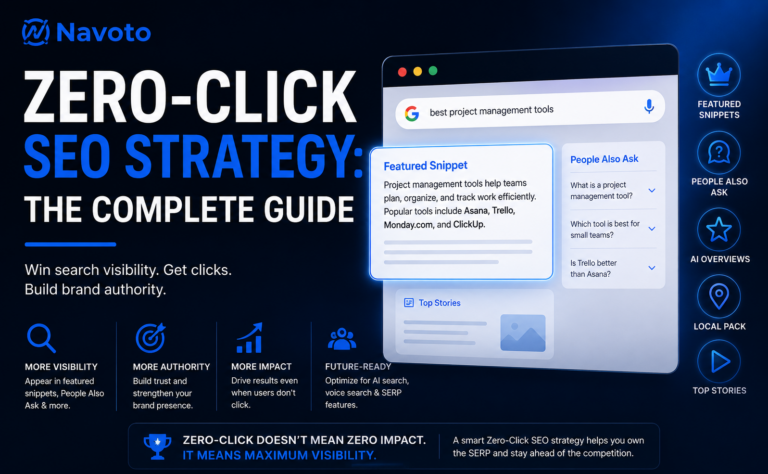
60–65% of all Google searches now end without a single click to any website. That means more than half the time, Google is keeping people right where they are. If your SEO plan still revolves only around clicks, you are missing the biggest shift in search history.
Picture this: you type “how to remove a stripped screw” into Google. Before you can even blink, Google shows you a neat, boxed answer at the top of the page. You read it, you fix your screw, you close the tab. You never visited any website. That is a zero-click search — and it just happened to your website too.
This is not a glitch or a bug. It is Google doing exactly what it was built to do — answer questions as fast as possible. And it is happening more often every single year. For anyone running a website or business online, this matters enormously. Not because it means the end of SEO, but because it means the rules of the game have changed.
This guide will walk you through exactly what zero-click SEO is, why it matters more in 2025 than ever before, and — most importantly — the exact steps you can take today to build visibility, authority, and business growth even in a world where most searchers never click your link.
1. What Is a Zero-Click Search? (The Simple Version)
A zero-click search is any search where the person typing the question gets their answer directly on Google’s results page — without needing to click into any website.
You have seen these your whole life without realizing they have a name. When you search “temperature in Delhi today” and Google shows you the weather right there — that is a zero-click. When you ask “what is the capital of Australia” and the answer pops up in a box before any links — that is a zero-click. When your smart speaker reads out an answer to your voice question — that is a zero-click.
💡 Simple Definition
Zero-click search = Google answers the question itself, so the searcher never needs to visit any website. Your content may still power that answer — but you get no click.
Here is why this matters so much: every time someone searches and does not click your website, you miss a visitor. If you have 10,000 people searching for things your business is an expert on, and 65% never click any result, you are potentially missing 6,500 visitors every single month — visitors who still see information (possibly from your site) but never come to you directly.
The question is not whether zero-click searches hurt you. They do affect traditional traffic. The question is: how do you build a strategy that wins anyway?
2. Why Zero-Click SEO Matters More Than Ever in 2025
Zero-click searches are not new — Google has been adding quick-answer features since the early 2010s. But 2025 is a turning point. Here is why:
60–65%
of Google searches end with zero clicks
75%+
zero-click rate on mobile devices
34.5%
drop in CTR when AI Overviews appear
8B+
voice assistants globally by end of 2025
Google’s AI Overviews — those long, AI-generated answers at the very top of search results — now appear in nearly 1 in every 5 searches. When one shows up, the #1 organic result drops from a 7.3% click rate to just 2.6%. That is a massive hit for websites that were relying on top rankings to bring in visitors.
SEO professionals now talk about what they call the “Great Decoupling” — where the number of times your content appears in search (impressions) keeps going up, but the number of people actually clicking your site goes down. You are being seen more, but getting fewer visits. That sounds bad. But here is the flip side:
🔑 The Big Insight
Brands that show up in featured snippets, AI Overviews, and People Also Ask boxes consistently — even without being clicked — build massive trust and authority. That trust turns into branded searches, direct traffic, and conversions that you can actually measure. Visibility is the new click.
This is why zero-click SEO is not about giving up on traffic. It is about understanding that the game now has two stages: first, get seen on the SERP; second, be compelling enough that people come back to find you later.
3. The 7 Types of Zero-Click Features You Need to Know
Google has built many different “boxes” and sections on its results pages that answer questions directly. Each one is an opportunity for your brand. Here are the main ones:
Now that you know what these features are, let’s talk about how to get into them. Each one requires a slightly different approach.
4. How to Win Featured Snippets — The #1 Zero-Click Prize
A featured snippet is the holy grail of zero-click SEO. It sits above everything else on the page — sometimes called Position Zero because it beats even the #1 ranked result. Your content gets displayed in a highlighted box, with your brand name and link visible. Even if nobody clicks, thousands of people see that you are the authority.
Here is the honest truth about featured snippets: Google almost always picks them from pages that already rank on page 1. So if your page is on page 2 or 3, start by getting it to page 1 first. Once you are there, these steps will significantly increase your chances of getting the snippet box.
Step-by-Step: Optimizing for Featured Snippets
Answer the question in the first 40–60 words of your section
Right after your H2 or H3 heading, give a clean, clear answer in plain English. Do not build up to the answer — just say it. Google wants to grab that answer quickly. If your answer is buried in paragraph five, it will get ignored.
Use question-based headings that match how people actually search
Instead of a heading like “Benefits of Email Marketing,” try “What Are the Benefits of Email Marketing?” This matches the exact phrasing people type into Google, making it much easier for the algorithm to match your content to the query.
Use the right format — lists, tables, and definitions win
Google loves three snippet formats above all: a short paragraph definition (40–60 words), a numbered list for step-by-step processes, and a table for comparing things. Match the format to the type of question. “How to” questions get numbered lists. “What is” questions get definition paragraphs. “Best X” comparisons get tables.
Keep your content fresh and updated
Google strongly prefers content that is recently updated. If you have a page that used to have a snippet and lost it, try updating the content with new data, a new publish date, and a refreshed answer section. Freshness is a real ranking signal in 2025.
Find your near-miss opportunities first
Use tools like Semrush, Ahrefs, or even free Google Search Console data to find queries where you currently rank positions 2–5 with high impressions. These are your fastest wins — you are already close, and a small content tweak can push you to the featured box.
✅ Quick Test
Go to Google and type your main target keyword right now. Is there a featured snippet? If yes — who owns it? What does their answer look like? That is your benchmark. Read it, understand why Google chose it, then write something more accurate, more complete, and more clearly structured.
5. Dominating the People Also Ask Box
The People Also Ask (PAA) box is that cluster of questions you see in the middle of almost every search result. You click one, a short answer expands. More questions appear below it. It is almost like Google showing you a rabbit hole of related questions — and it shows up in 78% of all searches.
Here is what makes PAA boxes special for zero-click SEO: they are dynamic. When a user clicks one question, three more appear. This means there are practically unlimited slots for your content to appear in. Unlike featured snippets, where only one page wins, multiple different websites can appear in PAA for the same search.
How to Get Into People Also Ask
- Build an FAQ section on every major page. A dedicated FAQ section at the bottom of your blog posts and service pages is one of the most reliable ways to land in PAA. Each question and answer is a potential snippet. Keep answers between 40–80 words.
- Research questions using real Google data. Before you write, look at what actually appears in the PAA box for your target keywords. Tools like AnswerThePublic, AlsoAsked.com, and the PAA section itself will give you a goldmine of question ideas that real people are searching for.
- Write conversationally — the way people actually speak. PAA answers that win are written in plain, direct language. No jargon, no fluff. Google’s NLP (natural language processing) system is very good at matching casual, conversational content to natural-language questions.
- Add FAQ Schema Markup. This tells Google “hey, this part of my page is a list of questions and answers.” It significantly increases your chances of landing in PAA and can also generate rich results directly in the SERP. More on this in the next section.
“Think of the PAA box like a billboard on a highway — appearing in it means thousands of people see your brand name as the authority on a question, even if they never click through.”
6. Schema Markup: The Secret Weapon Most Websites Ignore
Schema markup is a small piece of code you add to your website that acts like a name tag for your content. Instead of making Google guess what your page is about, you tell it directly: “this section is a FAQ,” or “this is a recipe,” or “this is a product with a 4.8-star rating.” Google reads that code and uses it to build rich, eye-catching results in the SERP.
Websites that use structured data see measurably higher visibility in SERP features. And in 2025, with AI Overviews consuming so much of the top of the page, schema is one of the most reliable ways to still stand out visually even lower on the page.
🔧 Most Important Schema Types for Zero-Click SEO
| Schema Type | Best For | What It Unlocks |
|---|---|---|
| FAQ Schema | Any page with Q&A sections | Expandable questions right in search results, PAA inclusions |
| HowTo Schema | Tutorial and guide content | Numbered steps displayed in SERP, voice search answers |
| Article Schema | Blog posts, news articles | Headline, author, date shown in results; higher credibility signals |
| LocalBusiness Schema | Any local business | Hours, phone, address in local pack; knowledge panel accuracy |
| Product Schema | E-commerce product pages | Price, availability, star ratings in search results |
| Organization Schema | Brand / company homepage | Knowledge panel info, logo in search results, branded searches |
How to Add Schema Without Coding Skills
You do not need to know how to write code to use schema markup. If you use WordPress (which most sites do), you have three easy options:
- Rank Math SEO — Has built-in schema blocks you can add to any page with just a few clicks. One of the most popular free options.
- Yoast SEO Premium — Includes schema configuration in its settings panel. Clean, reliable, and widely trusted.
- Schema Pro — A dedicated schema plugin that gives you fine-grained control over every schema type without writing a single line of code.
After adding schema, always verify it using Google’s free Rich Results Test tool at search.google.com/test/rich-results. It tells you exactly what rich results your page is eligible for.
7. Optimizing for Voice Search — The Silent Giant
Over 50% of internet users worldwide now use voice search regularly. Every single time someone asks their phone, their smart speaker, or their car’s infotainment system a question — they are doing a zero-click search. The device reads the answer aloud. They never open a browser. They never see a search results page.
Voice search almost always pulls its answers from the same place as featured snippets. Which means if you win the featured snippet, you win the voice answer. But there are a few extra things to keep in mind:
🗣️
Write the Way People Talk
Voice queries are longer and more conversational than typed queries. Instead of “best laptop 2025,” people say “what is the best laptop to buy in 2025 for college students?” Your content needs to include those natural, full-sentence phrasings.
📍
Add “Near Me” Optimization
A huge proportion of voice searches have local intent. “Where is the nearest pharmacy open now?” Keep your Google Business Profile perfectly updated so voice assistants can pull your info instantly.
⚡
Speed Up Your Site
Google voice search heavily favors fast-loading pages. If your site takes more than 3 seconds to load, it is unlikely to be chosen as a voice answer source. Use our page speed optimization guide to fix slow load times.
8. Building Brand Authority Beyond Clicks
Here is one of the most powerful — and most overlooked — ideas in modern SEO: visibility builds trust even without a click. Every time your brand name appears in a featured snippet, a PAA box, or an AI Overview, thousands of people see that Google trusts you to answer the question. That is brand equity. It is real, and it compounds over time.
This is how well-known brands stay dominant in search even when their click-through rates fall. People do not need to visit CNN to trust CNN. They see it cited in snippets so often that it builds unconscious authority. Your goal is to build the same reputation — even as a small or mid-size business.
E-E-A-T: The Foundation of Brand Trust in Google
E-E-A-T stands for Experience, Expertise, Authoritativeness, and Trustworthiness. Google uses these signals to decide which content is worth showing at the top of the page. In the zero-click era, improving your E-E-A-T score is not just good SEO — it is what gets you cited in AI Overviews and PAA answers.
- Experience: Show real-world experience in your content. Include case studies, original data, personal examples, and first-hand testing. AI systems specifically look for this in 2025.
- Expertise: Have authors sign their content with proper bio pages, credentials, and links to their professional profiles. Google’s algorithm checks these signals.
- Authoritativeness: Build backlinks from respected, relevant sites in your industry. Get mentioned in industry publications and news sites. Be the source that other websites cite.
- Trustworthiness: Keep your website secure (HTTPS), have a clear Privacy Policy and About page, display contact information prominently, and collect genuine customer reviews.
⚠️ The “Great Decoupling” Warning
If you are only measuring SEO success by website sessions in Google Analytics, your numbers are going to look worse every year even if your brand is growing. Learn to read impressions in Search Console, track branded search volume in Google Trends, and monitor direct traffic — these are the signals that show real zero-click growth.
9. Local SEO: The Zero-Click Goldmine for Small Businesses
If you run a local SEO business — a shop, a restaurant, a clinic, a law firm, a real estate agency — zero-click SEO might actually be your biggest opportunity. The local pack (that map box with three business listings) and Knowledge Panels are designed to give searchers what they need without clicking. And they drive real, offline action: calls, directions, reservations, and walk-ins.
Someone searches “dentist in Pune” on their phone while sitting in the parking lot. They see your Google Business Profile with your phone number, hours, rating, and address. They call you directly from the search result. Zero clicks to your website — but one very real new patient. That is the power of local zero-click SEO.
Your Local Zero-Click Checklist
- ✅
Claim and verify your Google Business Profile — If you have not done this, stop reading and do it now at
business.google.com. It is free and critical. - ✅
Fill in every single field — Business hours, photos, category, description, attributes (wheelchair accessible? free WiFi?). Completeness is a ranking factor in the local pack.
- ✅
Actively get customer reviews — Ask every happy customer to leave a Google review. More reviews (especially with keywords) = better local pack rankings and better zero-click visibility.
- ✅
Respond to every review — Both positive and negative. Google rewards businesses that actively engage. It signals that you are a real, active business.
- ✅
Keep NAP consistent everywhere — Your Name, Address, and Phone number should be identical on your website, Google Business Profile, Justdial, Sulekha, Facebook, and every other directory. Inconsistency confuses Google.
- ✅
Add LocalBusiness schema to your website — This reinforces all your Google Business Profile information directly from your website, improving your knowledge panel accuracy.
10. How to Measure Your Zero-Click SEO Success
Traditional SEO lived and died by one number: clicks. More clicks = winning. Zero-click SEO does not work that way. You need to expand your measurement framework to see the full picture. Here is what to track and where to find it:
| Metric | What It Tells You | Where to Find It |
|---|---|---|
| Total Impressions | How often your pages show up in Google search | Google Search Console → Performance |
| Featured Snippet Count | Number of Position Zero rankings you hold | Semrush → Organic Research → SERP Features |
| Branded Search Volume | How often people search your brand name directly | Google Trends → Search term = your brand |
| Direct Traffic | Visitors who type your URL directly — brand recall | Google Analytics → Acquisition → Direct |
| PAA Appearances | How often you appear in People Also Ask | Semrush or Ahrefs SERP Feature tracking |
| Knowledge Panel Accuracy | Is your brand info shown correctly by Google? | Search your brand name → check right-side panel |
When you combine these metrics into a monthly dashboard, you will see something remarkable: even on months when your organic sessions dip, your impressions may be climbing and your branded searches growing. That is a healthy zero-click strategy working exactly as it should. For help building this dashboard, read our guide on building a proper SEO reporting dashboard →
11. Your 90-Day Zero-Click SEO Action Plan
Knowing all of this is one thing. Actually doing it is another. Here is a realistic 90-day plan you can start this week, broken into three monthly sprints:
Frequently Asked Questions About Zero-Click SEO
Still have questions? Here are answers to the ones we get asked most often.
The Bottom Line: Win the Visibility Game, Not Just the Click Game
Zero-click SEO is not the death of SEO. It is SEO growing up. The brands that will thrive in 2025 and beyond are not the ones trying to trick the algorithm into sending more clicks. They are the ones smart enough to show up everywhere — in snippets, in voice answers, in knowledge panels, in local packs, in AI Overviews — and trust that visibility builds the kind of authority that translates into real business.
Start with your Google Business Profile if you are local. Then schema markup and FAQ sections if you are publishing content. Start with Search Console if you have existing rankings to optimize. The hardest part is starting. The rest follows.