The world of online shopping is experiencing its biggest transformation since Amazon revolutionized e-commerce. At the heart of this seismic shift is ChatGPT Shopping—a groundbreaking feature that’s fundamentally changing how millions of people discover, research, and purchase products online.
If you’ve heard about ChatGPT Shopping but aren’t sure what it is, how to use it, or whether it’s worth your time, this comprehensive guide has everything you need. We’ll walk you through every aspect of this game-changing technology, from basic setup to advanced shopping strategies that save you time and money.
By the end of this guide, you’ll understand exactly how to leverage ChatGPT Shopping to make smarter purchasing decisions, whether you’re buying your first product or you’re a seasoned online shopper looking to optimize your buying process.
What Is ChatGPT Shopping?
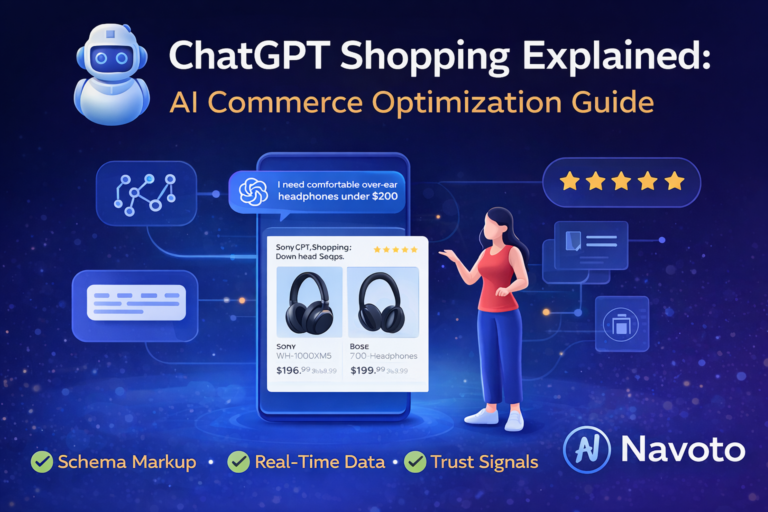
ChatGPT Shopping is an AI-powered shopping assistant built into ChatGPT that helps you discover, research, and purchase products through natural conversation instead of traditional search.
Think of it this way: instead of going to Google, typing keywords, clicking through dozens of product pages, reading reviews on multiple sites, and comparing prices across different tabs, you simply tell ChatGPT what you need—and it does all the research for you.
The Two Core Features
ChatGPT Shopping consists of two main capabilities:
1. Shopping Research (Launched November 2025)
This is your personal product research assistant. When you ask ChatGPT about products, it:
- Searches thousands of products across the internet
- Analyzes specifications, reviews, and pricing
- Creates customized buyer’s guides tailored to your needs
- Explains trade-offs between different options
- Provides source citations for all recommendations
2. Instant Checkout (Launched September 2025)
This feature allows you to complete purchases directly inside ChatGPT without visiting external websites. Currently available for:
- Etsy products
- Over 1 million Shopify stores (including Glossier, SKIMS, Spanx, Vuori)
- U.S. customers only (for now)
Why ChatGPT Shopping Matters
According to recent data, ChatGPT has over 800 million weekly active users as of September 2025—a number that doubled in just seven months. This massive audience represents a fundamental shift in how people search for and discover products online.
Unlike traditional e-commerce platforms that rely on keyword research matching and paid advertising, ChatGPT Shopping uses conversational AI to understand your actual needs and preferences, then provides unbiased, organic recommendations based purely on relevance.
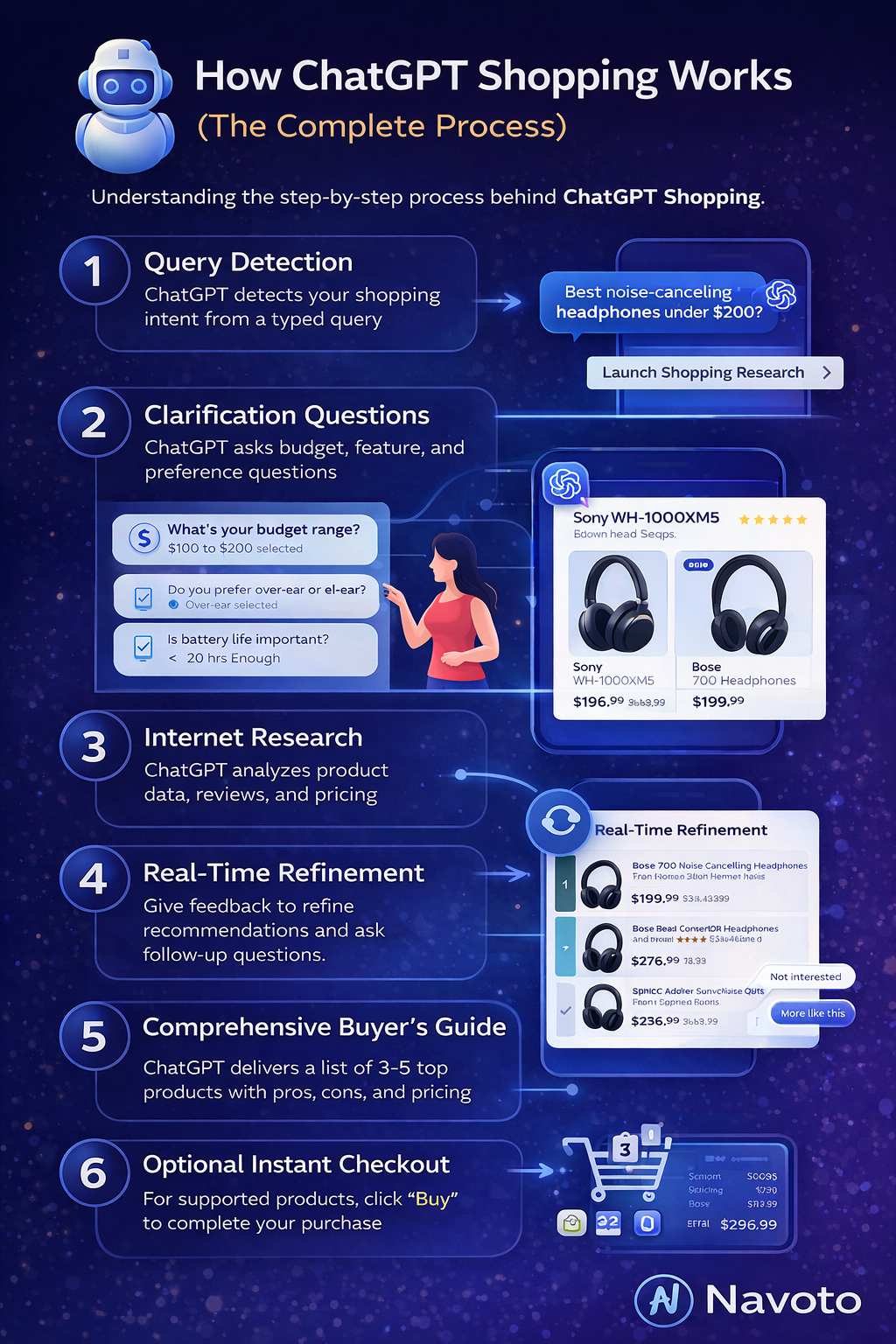
How ChatGPT Shopping Works (The Complete Process)
Understanding how ChatGPT Shopping works behind the scenes helps you use it more effectively. Let’s break down the entire process from start to finish.
The Technology Stack
GPT-5 Mini for Shopping
ChatGPT Shopping Research is powered by a specialized version of GPT-5 mini that OpenAI specifically trained using reinforcement learning for shopping tasks. This isn’t just regular ChatGPT with a shopping plugin—it’s a purpose-built AI model optimized to:
- Evaluate product specifications and features
- Read and synthesize customer reviews
- Compare products across multiple dimensions
- Understand trade-offs and constraints
- Provide balanced recommendations without commercial bias
The Agentic Commerce Protocol (ACP)
The checkout functionality runs on the Agentic Commerce Protocol—an open standard co-developed by OpenAI, Stripe, and merchant partners. This protocol enables:
- Secure payment processing without storing card details
- Merchant control over customer relationships
- Platform-agnostic integration (works with different payment systems)
- Encrypted payment tokens authorized for specific amounts
The Step-by-Step Process
Here’s exactly what happens when you use ChatGPT Shopping:
Step 1: Query Detection
When you type a shopping-related question (like “best noise-canceling headphones under $200”), ChatGPT’s system automatically detects shopping intent and suggests launching Shopping Research.
Step 2: Clarification Questions
ChatGPT asks targeted questions to understand your specific needs:
- Budget range
- Intended use case
- Must-have features
- Deal-breakers
- Brand preferences
Step 3: Internet Research
While you’re answering questions, ChatGPT simultaneously:
- Searches retail websites across the internet
- Analyzes product specifications and descriptions
- Reads customer reviews and ratings
- Checks current pricing and availability
- Evaluates source reliability and credibility
Step 4: Real-Time Refinement
As ChatGPT presents initial product options, you can provide feedback:
- Mark items as “Not interested”
- Select “More like this” for products you prefer
- Ask follow-up questions to refine results
This creates a dynamic feedback loop that improves recommendations in real-time.
Step 5: Comprehensive Buyer’s Guide
After research (typically 2-5 minutes), ChatGPT delivers a detailed buyer’s guide containing:
- 3-5 top product recommendations
- Clear explanations of key differences
- Honest pros and cons for each option
- Current pricing and retailer links
- Reasoning behind each recommendation
Step 6: Optional Instant Checkout
For supported products, you’ll see a “Buy” button that enables you to:
- Review product details and pricing
- Confirm shipping address
- Select payment method
- Complete purchase without leaving ChatGPT
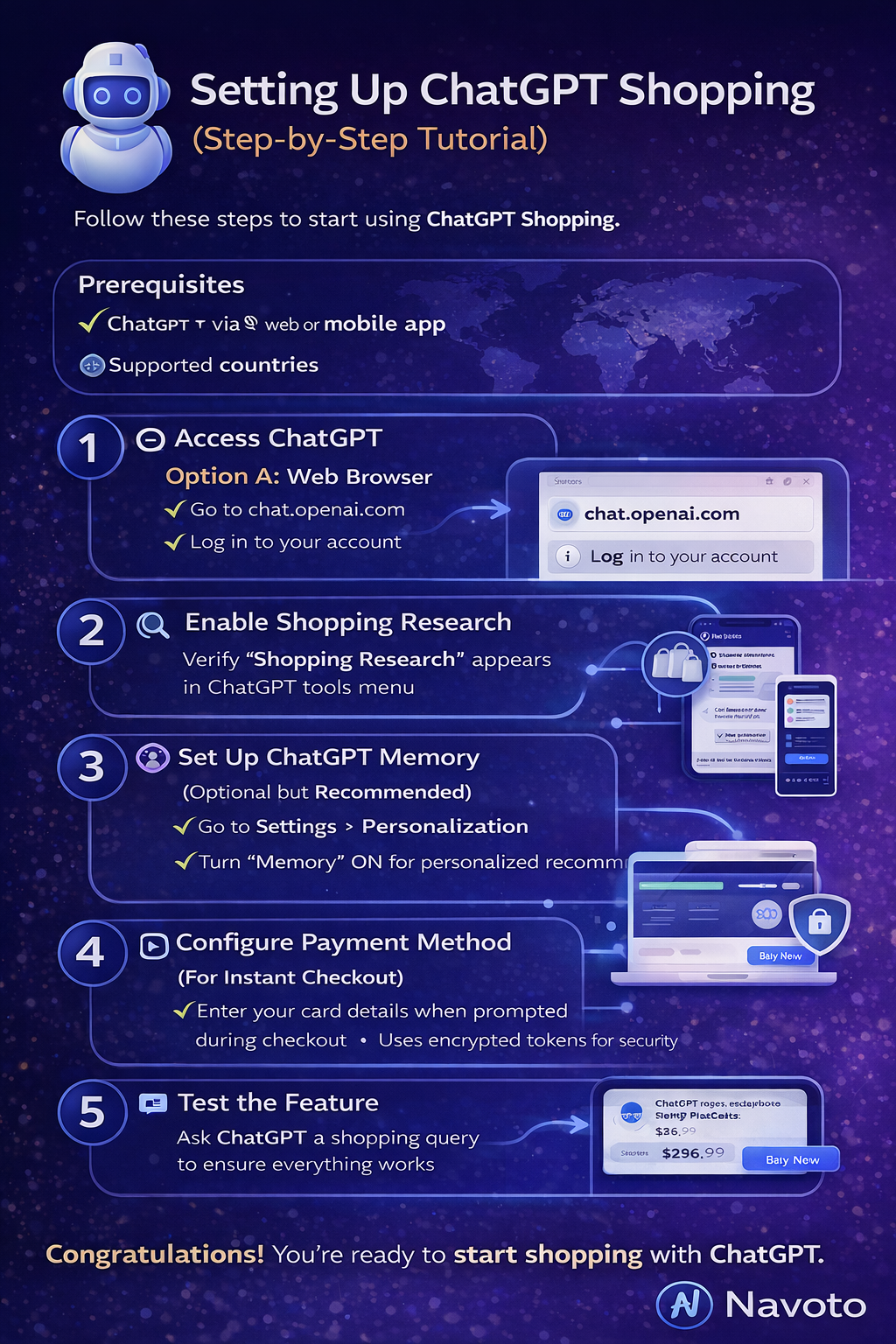
Setting Up ChatGPT Shopping (Step-by-Step Tutorial)
Getting started with ChatGPT Shopping is straightforward. Follow these steps to access the feature.
Prerequisites
Before you begin, make sure you have:
- A ChatGPT account (Free, Plus, or Pro)
- Access to ChatGPT via web browser or mobile app (iOS/Android)
- Location in a supported country (Shopping Research: Global, Instant Checkout: U.S. only)
Step 1: Access ChatGPT
Option A: Web Browser
- Go to chat.openai.com
- Log in to your account
- You’ll see the main ChatGPT interface
Option B: Mobile App
- Download the ChatGPT app from App Store (iOS) or Google Play (Android)
- Open the app and log in
- Access the chat interface
Step 2: Enable Shopping Research
ChatGPT Shopping Research should be enabled by default, but here’s how to verify:
- Start a new conversation in ChatGPT
- Look for the tools menu (usually near the message input box)
- Verify that “Shopping Research” appears in the available tools list
If you don’t see it, ensure your account is updated and try refreshing the page or restarting the app.
Step 3: Set Up ChatGPT Memory (Optional but Recommended)
Enabling Memory allows ChatGPT to remember your preferences across conversations, leading to more personalized recommendations:
- Click your profile icon (top-right corner on web, menu on mobile)
- Select “Settings”
- Navigate to “Personalization”
- Toggle “Memory” to ON
- Optionally, review what ChatGPT has remembered and delete anything you don’t want stored
Step 4: Configure Payment Method (For Instant Checkout)
If you plan to use Instant Checkout:
- Have a valid credit or debit card ready
- Ensure your shipping address is accurate
- You’ll be prompted to enter payment information during your first purchase
- ChatGPT uses encrypted tokens and doesn’t store your full card details
Step 5: Test the Feature
Let’s do a quick test to make sure everything works:
- In ChatGPT, type a simple shopping query like: “What’s the best wireless mouse under $50?”
- ChatGPT should detect shopping intent and suggest launching Shopping Research
- Click “Launch Shopping Research” or type “yes”
- Answer any clarification questions ChatGPT asks
- Wait for the buyer’s guide to generate (2-5 minutes)
- Review the recommendations
Congratulations! You’ve successfully set up and tested ChatGPT Shopping.
How to Use ChatGPT Shopping Research (Beginner’s Guide)
Now that you’re set up, let’s learn how to use ChatGPT Shopping Research effectively to get the best recommendations.
Crafting Effective Shopping Queries
The way you phrase your question significantly impacts the quality of recommendations. Here’s how to ask better questions:
Bad Query Examples:
- “headphones” (too vague)
- “cheap laptop” (lacks context)
- “gift” (no specifics)
Good Query Examples:
- “Best noise-canceling headphones under $300 for frequent airplane travel”
- “Laptop for college student studying graphic design, budget $1,200”
- “Gift for coworker who loves gardening, small apartment balcony, $40 budget”
The SPECIFIC Framework for Better Queries:
Use this framework to structure your questions:
- Situation: Who will use it and how?
- Purpose: What problem does it solve?
- Expectations: What features matter most?
- Constraints: Budget, size, compatibility limits?
- Information: Any preferences or deal-breakers?
- Flexibility: Are you willing to compromise on anything?
- Intent: When do you need it?
- Context: Any additional relevant details?
Step-by-Step: Your First Shopping Research Session
Let’s walk through a complete shopping research session from start to finish.
Scenario: You need a coffee maker for your home office.
1: Start with a Clear Query
Type into ChatGPT:
"I need a coffee maker for my home office. I drink 2-3 cups per day, prefer strong coffee, and my budget is around $150. I don't have much counter space."
2: Launch Shopping Research
ChatGPT will respond with something like:
"I can help you find the perfect coffee maker! Would you like me to launch Shopping Research to find options that match your needs?"
Click “Yes” or “Launch Shopping Research”
3: Answer Clarifying Questions
ChatGPT will ask follow-up questions such as:
- “Do you prefer single-serve (like Keurig) or full pot brewing?”
- “How important is brewing speed to you?”
- “Do you want any smart features or programmability?”
- “Any brands you prefer or want to avoid?”
Answer honestly and specifically. Your answers directly influence recommendations.
4: Provide Real-Time Feedback
As ChatGPT shows initial options, you’ll see product cards with images and key details. Use the feedback buttons:
- “Not interested”: Removes that product and tells ChatGPT what to avoid
- “More like this”: Finds similar products with comparable features
This iterative process helps ChatGPT understand your preferences better.
5: Review the Final Buyer’s Guide
After a few minutes, you’ll receive a comprehensive guide containing:
Top Recommendations (Example):
- Technivorm Moccamaster – $309
- Why recommended: Exceptional coffee quality, compact design, lasts decades
- Pros: Best taste, durable, simple to use
- Cons: Over budget, no programmability
- Best for: Coffee purists who prioritize quality
- Ninja Specialty Coffee Maker – $169
- Why recommended: Versatile, compact, in-budget, makes specialty drinks
- Pros: Multiple brew styles, small footprint, well-reviewed
- Cons: Plastic construction, some learning curve
- Best for: Those who want variety and features
- Bonavita BV1900TS – $139
- Why recommended: Excellent coffee quality, compact, budget-friendly
- Pros: Simple operation, consistent results, good value
- Cons: Basic features, no frills
- Best for: Those prioritizing coffee quality on a budget
Each recommendation includes:
- Direct links to purchase from retailers
- Current pricing and availability
- Source citations for specifications
- Clear reasoning for inclusion
6: Ask Follow-Up Questions
Don’t hesitate to ask for more information:
- “Which of these is easiest to clean?”
- “Are there any good options under $120?”
- “What’s the most durable choice?”
- “Can you find something with a thermal carafe?”
ChatGPT will refine recommendations based on your additional criteria.
Advanced Tips for Power Users
1: Use Comparison Queries
Instead of starting from scratch, compare specific products:
"Compare the Breville Barista Express vs Gaggia Classic Pro for a home espresso beginner"
2: Leverage Memory for Recurring Purchases
If you’ve shared lifestyle details in previous conversations (e.g., “I live in a small apartment”), ChatGPT will automatically factor this into future recommendations without you needing to repeat it.
3: Request Specific Formats
Ask for recommendations in formats that help your decision-making:
"Can you create a comparison table showing battery life, weight, and price for these three laptops?"
4: Set Multiple Constraints
Don’t be shy about being picky:
"Find me a vacuum cleaner under $200, quieter than 70 decibels, weighs less than 8 pounds, works on hardwood and carpet, has at least 40 minutes runtime, and has good reviews for pet hair"
5: Ask for Category Education
If you’re unfamiliar with a product category:
"I need running shoes but don't know what to look for. Can you explain what matters and then recommend options?"
How to Buy Products with Instant Checkout (Step-by-Step)
For products that support Instant Checkout, the buying process is remarkably streamlined. Here’s how to complete your first purchase.
Checking Instant Checkout Availability
Not all products support Instant Checkout. Currently available for:
- Etsy sellers
- 1+ million Shopify merchants (Glossier, SKIMS, Spanx, Vuori, etc.)
- U.S. customers purchasing from U.S. merchants
- You’ll know a product supports Instant Checkout when you see a “Buy” button on the product card.
Step-by-Step Purchase Process
1: Select Your Product
After receiving shopping recommendations, identify a product you want to purchase. If it shows a “Buy” button, it supports Instant Checkout.
2: Click “Buy”
Tap or click the “Buy” button. ChatGPT will display a checkout interface within the conversation.
3: Review Product Details
Verify:
- Product name and description
- Price (including any taxes or fees)
- Quantity (default is usually 1)
- Shipping costs (if applicable)
4: Confirm or Update Shipping Address
ChatGPT will show your saved shipping address. You can:
- Confirm if correct
- Edit if you need to change it
- Add a new address for this purchase
5: Select Payment Method
First-time purchase:
- Click “Add payment method”
- Enter your credit or debit card information
- Your card details are tokenized (encrypted) for security
- ChatGPT doesn’t store your full card number
Returning purchase:
- Select your saved payment method
- Or add a new card if preferred
6: Review and Confirm
Before finalizing:
- Double-check product, price, shipping address, and payment method
- Review the total amount (product + shipping + tax)
- Read any return/refund policies shown
7: Complete Purchase
Click “Confirm Purchase” or “Buy Now”
ChatGPT will:
- Process the payment through encrypted tokens
- Send the order directly to the merchant
- Show you an order confirmation
8: Receive Confirmation
You’ll receive:
- Order confirmation in ChatGPT
- Email confirmation from the merchant
- Tracking information (once shipped)
Payment Security Explained
How Your Payment Information Is Protected:
- Tokenization: Your card details are converted into encrypted tokens
- Limited authorization: Tokens work only for specific amounts and merchants
- No storage: ChatGPT doesn’t store your full card information
- Merchant processing: The actual charge is processed by the merchant’s payment system
- Stripe security: Built on Stripe’s enterprise-grade security infrastructure
Managing Orders and Returns
After Purchase:
- Track your order: Check email for tracking information from the merchant
- Returns: Contact the merchant directly (they handle customer service)
- Refunds: Follow the merchant’s standard return policy
- Issues: The merchant is responsible for order fulfillment and customer support
Important: ChatGPT facilitates the purchase, but the merchant processes and fulfills the order. For post-purchase support, contact the merchant directly.
Troubleshooting Common Issues
Issue: “Buy” button doesn’t appear
- Solution: Product doesn’t support Instant Checkout. Click the retailer link to purchase on their website.
Problem: Payment declined
- Solution: Verify card details, check available balance, or try a different payment method.
Issue: Address not recognized
- Solution: Ensure address is complete and formatted correctly. Try entering manually.
Problem: Order didn’t go through
- Solution: Check email for confirmation. If no confirmation within 10 minutes, retry or contact merchant.
ChatGPT Shopping vs Traditional Online Shopping (Detailed Comparison)
Understanding how ChatGPT Shopping differs from traditional e-commerce helps you decide when to use each approach.
Comparison Table: ChatGPT Shopping vs Traditional E-Commerce
| Feature | ChatGPT Shopping | Traditional E-Commerce |
|---|---|---|
| Search Method | Natural language conversation | Keyword-based search |
| Product Discovery | AI curates 3-5 options | Browse hundreds of results |
| Research Process | AI synthesizes info in one place | Manual comparison across multiple tabs |
| Time Required | 5-10 minutes (AI does research) | 30-60+ minutes (you do research) |
| Personalization | Context-based on conversation | History-based algorithms |
| Recommendations | Organic, unsponsored | Mix of organic and sponsored |
| Comparison | AI explains trade-offs | Manual spec comparison |
| Checkout | Single-item, in-conversation | Full cart, on retailer site |
| Best For | Research-intensive purchases | Quick reorders, familiar products |
| Merchant Selection | Open web search | Platform-specific inventory |
When to Use ChatGPT Shopping
Choose ChatGPT Shopping When:
- You’re buying something unfamiliar: Product categories you don’t understand well
- Complex comparison needed: Multiple features and specifications to evaluate
- Decision fatigue: Overwhelmed by too many options
- Time-constrained research: Want comprehensive info without hours of work
- Gift shopping: Need to find something for someone else’s preferences
- Constraint-heavy purchases: Multiple specific requirements to meet
- Unbiased recommendations wanted: Prefer organic results over ads
Example Scenarios:
- Choosing a laptop for specific use cases
- Finding the right camera for your photography needs
- Selecting kitchen appliances you’ve never bought before
- Gift shopping for someone with particular interests
When to Use Traditional E-Commerce
Choose Traditional E-Commerce When:
- You know exactly what you want: Specific brand and model already decided
- Reordering familiar products: Repeat purchases you’ve made before
- Multi-item shopping: Buying multiple products at once (groceries, supplies)
- Browse-based shopping: Enjoying the browsing experience itself
- Platform-specific deals: Taking advantage of Prime Day, flash sales, etc.
- Immediate availability matters: Need same-day or next-day delivery
- Returns/support important: Established relationship with retailer
Example Scenarios:
- Reordering vitamins or household supplies
- Taking advantage of Amazon Prime Day deals
- Buying groceries or bulk items
- Shopping with specific store gift cards or credits
The Hybrid Approach (Best of Both Worlds)
Many smart shoppers use both methods strategically:
Step 1: Use ChatGPT Shopping for research and narrowing options
Step 2: Take the 3-5 recommended products
Step 3: Check those specific products on Amazon, eBay, or retailer sites
Step 4: Purchase where you get the best deal, shipping, or loyalty benefits
This approach gives you:
- AI-powered research and curation
- Unbiased product recommendations
- Flexibility to buy from your preferred retailer
- Ability to use platform-specific discounts or loyalty programs
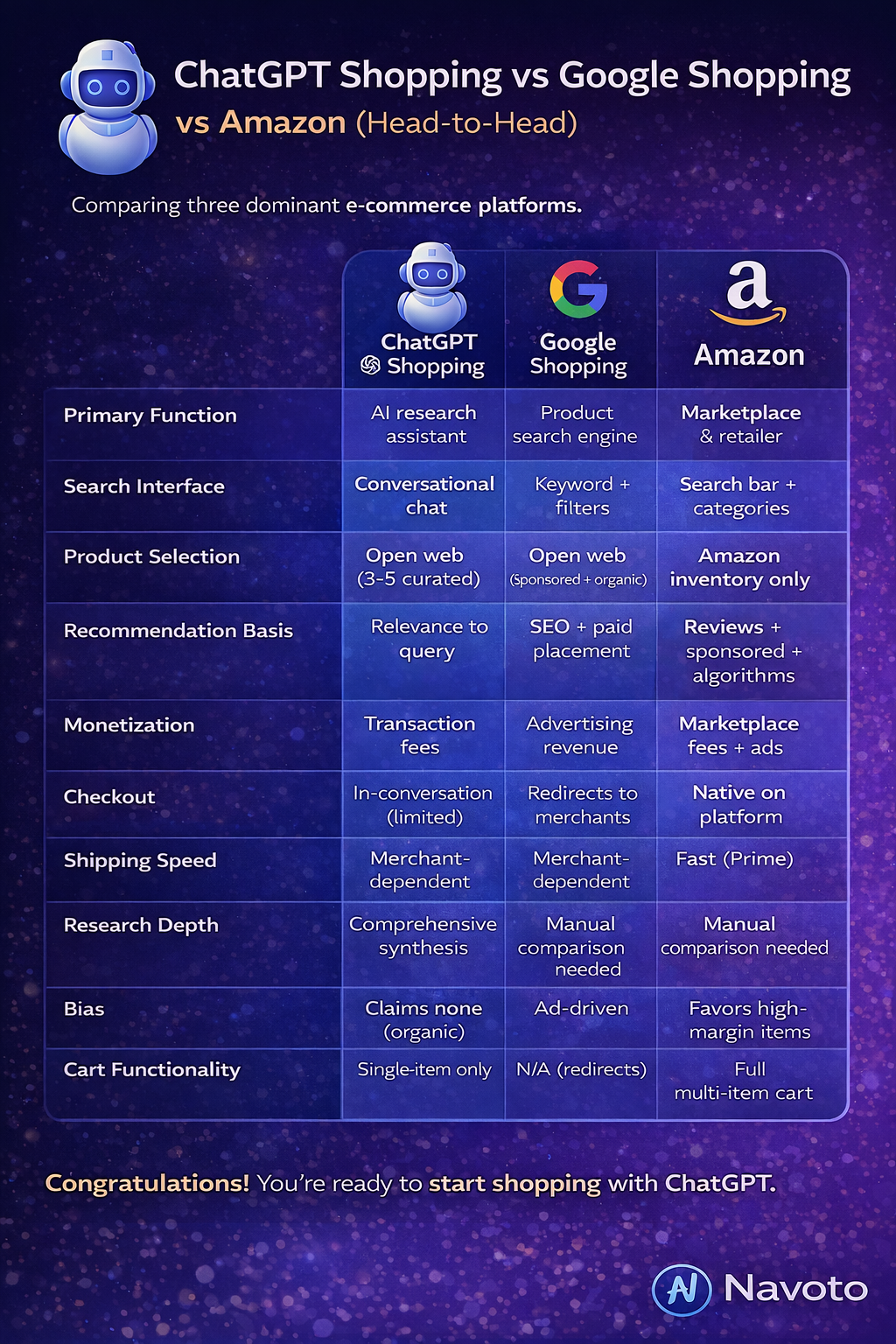
ChatGPT Shopping vs Google Shopping vs Amazon (Head-to-Head)
Let’s compare ChatGPT Shopping with the two dominant e-commerce platforms google shopping and Amazon to understand the competitive landscape.
The Three-Way Comparison
| Aspect | ChatGPT Shopping | Google Shopping | Amazon |
|---|---|---|---|
| Primary Function | AI research assistant | Product search engine | Marketplace & retailer |
| Search Interface | Conversational chat | Keyword + filters | Search bar + categories |
| Product Selection | Open web (3-5 curated) | Open web (sponsored + organic) | Amazon inventory only |
| Recommendation Basis | Relevance to query | SEO + paid placement | Reviews + sponsored + algorithms |
| Monetization | Transaction fees | Advertising revenue | Marketplace fees + ads |
| Checkout | In-conversation (limited) | Redirects to merchants | Native on platform |
| Shipping Speed | Merchant-dependent | Merchant-dependent | Fast (Prime) |
| Research Depth | Comprehensive synthesis | Manual comparison needed | Manual comparison needed |
| Bias | Claims none (organic) | Ad-driven | Favors high-margin items |
| Cart Functionality | Single-item only | N/A (redirects) | Full multi-item cart |
ChatGPT Shopping vs Google Shopping
Where ChatGPT Shopping Wins:
Better for complex research: Synthesizes information from multiple sources automatically
Unbiased recommendations: No paid placements or sponsored results
Conversational refinement: Natural language instead of filter manipulation
Explains reasoning: Tells you why products were recommended
Where Google Shopping Wins:
Broader selection: More comprehensive product coverage
Price comparison: Shows prices from multiple sellers for same product
Established trust: Decades of user familiarity
Merchant diversity: Wider range of retailers participate
Interesting Data Point:
Recent research shows Google AI cites retailers only 4% of the time in e-commerce queries, while ChatGPT cites retailers 36% of the time, suggesting ChatGPT is more transparent about sources and merchant attribution.
ChatGPT Shopping vs Amazon
Where ChatGPT Shopping Wins:
No platform lock-in: Searches across all retailers, not just one ecosystem
Unbiased by profit margins: Doesn’t favor products that benefit the platform
Better gift discovery: Conversational approach excels for gift finding
Research quality: Synthesizes reviews and specs intelligently
Where Amazon Wins:
Fulfillment speed: Prime offers same-day or next-day delivery
Massive selection: 350+ million products available
Returns infrastructure: Established, hassle-free return process
Multi-item shopping: Full cart functionality
Price competitiveness: Often lowest prices due to scale
Important Note:
Amazon explicitly blocks ChatGPT’s web crawler, meaning Amazon products do NOT appear in ChatGPT Shopping results at all. This is a significant limitation if you prefer Amazon’s ecosystem.
The Competitive Landscape
Google’s Response:
Google launched Gemini-powered AI shopping features to compete, integrating AI into Google Shopping results and introducing conversational product search.
Amazon’s Response:
Amazon launched Rufus, an AI shopping assistant trained on Amazon’s product catalog, reviews, and customer behavior. Rufus operates within the Amazon ecosystem and aims to keep users on Amazon.
The Battle Ahead:
According to CNN Business, we’re seeing “a battle brewing over the future of online shopping,” with Google, Amazon, and OpenAI each bringing different strengths:
- Google: Search expertise, merchant relationships, advertising infrastructure
- Amazon: Largest selection, fastest delivery, customer data
- OpenAI: Most advanced AI, unbiased approach, conversational experience
The winner isn’t predetermined—success depends on which approach resonates most with consumers.
Best Use Cases for ChatGPT Shopping
Understanding specific use cases helps you know when ChatGPT Shopping will provide the most value. Here are detailed real-world scenarios.
1: Complex Electronics Purchases
Scenario: You need a new laptop but aren’t sure what specifications you actually need.
Traditional Approach:
- Spend hours reading laptop reviews
- Watch YouTube comparison videos
- Try to understand RAM, processor types, storage options
- Compare 20+ models across multiple websites
- Still feel uncertain about the right choice
ChatGPT Shopping Approach:
Your Query:
"I need a laptop for video editing 4K footage, some light gaming, and everyday browsing. My budget is $1,500. I prefer good battery life and something under 5 pounds. What should I get?"
What ChatGPT Does:
- Asks clarifying questions about video editing software, gaming preferences
- Explains which specs matter for your use case (GPU, RAM, storage type)
- Researches laptops matching your criteria
- Recommends 3-5 specific models with clear trade-offs
- Explains why each was chosen and who it’s best for
Result: In 10 minutes, you understand what to look for and have specific models to choose from, saving hours of research.
2: Gift Shopping for Someone Else
Scenario: You need a birthday gift for a coworker who enjoys gardening, but you know nothing about gardening supplies.
Traditional Approach:
- Search “gardening gifts” and scroll through generic lists
- Feel uncertain if items are actually useful
- Wonder if the recipient already owns these items
- Settle for a gift card due to decision paralysis
ChatGPT Shopping Approach:
Your Query:
"I need a thoughtful gift for my coworker who loves gardening. She has a small balcony garden and mentioned wanting to grow herbs. Budget is $50. What are some unique options?"
What ChatGPT Does:
- Asks about her gardening experience level
- Suggests practical items (herb garden kits, quality tools)
- Offers unique options she might not own (soil moisture meters, grow lights)
- Explains why each gift would be meaningful
- Provides options at different price points within budget
Result: You find a thoughtful, specific gift that shows you listened, making you look like a gifting genius.
Use Case #3: Constraint-Heavy Purchases
Scenario: You need a vacuum cleaner that meets very specific requirements.
Traditional Approach:
- Apply filters on Amazon: price, weight, ratings
- Filters don’t cover all your needs (noise level, specific surfaces)
- Manually check each product’s specs
- Read dozens of reviews looking for specific mentions
- Takes 1-2 hours and still miss important details
ChatGPT Shopping Approach:
Your Query:
"I need a cordless vacuum under $250, quieter than 70 decibels, works on hardwood and thick carpet, weighs less than 7 pounds, has at least 45 minutes runtime, and is good for pet hair. What exists?"
What ChatGPT Does:
- Searches for products meeting ALL criteria
- If no perfect match exists, explains which constraint to relax
- Ranks options by how many requirements they meet
- Provides noise level data not typically in product titles
- Synthesizes review mentions of pet hair performance
Result: You quickly identify the 2-3 options that meet your specific needs, or learn that you need to adjust expectations.
4: Product Category Education
Scenario: You’ve decided to get into bread baking but have no idea what equipment you need.
Traditional Approach:
- Search “bread baking equipment for beginners”
- Get overwhelmed by conflicting blog posts
- Unsure what’s essential vs nice-to-have
- End up buying unnecessary items or missing important ones
ChatGPT Shopping Approach:
Your Query:
"I want to start baking bread at home. What equipment do I actually need? Budget around $200 for everything."
What ChatGPT Does:
- Explains essential items (mixing bowl, bench scraper, Dutch oven)
- Identifies nice-to-have items (banneton, lame, dough whisk)
- Suggests specific products with reasoning
- Allocates your budget across items intelligently
- Explains why each item matters for bread baking
Result: You get a complete shopping list with educated recommendations, avoiding both over-buying and missing essentials.
5: Finding Better Alternatives
Scenario: You’ve heard about a popular product but wonder if there’s a better or more affordable option.
ChatGPT Shopping Approach:
Your Query:
"Everyone recommends the Yeti Rambler for insulated tumblers, but it's expensive. Are there comparable alternatives that cost less?"
What ChatGPT Does:
- Identifies what makes the Yeti popular (insulation, durability, build quality)
- Finds alternatives with similar performance
- Compares key specs (insulation hours, build materials)
- Explains trade-offs (slightly less durable but half the price)
- Recommends options at different price points
Result: You discover high-quality alternatives you wouldn’t have found otherwise, potentially saving $20-50.
6: Comparing Specific Products
Scenario: You’ve narrowed your choice to three specific products but can’t decide.
ChatGPT Shopping Approach:
Your Query:
"Help me choose between the Sony WH-1000XM5, Bose QuietComfort Ultra, and Apple AirPods Max headphones. I prioritize comfort for long wear and noise cancellation."
What ChatGPT Does:
- Creates a comparison table of key specs
- Synthesizes reviews about comfort specifically
- Ranks noise cancellation performance
- Identifies which is best for your stated priority
- Explains trade-offs (sound quality vs comfort vs ecosystem integration)
Result: Clear recommendation based on your specific priorities, ending decision paralysis.
Limitations and Drawbacks You Should Know
ChatGPT Shopping is impressive but not perfect. Understanding its limitations helps set realistic expectations and avoid frustration.
1: Accuracy Issues
The Problem:
OpenAI explicitly states that Shopping Research “might make mistakes about product details like price and availability.”
Real-World Examples:
- Prices may be outdated (merchant changed pricing after ChatGPT accessed the site)
- Availability might be wrong (inventory changed)
- Specifications could be misinterpreted
- Reviews might be summarized in ways that miss nuances
What This Means for You:
Always verify critical information on the merchant’s website before purchasing:
- Double-check current price
- Confirm product is in stock
- Verify specifications if they’re deal-breakers
- Read some actual reviews yourself for expensive purchases
OpenAI’s Recommendation:
They encourage users to “visit merchant sites for the most accurate information.”
2: Geographic Restrictions
Current Availability:
Shopping Research:
- Available globally (all countries)
Instant Checkout:
- U.S. customers only
- Purchasing from U.S.-based merchants only
What This Means:
If you’re outside the U.S., you can use Shopping Research for recommendations but must complete purchases on merchant websites. International expansion is planned but not scheduled.
3: Category Performance Varies
Where ChatGPT Shopping Excels:
OpenAI notes that Shopping Research “performs especially well in detail-heavy categories” including:
- Electronics
- Beauty products
- Home and garden items
- Kitchen appliances
- Sports and outdoor equipment
Where Performance May Be Weaker:
Categories that depend heavily on:
- Subjective preferences (fashion, art, decor)
- Specialized expertise (professional tools, medical equipment)
- Personal fit (clothing, shoes without trying)
- Aesthetic taste (furniture, artwork)
What This Means:
Use ChatGPT Shopping for spec-heavy products where objective comparison helps. For highly subjective categories, traditional browsing might work better.
4: Single-Item Purchase Only
The Problem:
Instant Checkout currently supports only one item per transaction. You cannot:
- Build a cart with multiple products
- Bundle related items
- Buy a complete set at once
What This Means:
For shopping trips requiring multiple items:
- Grocery shopping: Not practical
- Buying an entire outfit: Requires multiple transactions
- Purchasing related accessories: Separate purchases needed
Future Plans:
OpenAI has confirmed multi-item cart functionality is coming but hasn’t provided a timeline.
5: Limited Merchant Coverage
What’s Missing:
Amazon: Explicitly blocks ChatGPT’s crawler, so Amazon products don’t appear in results at all. This is a massive gap given Amazon’s selection.
Many Major Retailers: Not all retailers allow ChatGPT to access their sites or have integrated Instant Checkout.
International Merchants: Limited for non-U.S. shoppers.
What This Means:
You’re seeing a subset of available products, not the complete market. Amazon’s absence is particularly significant for:
- Price comparison (Amazon often has lowest prices)
- Product selection (Amazon carries unique items)
- Fast shipping (Prime delivery)
6: Lower Conversion Rates (So Far)
Early Research Findings:
A University of Chicago working paper found that ChatGPT traffic currently converts at lower rates than traditional channels like organic search or affiliate links.
Possible Reasons:
- Users are in “research mode” not “buying mode”
- Novelty factor attracts browsers, not committed buyers
- Users don’t fully trust the new process yet
- Technology is still unfamiliar to many
What This Means:
For merchants, ChatGPT Shopping is driving traffic but not yet converting as well as established channels. For consumers, you might find yourself researching on ChatGPT then buying elsewhere—which is perfectly fine!
7: No Promotional Integration
What’s Missing:
ChatGPT Shopping doesn’t have a clear way to display:
- Coupon codes
- Limited-time offers
- Flash sales
- Platform-specific deals (Prime Day, Black Friday)
What This Means:
You might miss good deals that require promotional codes or are only available during specific sales events. Traditional e-commerce platforms excel at surfacing these opportunities.
8: Limited Personalization (For Now)
Current State:
Personalization is based on:
- The current conversation
- ChatGPT Memory (if enabled)
- Explicit preferences you state
Not Based On:
- Purchase history
- Browsing behavior across sessions
- Demographic data
- Social connections
What This Means:
Recommendations are conversationally personalized but lack the deep behavioral data that Amazon or Google use. This could be a feature (more privacy) or limitation (less accurate) depending on your perspective.
Tips and Tricks to Get Better Recommendations
Master these strategies to maximize the value you get from ChatGPT Shopping.
1: Be Specific in Your Initial Query
Instead of: “best laptop”
Try: “Best laptop for college student studying computer science, needs to run code editors and virtual machines, budget $1,200, prefer good battery life”
Why it works: Specificity gives ChatGPT the context needed to narrow options immediately, saving back-and-forth clarification.
2: Share Your Decision-Making Process
Example:
"I'm deciding between prioritizing sound quality vs comfort for long listening sessions. I work from home and wear headphones 6-8 hours daily. Which should I prioritize?"
Why it works: ChatGPT can weigh trade-offs based on your actual usage patterns, not generic advice.
3: Mention Deal-Breakers Upfront
Example:
"Find me a standing desk under $400. Must be stable (no wobbling), easy to assemble alone, and fit in a space only 48 inches wide. Stability is non-negotiable."
Why it works: Prevents wasted time reviewing options that won’t work for you.
4: Ask for Educational Context First
For Unfamiliar Categories:
"I need a mechanical keyboard but don't understand the difference between switch types. Can you explain what matters, then recommend options?"
Why it works: You learn what to look for, making you a more informed shopper beyond just this purchase.
5: Request Comparison Tables
Example:
"Can you create a comparison table showing price, battery life, water resistance, and GPS accuracy for these three fitness watches?"
Why it works: Visual comparisons make differences clear at a glance.
6: Use Follow-Up Refinements
Effective Follow-Ups:
- “Which of these is quietest?”
- “Any options with better warranty coverage?”
- “What if I increased my budget to $X?”
- “Are there eco-friendly alternatives?”
- “Which is easiest to clean or maintain?”
Why it works: Iterative refinement helps ChatGPT understand your priorities without requiring you to specify everything upfront.
7: Leverage ChatGPT Memory
Enable and Train Memory:
Share relevant lifestyle details in conversations:
- “I live in a small apartment with limited storage”
- “I’m vegetarian and prefer eco-friendly products”
- “I have a home gym and work out 5 days/week”
Why it works: ChatGPT automatically factors these into future shopping recommendations without you repeating yourself.
8: Ask About Total Cost of Ownership
Example:
"For these vacuum recommendations, which has the lowest total cost over 3 years including replacement parts and maintenance?"
Why it works: Considers long-term value, not just upfront price.
9: Request Risk Mitigation
Example:
"Which of these products has the best return policy and warranty? I'm nervous about buying something I haven't seen in person."
Why it works: Reduces purchase risk by prioritizing options with customer-friendly policies.
10: Use Scenario-Based Queries
Example:
"I'm moving across the country and need to buy all new kitchen equipment. Budget $800 total. What should I prioritize?"
Why it works: ChatGPT can allocate budget across multiple items intelligently.
For Merchants: How to Get Your Products Featured in ChatGPT Shopping
If you sell products online, understanding how to optimize for ChatGPT Shopping is increasingly important as the platform grows.
1: Allow OpenAI’s Web Crawler
Critical First Step:
Ensure your website allows OAI-SearchBot (OpenAI’s web crawler) to access your product pages.
How to Check:
- Open your website’s
robots.txtfile (usually atyourdomain.com/robots.txt) - Look for any rules that block OpenAI’s crawler
- Remove or modify rules blocking OAI-SearchBot
Example robots.txt – Don’t Do This:
User-agent: OAI-SearchBot
Disallow: /
Example robots.txt – Do This:
User-agent: OAI-SearchBot
Allow: /products/
Allow: /shop/
Why This Matters:
If ChatGPT can’t crawl your site, your products are invisible to 800+ million weekly users. This is the most common reason products don’t appear in results.
2: Implement Structured Data (Schema Markup)
What to Add:
Implement Product Schema markup on all product pages using JSON-LD format.
Required Fields:
- Product name
- Brand
- Description
- Price
- Currency
- Availability (in stock, out of stock)
- Image URL
- Product URL
Recommended Fields:
- Average rating
- Number of reviews
- SKU or product ID
- Product category
- Material or features
- Dimensions and weight
Example Code:
<script type="application/ld+json">
{
  "@context": "https://schema.org/",
  "@type": "Product",
  "name": "Wireless Noise-Canceling Headphones XZ100",
  "image": "https://example.com/images/headphones-xz100.jpg",
  "description": "Premium wireless headphones with active noise cancellation, 30-hour battery life, and superior sound quality.",
  "brand": {
    "@type": "Brand",
    "name": "AudioTech"
  },
  "offers": {
    "@type": "Offer",
    "price": "249.99",
    "priceCurrency": "USD",
    "availability": "https://schema.org/InStock",
    "url": "https://example.com/products/headphones-xz100"
  },
  "aggregateRating": {
    "@type": "AggregateRating",
    "ratingValue": "4.7",
    "reviewCount": "342"
  }
}
</script>
Why This Matters:
Structured data makes it easy for ChatGPT to accurately extract and understand your product information, reducing errors and improving your chances of being recommended.
3: Write Natural, Benefit-Focused Product Descriptions
Shift Your Writing Style:
Bad (Keyword-Stuffed): “Ergonomic mesh back chair with pneumatic height adjustment, tilt-lock feature, 360-degree swivel, lumbar support cushion, breathable mesh material, adjustable armrests.”
Good (Natural, Benefit-Focused): “This ergonomic office chair keeps you comfortable during 8+ hour workdays with breathable mesh that prevents heat buildup and adjustable lumbar support that adapts to your spine’s natural curve. The pneumatic height adjuster makes it easy to find your perfect sitting position, while the smooth 360-degree swivel helps you reach everything on your desk without strain.”
Key Principles:
- Write for humans first: ChatGPT understands natural language better than keyword lists
- Focus on benefits over features: Explain what problems the product solves
- Use conversational tone: How would you explain it to a friend?
- Include use cases: “Perfect for home offices, dorm rooms, or small apartments”
- Be honest: Mention minor limitations to build trust
4: Use Clear, Descriptive Product Titles
Avoid Overly Creative Names:
Bad: “The CloudStep LX”
Good: “Men’s Waterproof Running Shoes – CloudStep LX”
Title Formula:
[Product Type] + [Key Feature/Benefit] + [Brand/Model]
Examples:
- “Wireless Noise-Canceling Headphones – Sony WH-1000XM5”
- “4-Cup Programmable Coffee Maker – Stainless Steel – Cuisinart DCC-3200”
- “Organic Cotton Bed Sheets – King Size – 400 Thread Count”
Why This Matters:
Clear titles help ChatGPT understand exactly what your product is and match it to relevant queries.
5: Encourage and Showcase Detailed Customer Reviews
Why Reviews Matter:
ChatGPT reads and synthesizes customer reviews to understand:
- Real-world performance
- Common complaints or issues
- Who the product is best suited for
- Comparison to alternatives
How to Get Better Reviews:
- Ask for specificity: “Please mention how you use the product and who it’s ideal for”
- Follow up post-purchase: Send review requests 2-3 weeks after delivery
- Make it easy: Include direct links to review page
- Respond to reviews: Show you care about customer feedback
- Showcase reviews prominently: Make them easily accessible on product pages
What Makes Reviews Valuable to ChatGPT:
Detailed use cases (“I use this for daily commuting…”)
Comparisons (“Better than my previous XYZ…”)
Specific performance mentions (“Battery lasts a full week…”)
Who it’s suited for (“Perfect for small apartments…”)
Generic praise (“Great product!”)
Overly short (“Five stars!”)
6: Keep Product Information Current
Update Regularly:
- Current pricing
- Accurate availability status
- Up-to-date specifications
- Recent product images
- Current shipping information
Why This Matters:
Outdated information reduces trust in your product and may lead ChatGPT to recommend competitors with more current data.
7: Build Brand Mentions Across the Web
Beyond Your Website:
ChatGPT doesn’t just look at your product pages—it evaluates information across the internet.
Where to Get Mentioned:
- Review Sites: Wirecutter, CNET, TechRadar, Good Housekeeping
- Forums: Reddit product recommendation threads
- YouTube: Product review videos and comparisons
- Industry Publications: Trade magazines and blogs
- Expert Roundups: “Best [Product Category] of 2026” articles
How to Earn Mentions:
- Send samples to reviewers and influencers
- Pitch your product story to relevant publications
- Participate in industry awards and competitions
- Engage authentically in community discussions
- Create newsworthy product innovations
Why This Matters:
Multiple independent sources mentioning your product builds credibility and provides ChatGPT with diverse information to synthesize.
8: Optimize for Mobile and Speed
Technical Requirements:
Fast page load times (under 3 seconds)
Mobile-responsive design
Clean, crawlable HTML
No JavaScript-only content rendering
No login walls blocking product pages
Why This Matters:
ChatGPT needs to quickly access and analyze your pages. Slow sites may be deprioritized or incompletely analyzed.
9: Integrate Instant Checkout (If Eligible)
Who Can Integrate:
- Shopify merchants
- Businesses using Stripe for payments
- U.S.-based sellers serving U.S. customers
How to Enable:
For Shopify Stores:
- Update to the latest Shopify version
- Enable the Agentic Commerce Protocol in settings
- Complete OpenAI’s merchant onboarding
- Test the integration
For Stripe Users:
- Contact Stripe about Agentic Commerce Protocol
- Implement the integration (often just one line of code)
- Complete OpenAI merchant verification
Why This Matters:
While Instant Checkout doesn’t preferentially rank your products in search results, it does provide a smoother buying experience that may improve conversion rates. OpenAI notes that when ranking multiple merchants selling the same product, factors include “whether Instant Checkout is enabled.”
10: Monitor Your Performance
Tracking Methods:
Google Analytics:
- Monitor traffic from
chatgpt.comreferrer - Track
utm_source=chatgptparameters if you add tracking
Ask Customers:
- “How did you discover our product?”
- Include ChatGPT as an option in post-purchase surveys
Periodic Testing:
- Regularly query ChatGPT for products in your category
- See if your products appear in recommendations
- Note what context triggers your products
What to Track:
- Referral traffic volume from ChatGPT
- Conversion rate of ChatGPT traffic
- Which products get recommended most
- What queries surface your products
What NOT to Do
Don’t Try to “Game” the System:
Unlike traditional SEO, you can’t pay for placement or manipulate rankings through:
- Keyword stuffing
- Paid placements (not available)
- Excessive backlink schemes
- Fake reviews
ChatGPT Shopping prioritizes:
- Genuine product quality
- Comprehensive, accurate information
- Authentic customer reviews
- Relevance to user queries
Focus on creating genuinely excellent products and communicating their value clearly—that’s the best optimization strategy.
The Future of AI Shopping (What’s Coming)
ChatGPT Shopping is in its early stages. Here’s what’s likely coming based on OpenAI’s announcements and industry trends.
Confirmed Future Features
1. Multi-Item Cart Functionality
Status: Confirmed by OpenAI, timeline not announced
What It Means:
- Purchase multiple products in a single transaction
- Bundle related items together
- More practical for comprehensive shopping trips
Impact: Makes ChatGPT Shopping viable for grocery shopping, outfit building, and project purchases.
2. Geographic Expansion
Current: U.S. only for Instant Checkout Future: International rollout expected
What’s Needed:
- Partnerships with international payment processors
- Support for multiple currencies
- Localization for different markets
- Compliance with regional regulations
Impact: Hundreds of millions more potential shoppers globally.
Probable Future Developments
3. Category Expansion and Specialization
Current Weakness: Performs best in “detail-heavy categories” Future: Specialized training for underperforming categories
Possible Additions:
- Fashion-specific model trained on style and fit
- Furniture model with spatial reasoning
- Food and beverage with taste preference learning
Impact: ChatGPT Shopping becomes useful across all product categories, not just electronics and home goods.
4. Visual Search and Product Matching
Capability: Upload images and ask “Find me something similar”
Use Cases:
- See a product in real life, find where to buy it
- Show your current item, find upgrades or alternatives
- Share inspiration images, get purchase recommendations
Impact: Bridges the gap between offline inspiration and online purchase.
5. Price Tracking and Alerts
Features:
- Monitor specific products for price drops
- Get alerts when products go on sale
- Historical pricing data and trends
- “Best time to buy” recommendations
Impact: Helps shoppers time purchases for maximum savings.
6. Subscription and Replenishment Management
Features:
- Track consumable products (vitamins, toiletries, pet food)
- Automated replenishment reminders
- Subscribe and save optimization
- Multi-merchant subscription management
Impact: ChatGPT becomes an ongoing shopping assistant, not just one-time research tool.
7. Integration with Other OpenAI Products
Potential Integrations:
Use ChatGPT Voice:
- Voice-based shopping queries
- Hands-free product research while driving or cooking
- Voice checkout confirmations
ChatGPT Workspace:
- B2B procurement and vendor research
- Bulk purchasing for businesses
- Vendor comparison for corporate needs
ChatGPT API:
- Third-party apps building on shopping capabilities
- Embedded shopping in other platforms
- Custom shopping experiences
Impact: Shopping becomes embedded across multiple interfaces and use cases.
8. Enhanced Merchant Analytics
Future Merchant Dashboard:
- Track product visibility in ChatGPT
- See which queries surface your products
- Analyze conversion from ChatGPT traffic
- A/B test product descriptions for AI optimization
Impact: Merchants can optimize specifically for AI shopping, similar to how they optimize for Google today.
Broader Industry Implications
The Shift to Conversational Commerce
From: Keyword search → Filter → Browse → Compare → Buy
To: Describe need → AI curates options → Refine → Buy
Impact on Skills:
- SEO evolves to “AIO” (AI Optimization)
- Content writing focuses on clarity over keyword density
- Product information architecture becomes conversation-ready
The Democratization of E-Commerce
Traditional Model: Large ad budgets = visibility
AI Shopping Model: Quality products + good information = visibility
Impact: Smaller merchants with excellent products can compete against large brands without massive marketing budgets.
The Attention vs Transaction Model
Traditional E-Commerce:
- Monetizes attention through advertising
- Goal: Keep users on platform longer
- Success: Ad impressions and clicks
AI Shopping:
- Monetizes completed transactions
- Goal: Help users buy quickly
- Success: Purchase completion
Impact: Platforms optimized for user outcomes rather than engagement metrics.
The Integration of Online and Offline
Future Scenario:
- Walk past a product in a store
- Take a photo, ask ChatGPT about it
- Get instant reviews, comparisons, price checks
- Decide whether to buy in-store or online
Impact: Physical retail becomes showrooms; AI handles the research and comparison.
FAQs
Q: Do I need a paid ChatGPT subscription to use Shopping features?
A: No. Shopping Research is available to Free, Plus ($20/month), and Pro ($200/month) users. Instant Checkout is also available across all plans. The main difference is that Pro users get ChatGPT Pulse, which proactively suggests shopping recommendations based on your conversation history.
Q: Is ChatGPT Shopping available in my country?
A: Shopping Research is available globally. Instant Checkout is currently limited to U.S. customers purchasing from U.S.-based merchants. International expansion is planned but not yet scheduled.
Q: How do I activate ChatGPT Shopping?
A: It should be enabled by default. Simply ask ChatGPT a shopping question (like “best wireless headphones under $200”) and it will suggest launching Shopping Research. You can also manually select it from the tools menu.
Q: Can I use ChatGPT Shopping on my phone?
A: Yes. ChatGPT Shopping works on the iOS and Android mobile apps, as well as on the web at chat.openai.com.
Q: Does ChatGPT Shopping work in languages other than English?
A: Currently optimized primarily for English. Support for other languages is expected to expand over time.
Trust and Recommendations
Q: Can I trust ChatGPT Shopping recommendations?
A: ChatGPT Shopping provides organic recommendations based on relevance to your query, not paid placements. However, OpenAI acknowledges the system “might make mistakes about product details like price and availability,” so you should verify critical information on merchant websites before purchasing.
Q: Do merchants pay to appear in ChatGPT Shopping results?
A: No. Product rankings are based on relevance to your query, not payment. Merchants cannot pay for preferential placement in recommendations. OpenAI does charge merchants a small transaction fee when purchases are completed through Instant Checkout, but this doesn’t affect which products are recommended.
Q: Why can’t I find Amazon products on ChatGPT Shopping?
A: Amazon explicitly blocks OpenAI’s web crawler (OAI-SearchBot) from accessing its site, so Amazon products do not appear in ChatGPT Shopping results. This is a significant limitation given Amazon’s massive product selection.
Q: How current is the pricing information?
A: ChatGPT pulls pricing from merchant websites, but this information can become outdated if merchants change prices after ChatGPT accessed the site. Always verify current pricing on the merchant’s website before purchasing.
Q: How long does it take to get shopping recommendations?
A: Typically 2-5 minutes for Shopping Research to generate a comprehensive buyer’s guide. Simple queries may be faster; complex research may take longer.
Q: Can I ask follow-up questions to refine recommendations?
A: Yes! The conversational interface allows you to ask follow-up questions like “Which of these is quietest?” or “What if I increased my budget?” to refine results.
Q: What should I do if the recommended products don’t match what I want?
A: Provide more specific feedback. Mark products as “Not interested,” ask for alternatives, or clarify your requirements with more detail. ChatGPT will adjust recommendations based on your feedback.
Q: How many products does ChatGPT typically recommend?
A: Usually 3-5 products that best match your criteria. This curated approach reduces decision fatigue compared to browsing hundreds of options.
Conclusion: Is ChatGPT Shopping Right for You?
ChatGPT Shopping represents a fundamental shift in how we discover and purchase products online—from keyword-based searching to conversational research, from fragmented comparison across multiple sites to synthesized buyer’s guides in one place, from ad-driven recommendations to organic, unbiased suggestions.
When to Use ChatGPT Shopping
You’ll Get Maximum Value When:
- Making unfamiliar or complex purchases (electronics, appliances, specialized equipment)
- Shopping for gifts where you understand interests but not preferences
- Comparing products with multiple specifications and trade-offs
- Facing decision paralysis from too many options
- Wanting research without spending hours across multiple websites
- Seeking unbiased recommendations not influenced by advertising
When Traditional Shopping Still Makes Sense
Stick with Conventional Methods When:
- You know exactly what you want (specific brand and model)
- Reordering familiar products you’ve bought before
- Shopping for multiple items at once (groceries, complete outfits)
- Taking advantage of platform-specific deals (Prime Day, flash sales)
- Browsing for inspiration rather than targeted shopping
- Need same-day or next-day delivery
The Hybrid Approach
The smartest strategy? Use both. Leverage ChatGPT Shopping for research and discovery, then purchase where you get the best combination of price, shipping speed, return policy, and loyalty benefits.
ChatGPT Shopping is not replacing traditional e-commerce—it’s adding a powerful new tool to your shopping toolkit. It excels at reducing the research burden for complex purchases, providing unbiased recommendations, and educating you about product categories you’re unfamiliar with.
As the technology matures, adds multi-item purchasing, expands internationally, and improves category coverage, it will become increasingly essential for online shopping. Early adopters who learn to use it effectively today will have a significant advantage in making smarter, faster purchasing decisions.
The future of shopping is conversational. ChatGPT Shopping is your first look at that future.
Ready to try ChatGPT Shopping? Open ChatGPT and ask a shopping question to get started. Remember to be specific, share your constraints, and don’t hesitate to ask follow-up questions. Happy shopping!