⚡ Key Takeaways
|
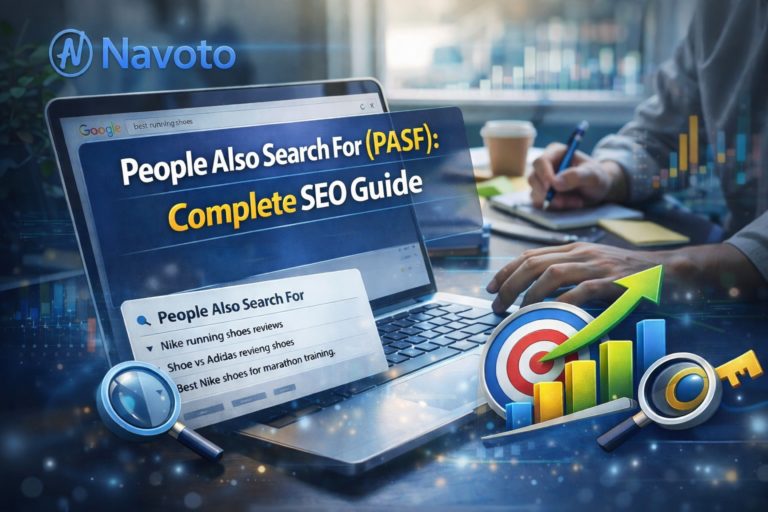
Most SEO experts ignore one of Google’s most powerful keyword discovery systems. Every time someone clicks a search result, hits the back button, and searches again — Google records that behavior and turns it into a feature called People Also Search For (PASF).
This guide goes deeper than anything currently ranking. You’ll get the complete picture: what PASF is, how it works technically, how it differs from People Also Ask and Related Searches, how to use it on mobile vs desktop, how to find and target PASF keywords, and — critically — how PASF fits into Google’s AI-powered search in 2026.
1. What Is ‘People Also Search For’ (PASF)?
People Also Search For is a dynamic Google feature that displays a set of related search queries beneath a specific search result — but only after a user has clicked on that result and returned to the results page. It is not the same as Related Searches (which always appears at the bottom of the page) and not the same as People Also Ask (which appears before any clicks).
Google introduced PASF around 2018 as part of its broader push to improve search refinement. The logic is simple: if you clicked on a result but came back, you didn’t find what you needed. PASF is Google’s attempt to redirect you to something more useful without you having to retype your query.
| Simple Definition
PASF = ‘You clicked this result and came back. Here are what other people searched for after doing the same thing.’ It is a behavioral signal turned into a navigation tool. |
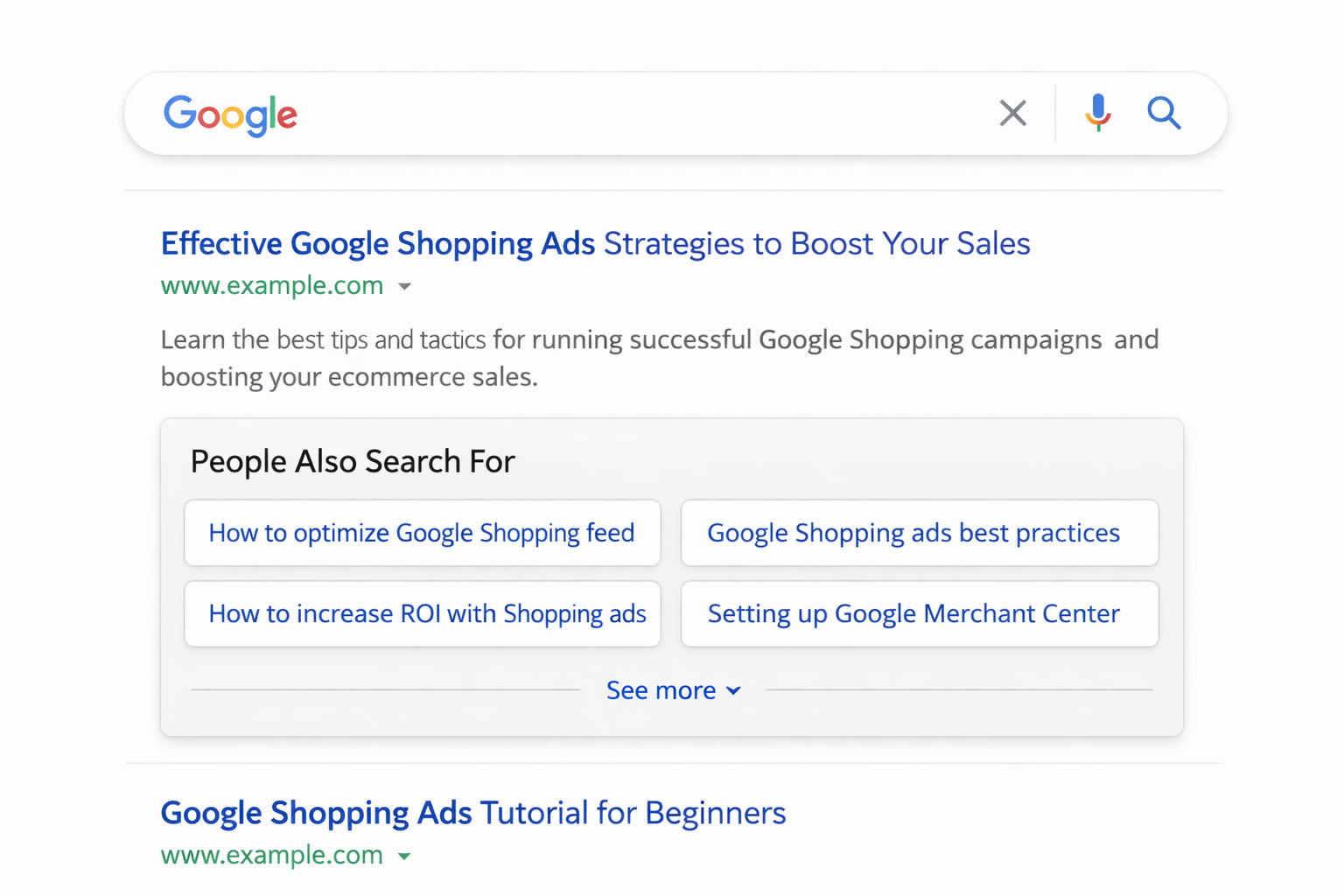
How to Trigger and See PASF (Step-by-Step)
- Open Google in an incognito/private window (avoids personalization).
- Search for any keyword — for example: ‘best project management software’.
- Click on the first organic result.
- Press the browser back button immediately.
- Look below that specific listing — a box of 6–8 related queries will appear.
- These are your PASF keywords for that result.
Pro Tip: Repeat this for the top 5–10 results. Each result shows a different set of PASF queries based on the behavior of users who clicked that specific page. Compile all of them — you now have a complete PASF keyword map for your topic.
2. PASF vs. People Also Ask vs. Related Searches: The Full 3-Way Comparison
Most articles only compare PASF to Related Searches. But there are actually three distinct Google features you need to understand — and confusing them leads to wrong content strategies.
| Feature | People Also Search For | People Also Ask | Related Searches |
| When it appears | After you click a result & return | Directly on results page (no click needed) | Always at bottom of results page |
| Trigger | User bounce / back-click behavior | AI-predicted question patterns | Semantic keyword similarity |
| Purpose | Refine your search based on what others did after clicking same result | Answer common questions directly | Broaden search exploration |
| Personalization | High — tied to specific result clicked | Medium — varies by query context | Low — mostly generalized |
| SEO Value | Content gap intelligence + long-tail keywords | Featured snippet / FAQ opportunities | Secondary keyword discovery |
| Best Used For | Identifying what competitors’ pages are missing | Capturing PAA boxes and voice search | Building keyword clusters |
Real Example: Searching ‘Email Marketing Tools’
People Also Ask (appears immediately, no click needed):
- What is the best free email marketing tool?
- Is Mailchimp still the best?
- What email marketing tool does Shopify use?
PASF (appears after clicking result #1 about Mailchimp and returning):
- Mailchimp pricing 2026
- Mailchimp alternatives free
- Mailchimp vs Klaviyo
PASF (appears after clicking result #3 about Klaviyo and returning):
- Klaviyo pricing for small business
- Klaviyo vs ActiveCampaign
- Best email marketing for ecommerce 2026
Notice how each result generates different PASF? That’s why checking PASF result-by-result gives you intelligence that no keyword tool alone can provide.
3. PASF on Mobile vs. Desktop: Critical Differences Most SEOs Miss
Here’s something almost no guide covers: PASF behaves differently depending on your device. If your entire PASF strategy is based on desktop testing, you’re missing how roughly 60% of Google users actually experience search.
Desktop PASF Behavior
- Appears as a card/box directly below the listing you clicked and returned from.
- Shows approximately 6–8 related queries in a 2-column grid layout.
- Visible immediately after back-click, above the next result.
- Cards are relatively large and easy to interact with.
Mobile PASF Behavior
- Appears as horizontally scrollable chips/pills below the result (not a box).
- Often shows only 3–4 queries initially visible without scrolling.
- The visual format means users interact differently — tapping a chip vs reading a list.
- PASF on mobile often shows shorter, more conversational queries than desktop.
- Due to limited screen space, mobile PASF prioritizes the highest-confidence query suggestions.
| Why This Matters for SEO
Mobile PASF queries tend to be shorter and more action-oriented (e.g., ‘Klaviyo price’ instead of ‘how much does Klaviyo cost per month’). If you’re only targeting desktop PASF keywords, you’re missing an entire category of high-intent mobile search terms. Always test both — use your phone in incognito mode to collect mobile PASF data separately. |
How to Research Mobile PASF
- Open Chrome on your phone in incognito mode.
- Search your target keyword.
- Tap a result and immediately tap the back arrow.
- Screenshot the scrollable chips that appear.
- Swipe right to see all available PASF suggestions.
- Note — these will often differ from desktop. Record both sets.
4. The Algorithm Behind PASF: Why It Works the Way It Does
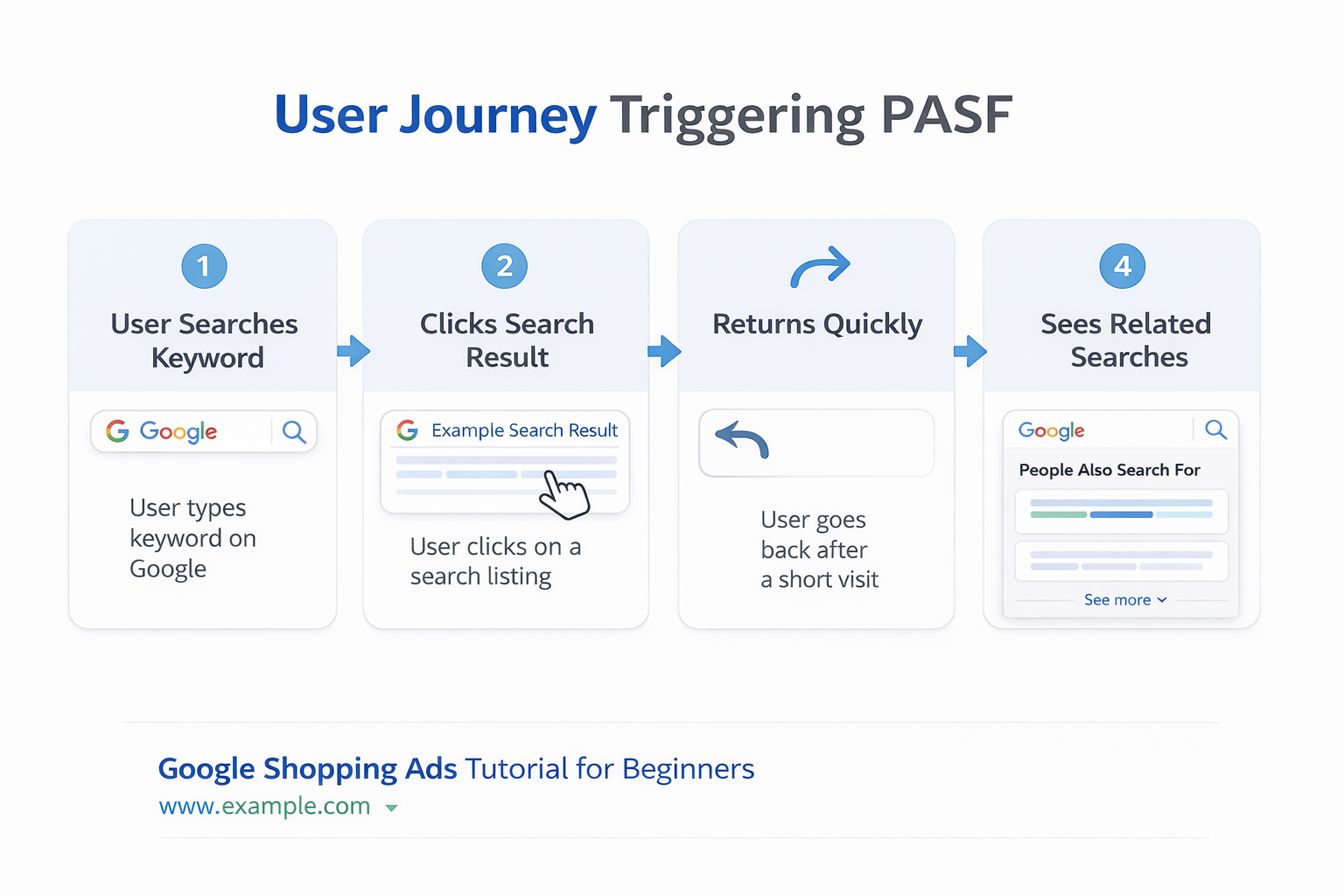
Understanding the mechanism behind PASF is what separates good SEOs from great ones. It’s not random — Google is applying a sophisticated behavioral analysis layer on top of its core ranking system.
The Pogo-Sticking Signal
When a user clicks your result and bounces back quickly, this is called ‘pogo-sticking.’ It’s one of the clearest negative user behavior signals Google can measure. The faster the bounce, the stronger the signal that your content didn’t satisfy intent. PASF is built on the aggregate of these pogo-stick patterns across millions of users.
This is why PASF is so valuable: it shows you exactly what users were looking for that they DIDN’T find in the result they clicked. It’s a direct window into unmet search intent.
4 Core Factors That Shape PASF Results
| Factor | What It Means | SEO Implication |
| Dwell Time | How long users stayed on the page before returning | Low dwell time = high PASF activity = gap in your content |
| Click-Through Patterns | Which results users choose after bouncing from a specific page | If users click result #3 after leaving result #1, Google shows PASF queries related to #3’s topic |
| Query Clustering | How semantically similar queries are grouped based on shared user journeys | Helps you understand which topics Google considers related to yours |
| Behavioral Trends | Aggregated back-click and refinement patterns across all users searching that query | PASF reflects collective user behavior, not individual sessions |
What Triggers High PASF Activity on Your Pages
If your page generates a lot of PASF activity, it means users are consistently returning to Google after visiting you. Common causes:
- Your content answers part of the query but not all of it.
- Your page loads slowly on mobile, causing immediate back-clicks.
- Your content is too advanced or too basic for the user’s actual level.
- You’re targeting a broad keyword but your content is too narrow.
- Your page lacks clear structure so users can’t quickly scan for what they need.
5. Does PASF Still Matter in 2026? PASF in the Age of AI Overviews
This is the question every SEO is asking in 2026: with Google AI Overviews appearing at the top of many results pages, does traditional PASF still have value? The answer is yes — and in some ways, more than ever.
How Google AI Overviews Changed PASF Dynamics
Google’s AI Overviews (formerly Search Generative Experience) now appear for a growing range of queries. These overviews are synthesized answers generated from multiple high-quality sources. Here’s the key insight: Google’s AI Overview algorithm preferentially pulls from pages that comprehensively cover the topic, including addressing related subtopics and PASF-type queries within the same content.
In other words, if your page answers the main keyword AND the top PASF queries related to it, you have a significantly higher chance of being cited in an AI Overview — which appears above all organic results and generates massive click-through.
| 2026 PASF + AI Overviews Strategy
Find the top 5-8 PASF queries for your target keyword. Build content sections specifically addressing each one. Pages that do this are being pulled into AI Overviews far more frequently than pages that only address the head keyword. This is the single biggest SEO opportunity of 2026. |
PASF Queries That AI Overviews Frequently Target
- Comparative queries: ‘X vs Y’, ‘best X for Y’
- How-to sub-questions: ‘how to do X with Y’
- Definition follow-ups: ‘what is X exactly’, ‘X meaning in Z context’
- Cost/pricing queries: ‘how much does X cost’
- Alternative searches: ‘X alternatives’, ‘instead of X’
Pages addressing these PASF patterns within their main content are disproportionately featured in AI Overviews compared to pages that only target the head keyword.
6. How to Find PASF Keywords: Complete Research Framework
Method 1: Manual Research (Free — Best for Accuracy)
- Open an incognito browser window.
- Search your target keyword on Google.
- Click on each of the top 10 results one at a time.
- Immediately press back after each click.
- Record every PASF suggestion shown beneath each result.
- Also check on mobile (repeat steps 1–5 on your phone).
- Group all collected queries by search intent (informational, navigational, transactional).
- Prioritize queries that appeared for multiple different results — these are high-consensus signals.
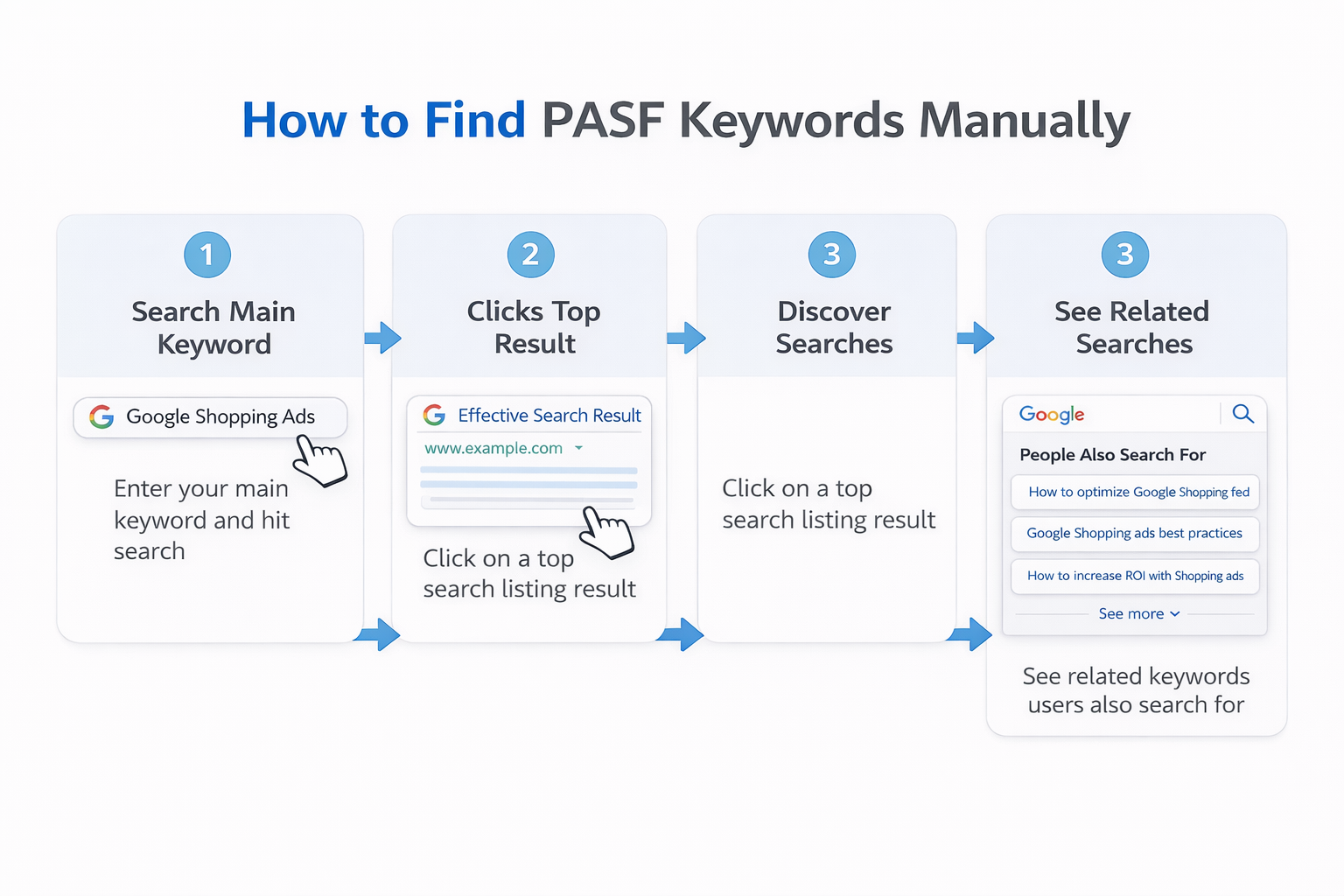
Time required: 30–60 minutes per target keyword. Worth it — manual research surfaces queries that tools miss.
Method 2: SEO Tools (Faster at Scale)
| Tool | How to Use for PASF | Cost |
| AlsoAsked.com | Enter keyword → see PASF and PAA data in tree diagram format. Best for question-based queries. | Free (limited) / Paid |
| SEMrush Keyword Magic Tool | Enter keyword → filter by ‘Questions’ and ‘Related’ → export. Cross-reference with manual PASF. | Paid |
| Ahrefs Keywords Explorer | Use ‘Also rank for’ and ‘Also talk about’ features to surface PASF-adjacent keywords. | Paid |
| Google Search Console | Check ‘Queries’ report for terms people use to find you after engaging with your pages. | Free |
| Answer The Public | Generates question/preposition/comparison keyword maps — overlaps heavily with PASF patterns. | Free (limited) / Paid |
| Keyword Surfer (Chrome ext.) | Shows related keywords alongside Google results in real time — useful for quick PASF mapping. | Free |
Method 3: Competitor PASF Analysis (Advanced)
This is the most powerful technique and the one competitors almost never do:
- Identify your top 3 competitors ranking for your target keyword.
- Manually check the PASF for each of their pages (click result → back).
- Extract all PASF queries their pages trigger.
- Compare to their actual content — what PASF topics do they NOT address?
- Those gaps are your content opportunities. Create sections, FAQs, or entire pages targeting those queries.
| Real Example
A competitor ranks #2 for ‘project management software’. PASF on their result shows ‘project management software for remote teams’ — but their article never mentions remote teams. Write a comprehensive section on that topic. You can rank for the PASF query, appear in AI Overviews, and build topical authority that helps you challenge their main keyword ranking too. |
7. How to Optimize Your Content for PASF Keywords
Strategy 1: Build Pillar Pages That Address PASF Clusters
Rather than creating separate pages for every PASF keyword, build comprehensive pillar content that answers the main query and its top PASF variations in a single, authoritative article.
Example structure for ’email marketing tools’:
- H1: Email Marketing Tools: Complete 2026 Guide
- H2: Best Email Marketing Tools by Use Case (main query)
- H2: Best Free Email Marketing Tools (PASF: ‘free email marketing’)
- H2: Email Marketing Tools for eCommerce (PASF: ’email marketing for ecommerce’)
- H2: Mailchimp vs Klaviyo vs ActiveCampaign Compared (PASF: comparison queries)
- H2: How to Choose an Email Marketing Tool for Small Business (PASF: SMB queries)
This structure captures the head keyword AND 4+ PASF queries within a single URL — maximizing topical authority.
Strategy 2: Place PASF Keywords in High-Impact Locations
| Location | Why It Matters | How to Use PASF Keywords |
| H2 / H3 Headings | Google uses headings to understand subtopic structure | Use exact-match or close variation of PASF query |
| First 100 Words | Signals page relevance early to crawlers | Mention the primary PASF query naturally in intro |
| Meta Description | Impacts CTR, shows intent alignment to users | Include 1–2 high-value PASF terms naturally |
| Image Alt Text | Semantic relevance signal | Describe images using PASF-related terminology |
| Internal Link Anchor Text | Passes topical context between pages | Use PASF queries as anchor text to related articles |
| FAQ Section | Direct match for PASF question-format queries | Turn each top PASF question into an FAQ entry with schema |
Strategy 3: Create PASF-Driven FAQ Sections with Schema
Question-based PASF queries (those starting with ‘how’, ‘what’, ‘why’, ‘when’, ‘which’) are prime candidates for FAQ sections with FAQ schema markup. This is a two-in-one win:
- It directly answers PASF queries in your content, improving relevance.
- FAQ schema markup can trigger rich results in the SERP, giving you more visual real estate.
- Question-format content is frequently pulled into Google AI Overviews.
Implementation: Use JSON-LD FAQ schema. Keep answers concise (40–70 words). Write answers that could stand alone without surrounding context — Google will often display them directly in the SERP.
Strategy 4: Reduce Bounce Rate to Lower Your Own PASF Activity
Remember: high PASF activity on your result means users are bouncing. The goal is to make your content so comprehensive that users don’t need to search again. Tactics:
- Add a clickable Table of Contents at the top of long articles.
- Include a ‘What You’ll Learn’ summary box at the beginning.
- Use headers so users can scan and jump to the exact section they need.
- Embed internal links that keep users exploring your site rather than returning to Google.
- Ensure your page loads in under 2.5 seconds on mobile (Core Web Vitals matter).
- Add visuals — screenshots, charts, comparison tables — to increase dwell time.
Strategy 5: Content Gap Analysis Using PASF
- Pick your target keyword.
- Check PASF for the top 10 results manually.
- List every PASF query that appears.
- Search each PASF query on Google separately.
- Check if any strong dedicated pages exist for that query.
- Queries with weak or no dedicated competition = your content gap opportunity.
- Create sections or standalone articles targeting those gaps.
8. Real-World PASF Case Study: From Gap to Traffic
Here’s a worked example showing exactly how the PASF strategy plays out in practice.
The Scenario
A B2B SaaS company wants to rank for ‘CRM software for small business’. They’re on page 2, getting minimal traffic.
Step 1: PASF Research
Manual PASF research on the top 10 results revealed these consistently appearing queries:
- ‘free CRM for small business’ — appeared in 7 of 10 results
- ‘CRM software pricing comparison’ — appeared in 6 of 10
- ‘best CRM for freelancers’ — appeared in 5 of 10
- ‘CRM vs spreadsheet for small business’ — appeared in 4 of 10
- ‘simple CRM for solo entrepreneur’ — appeared in 4 of 10
Step 2: Content Gap Check
The current top-ranking pages covered ‘free CRM’ briefly, but none had a dedicated section on ‘CRM vs spreadsheet’ — a high-intent comparison query with significant volume.
Step 3: Content Update
The company updated their existing article to add:
- H2 section: ‘Free CRM Options for Small Businesses in 2026’ (with a comparison table)
- H2 section: ‘CRM vs Spreadsheet: When to Make the Switch’ (750 words, decision framework)
- H2 section: ‘Best CRM for Freelancers and Solo Entrepreneurs’ (addressed the niche use case)
- FAQ schema on 5 question-based PASF queries
The Outcome
Within 8 weeks of publishing, the article began ranking for 12 additional long-tail queries derived from the PASF research. Organic traffic to that page increased significantly, and it was cited in a Google AI Overview for the ‘CRM vs spreadsheet’ query — driving featured placement above all organic results.
9. Common PASF Mistakes to Avoid
| Mistake | Why It Hurts | The Fix |
| Only researching PASF for your own pages | You miss what competitors’ audiences are searching for — often a bigger opportunity | Always check PASF for top 3–5 competitor pages too |
| Keyword stuffing PASF terms | Creates unnatural content, hurts UX, risks Google penalties | Target 5–8 most relevant PASF queries per article, integrated naturally |
| Ignoring mobile PASF | Mobile shows different, often shorter queries — missing these means missing ~60% of searches | Test PASF on mobile separately, build content for both query types |
| Treating PASF as a one-time task | PASF queries shift with trends, algorithm updates, and seasonal behavior | Review PASF quarterly; update after major Google updates or traffic shifts |
| Mixing all intent types on one page | Informational + transactional queries on the same page confuses both users and Google | Group PASF keywords by intent; create separate pages for different intent clusters |
| Not adding FAQ schema to question PASF | Misses rich result opportunity and AI Overview eligibility | Add JSON-LD FAQ schema to every question-format PASF section |
10. How to Track PASF Performance in Google Search Console
After optimizing for PASF keywords, you need to track whether it’s working. Google Search Console is your primary tool.
Step-by-Step Tracking Process
- Open Google Search Console → Performance → Search results.
- Set date range to last 3 months.
- Click ‘Queries’ tab to see all terms your pages appear for.
- Filter by the page you updated with PASF keywords.
- Look for new query appearances that match your PASF targets.
- Track impressions and clicks for those specific queries week-over-week.
- If a PASF-targeted query reaches position 11–20, it needs further optimization (add more detail, improve schema, build internal links).
Key Metrics to Monitor
- Impressions for PASF-targeted queries (should increase within 4–8 weeks of update).
- Average position for PASF queries (target top 10, aim for top 5).
- Click-through rate (CTR) — PASF keywords often have high CTR due to specific intent.
- Overall page traffic trend — PASF optimization should lift the entire page, not just individual queries.
How PASF Impacts SEO and User Intent
Understanding PASF is crucial for modern SEO because it reveals the gap between what users search for and what they actually need.
PASF as a User Intent Signal
PASF keywords reveal three types of user intent:
- Informational intent: Users want to learn more (e.g., “what is keyword research” → “keyword research tools free”)
- Navigational intent: Users are looking for specific brands or sites (e.g., “project management software” → “Asana vs Monday”)
- Transactional intent: Users are ready to buy or take action (e.g., “best laptop 2026” → “laptop deals Amazon”)
The SEO Advantage:
By targeting PASF keywords, you can capture users at different stages of their search journey, increasing your chances of ranking for multiple related queries.
How PASF Affects Rankings
While Google hasn’t officially confirmed PASF as a direct ranking factor, the data it represents—user satisfaction, bounce rates, and content relevance—certainly influences rankings. Here’s how:
- Content gaps: If many PASF queries appear for your pages, it suggests your content isn’t comprehensive enough
- Topic clustering: Pages that address PASF queries within the content tend to rank for more long-tail keywords
- User engagement: Covering PASF topics improves dwell time and reduces bounce rates
Frequently Asked Questions About PASF
1. Is PASF a direct Google ranking factor?
PASF itself is not a direct ranking signal — Google has not officially stated it uses PASF data to rank pages. However, the underlying behaviors that generate PASF data (bounce rate, dwell time, pogo-sticking) are widely understood to influence rankings. More importantly, optimizing for PASF queries improves your content’s topical authority, which is a confirmed ranking factor.
2. How is PASF different from People Also Ask?
People Also Ask (PAA) appears directly on the search results page before you click anything — it’s Google predicting common questions based on the query. PASF only appears after you click a result and return. PAA is keyword-triggered; PASF is behavior-triggered. Both are valuable for SEO but require different strategies: PAA targets featured snippets, PASF targets content gap coverage.
3. Can PASF keywords appear differently for different users?
Yes. PASF is partially personalized based on individual search history, location, and device type. However, core PASF results are driven by aggregate user behavior across millions of searches, so there is a consistent baseline. Use incognito mode and test from different locations or with VPNs to get more representative PASF data for your optimization work.
4. How often should I do PASF research?
At minimum, quarterly. For fast-moving niches (technology, finance, health, news), monthly is better. Always re-run PASF research after major Google algorithm updates, after you publish updated content, or whenever you notice significant traffic changes on an important page.
5. Does PASF matter for local SEO?
Yes, significantly. Local PASF searches surface neighborhood-specific and service-specific queries that generic keyword tools miss. Search your local service keyword (e.g., ‘dentist in Chicago’), click top results and return, and note the PASF — you’ll find hyperlocal queries like neighborhood names, specific service variants, and proximity modifiers that represent real ranking opportunities for local businesses.
6. How does PASF relate to Google’s AI Overviews in 2026?
Google’s AI Overviews synthesize answers from multiple sources. Pages that comprehensively address a main topic AND its related PASF queries are more frequently cited in AI Overviews. This means PASF-optimized content has a higher chance of appearing in the AI Overview placement — which sits above all standard organic results and can dramatically increase click-through.
7. What word count should PASF-optimized articles target?
There’s no fixed target, but content that successfully covers a main keyword plus 5–8 PASF queries naturally tends to fall between 2,500–4,500 words. Quality and comprehensiveness matter more than raw word count. Each PASF section should genuinely answer the query — thin sections written just to include the keyword will not perform and may increase bounce rate.
Final Thoughts: PASF Is a Window Into Your Audience’s Mind
People Also Search For is not just a Google UI feature — it’s a behavioral data layer that reveals the exact gap between what users search for and what they actually need. Every PASF query is an unmet need. Every cluster of PASF queries around your target keyword is a roadmap for content that will outperform generic articles.
In 2026, with AI Overviews reshaping the SERP and topical authority becoming the primary SEO currency, PASF research and optimization is one of the highest-ROI activities available to content teams. The playbook is clear:
- Research PASF manually on desktop AND mobile.
- Analyze competitor pages, not just your own.
- Build pillar content that addresses PASF query clusters.
- Add FAQ schema to question-based PASF sections.
- Track performance in Google Search Console to identify which PASF queries start generating impressions.
Also Read – Search Google or Type a URL – Simple Guide for Beginners