Learning how to create a Google sales ads campaign is one of the most important skills for business who is selling products or services online. Google Search Ads helps you to offer directly in front of customers who are searching with intent to buy. The Common Google Ads Mistakes why most campaigns fail because they target the wrong keywords, use poor structure, or don’t use the data for better Roi and performance.
In this guide, you will explain how to create a Google sales ads campaign step by step, using Google Keyword Planner to find buyer-focused keywords and avoid wasting budget on low-intent traffic. It works best for local services, ecommerce stores, and lead-generation businesses.
Step by Step guide to create a Google sales ads campaign
Step 1: Set Up Google Ads and Open Keyword Planner
The first step to create a Google sales ads campaign is access to Google Ads.
Go to ads.google.com and sign in with a Google account. You do not need to launch an ad or add payment details to use Keyword Planner.
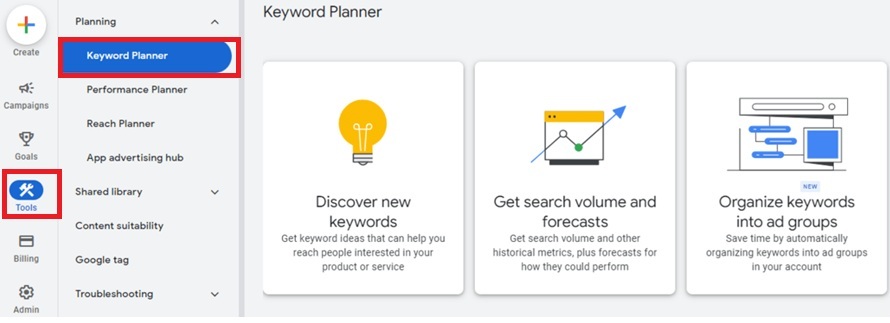
Once inside the dashboard, click the Tools icon in the top-right corner. Under the Planning section, choose Keyword Planner. This tool provides the foundation for your sales campaign because it shows what people are actively searching for on Google.
Step 2: Find Buyer Keywords for Your Google Sales Ads Campaign
To create a Google sales ads campaign that converts, you need to start with keywords that show intent to buy.
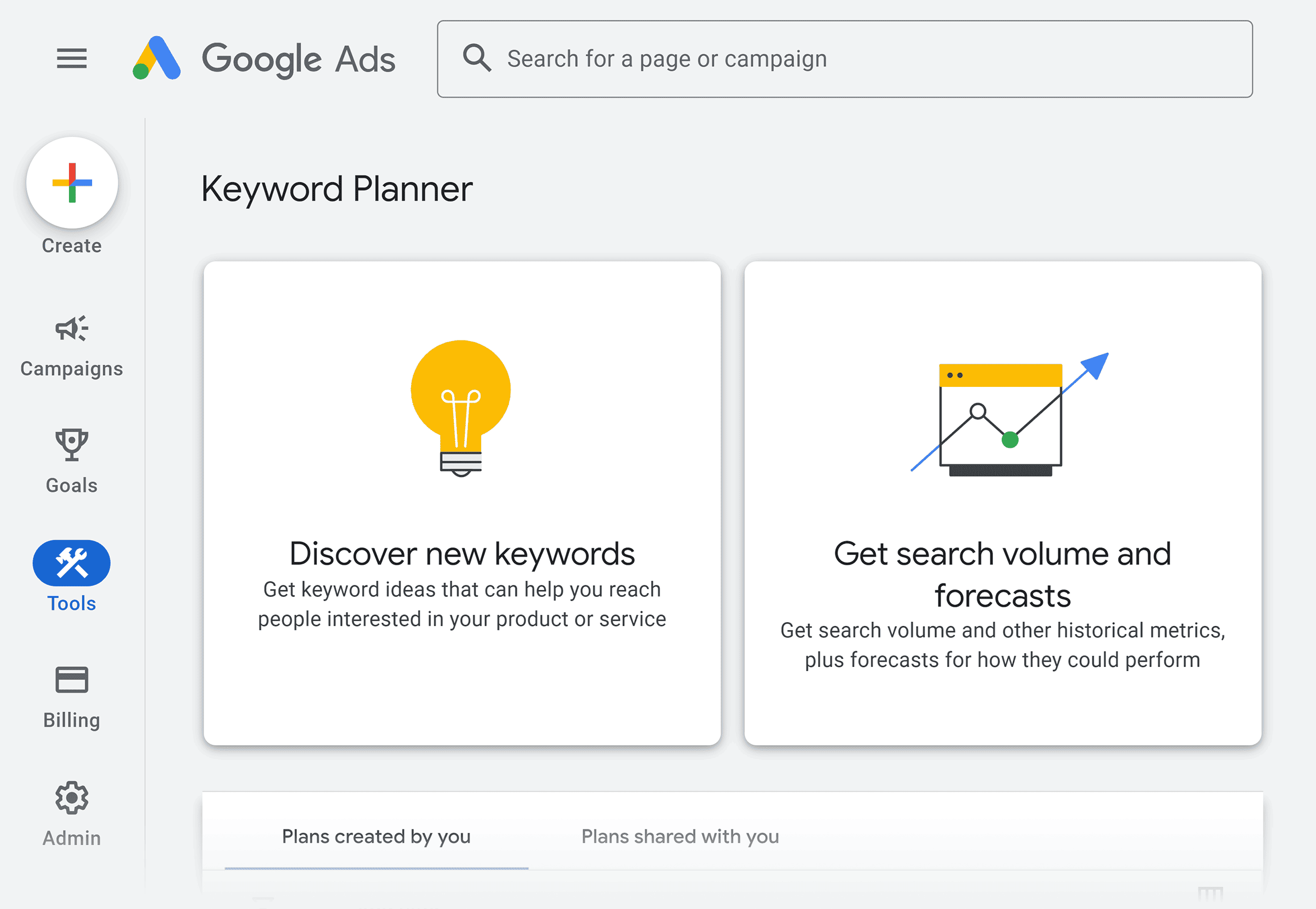
- Click “Discover new keywords” and select “Start with keywords.”
- Avoid broad terms Keywords that indicate unclear buying intent.
- Use Exact phrases keyword that real buyer’s type when they are close to making a decision. These often include words related to price, urgency, availability, or location.
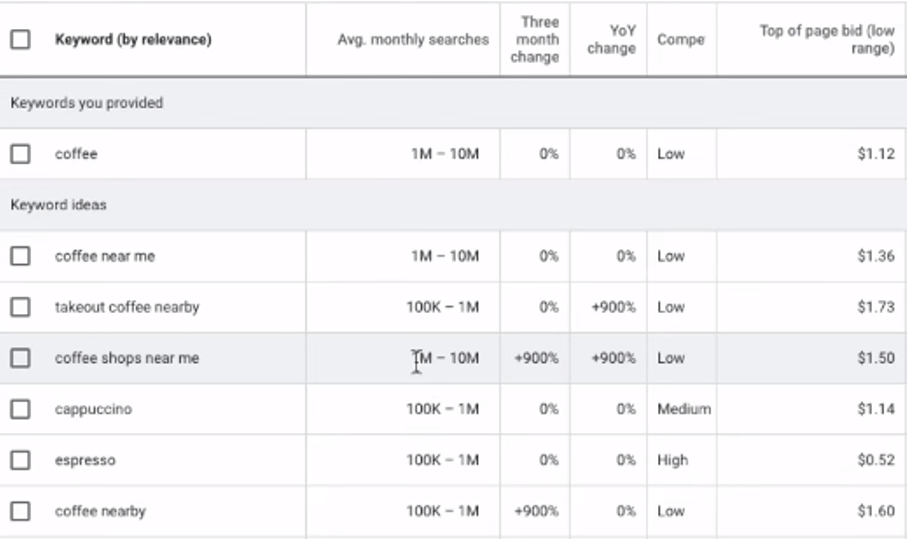
Enter five to ten buyer-focused keywords related to your product or service and generate results. Keyword Planner give you the keyword ideas along with search volume, competition level, and estimated cost per click.
Step 3: Understand the Keyword Data
When you search a keyword, it provides the main data points: average monthly searches, competition, and top-of-page bid. Monthly searches tell you demand. How much people fighting for the keyword and lots of other businesses are fighting to show their ad here. It is harder to get seen.
Here is how to use this data:
- High search volume does not mean high sales
- Low competition is usually easier for new campaigns
- Higher CPC often means stronger buying intent
A keyword with fewer searches but strong intent can outperform a high-volume keyword that attracts casual browsers.
Step 4: Use Filters to Remove Useless Keywords
It is important to start Filtering keyword which is not good for your business and service to get best lead and conversion.
- Start by setting your target location and language correctly. If your business serves a specific country or city, global data will distort reality.
- Next, apply keyword text filters. Include buyer terms such as “buy,” “price,” or “sale.” Removes informational searches like “what is” or “how to.”
- You should also exclude keywords with extremely low search volume unless your niche is very specialized.
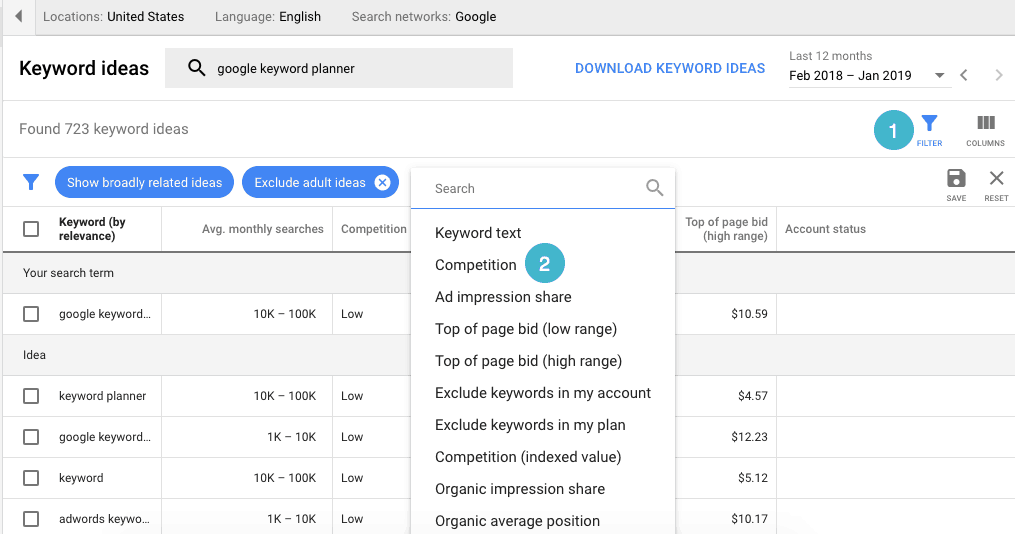
After filtering, sort keywords by search volume and scan the competition column. Keywords with low to medium competition and reasonable demand are usually the best starting point for new campaigns.
Step 5: Use Competitor Websites to Find Keyword Ideas
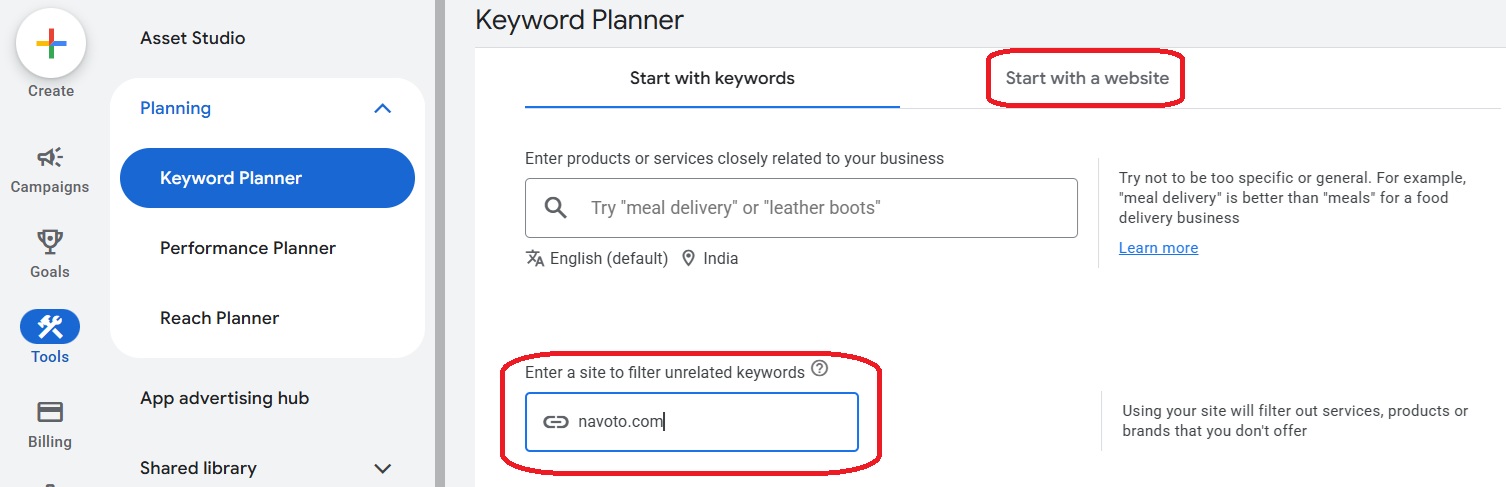
Keyword Planner also provide a feature to generate keyword ideas based on a website. This feature helps you understand what Google associates with successful businesses in your niche.
- Go back to “Discover new keywords” and choose “Start with a website.
- Paste the URL of a competitor that actively sells products or services similar to yours. Avoid blogs or review sites.
- Google will generate keyword ideas related to that website’s content and advertising relevance.
This helps you:
- Validate keywords you already selected
- Discover variations you missed
- Identify gaps competitors are not targeting
The goal is not copying exactly, but improving intent and relevance.
Step 6: Check Search Volume and Forecasts
After selecting your targeted keywords, go to “Get search volume and forecasts.” Paste your chosen keywords and review the results.
In this section, you get the historical trends and predicted performance based on estimated budgets.
Use forecasts to decide:
- Only pick words that show people are ready to buy now.
- Make sure the click cost is low enough so you still make money.
- Start with a small budget. Don’t spend a considerable amount until you see results.
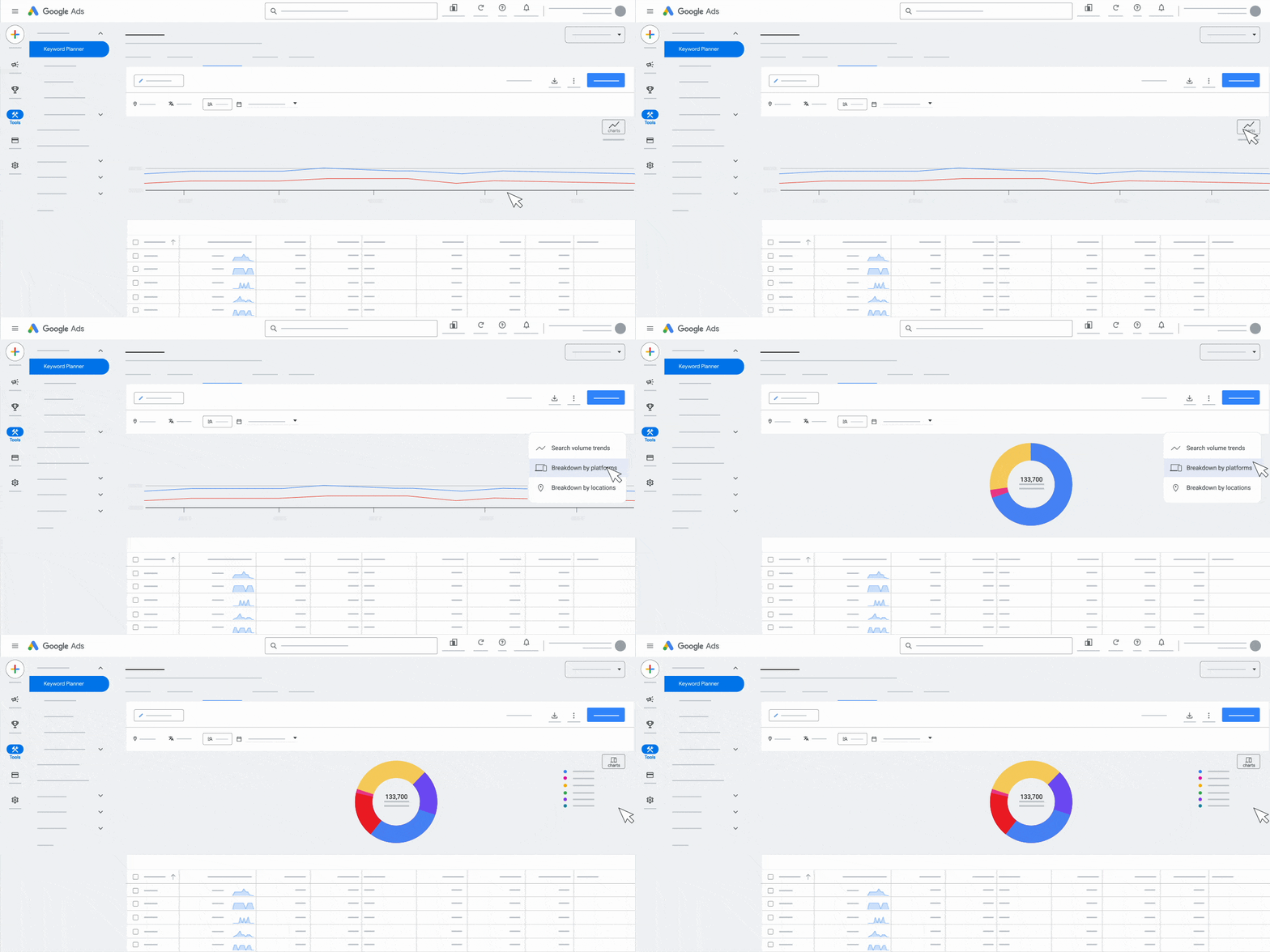
If the data looks unrealistic, adjust your keyword list before launching ads.
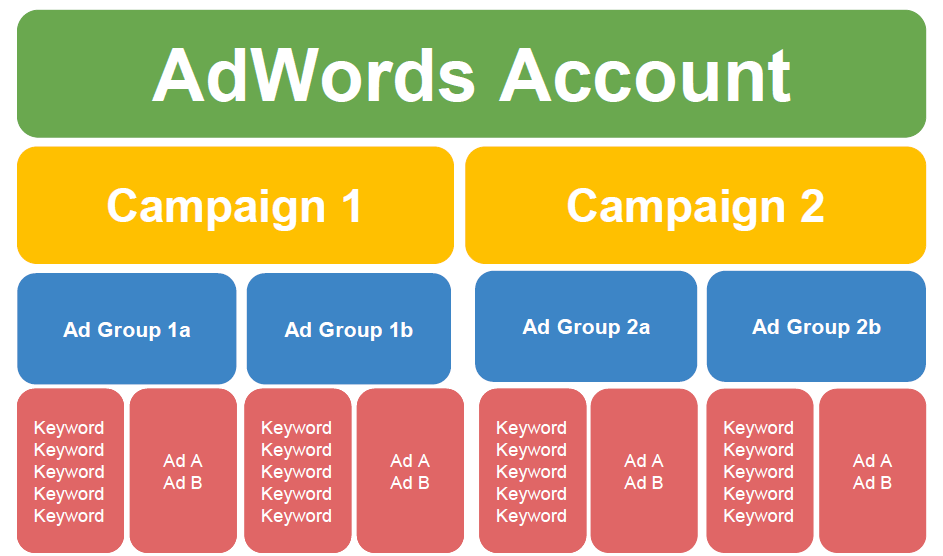
Step 7: Group Keywords Into Ad Groups
Good structure saves money. Keywords should be grouped by intent, not by product catalog. Each ad group should represent one clear search theme.
For example:
- “Buy running shoes online” and “running shoes price” belong together
- “Cheap shoes” should be separate
- Brand terms should be diffrent
When keywords are grouped, it helps your ad match exactly what the user typed. If they search for “Red Shoes,” your ad should say “Red Shoes. This improves relevance, click-through rate, and Quality Score.
Choose match types carefully
Exact match – Your ad shows only for the exact words you picked. (Safest choice)
Phrase match – Your ad shows for your words and close variations. (Good balance)
Broad match – Your ad shows for anything loosely related. (Only use if you are very careful)
Step 8: Turn Keywords Into Relevant Ads
Once you select the final keywords, create ad copy which is matches what people search for. If a customer types “buy red shoes,” your headline should be clear: “Buy Red Shoes” so they feel confident in their targeting. Also, make sure you add negative keywords like “free,” “repair,” “images,” or “meaning” to block irrelevant traffic, which helps your audience feel more in control of their ad spend and reduces worry about wasted clicks.
Step 9: Launch the Campaign and Optimize Early
Once everything is set up, do a final review and create a campaign from your keyword plan. Set a small daily budget you like. Send people to one product page. Check the first week. Stop keywords with clicks but no sales right away. Start fresh. Increase focus on keywords that generate leads or sales. Revisit Keyword Planner regularly to find new opportunities and adapt to changes in demand.
Why Google Keyword Planner is Best tool?
First thing is that Google Keyword Planner is the best and free tool, and it shows the real Google Ads data. On the other hand, other tools are more expensive and don’t provide the accurate data. When used with discipline and intent focus, it remains one of the most reliable resources for sales keyword research. What people often mistake is targeting curiosity instead of buyers. When you filter, focus on intent, and structure campaigns correctly, Keyword Planner becomes the best tool that helps you sell.
Conclusion
So we hope you clearly understand how to create a Google Sales Ads campaign. Google Keyword Planner provides fundamental insights into what buyers search for and how competitive those searches are.
What is a Google sales ads campaign?
Basically, Google’s sales ad campaign is a Search campaign designed to generate purchases, leads, or bookings by targeting keywords with clear buying intent, such as searches that include buy, price, cost, or near me.
How much does it cost to create a Google sales ads campaign?
There is no fixed cost. You can start with a small daily budget and scale based on performance. The price depends on the kind of keyword competition and bidding strategy.
Do I need Google Keyword Planner to create a Google sales ads campaign?
Yes. Google Keyword Planner helps identify buyer-intent keywords, estimate search volume, and understand competition. It is one of the most reliable tools for planning a sales-focused campaign.
How long does it take for Google sales ads to show results?
Most campaigns begin collecting valuable data within the first 3–7 days. Optimizations based on conversions usually improve results within 2–4 weeks.
Can Google sales ads work for small businesses?
Yes. When structured correctly and focused on high-intent keywords, Google sales ads are effective for small businesses, local services, and niche ecommerce stores.
Also Checkout – How To Set Up Google Merchant Center